
The ASRock Intel Arc B580 Challenger 12GB OC is a compact, factory-overclocked graphics card designed for gamers who want strong 1080p and 1440p performance without moving into expensive high-end GPU territory. It combines Intel’s Arc B580 GPU with 12GB of GDDR6 memory, a dual-fan cooler, a metal backplate, modern display connectivity, and support for Intel’s XeSS 2 technologies.
ASRock clocks this Challenger model at 2740 MHz, compared with the reference B580’s 2670 MHz graphics clock, while its 12GB of GDDR6 operates at 19 Gbps. The card uses a 192-bit memory interface and connects through PCIe 4.0 x8.
The biggest selling point is the combination of 12GB VRAM, modern features, compact dimensions, and competitive mid-range gaming performance. Intel also positions the B580 for 1440p gaming and highlights XeSS 2, ray tracing, AV1 media capabilities, and AI acceleration as important parts of the platform.
In this ASRock Intel Arc B580 Challenger 12GB OC review, we’ll examine its specifications, cooling, gaming performance, power requirements, features, real-world usability, reliability, and whether it makes sense for your next gaming PC.
Why it Matters to You
The ASRock Intel Arc B580 Challenger 12GB OC is worth considering if you want an affordable GPU capable of handling modern 1080p and 1440p gaming.
It is aimed at gamers, budget-conscious PC builders, streamers, and users upgrading from older graphics cards. The 12GB VRAM, strong feature set, factory overclock, and compact design are its biggest advantages.
For anyone building a balanced mid-range gaming PC, this GPU offers a good combination of performance, memory capacity, and modern features.
The ASRock Intel Arc B580 Challenger 12GB OC is a strong choice for gamers wanting affordable 1080p and 1440p performance. Its 12GB VRAM, factory overclock, modern features, and compact dual-fan design make it suitable for gaming, streaming, and content creation.
Best For: 1080p/1440p gaming, budget PC builds, and users upgrading from older GPUs.
Main Benefit: Excellent VRAM capacity and modern features at a mid-range price.
Worth Considering? Yes, especially if you want a future-ready GPU without spending on a high-end model.
In-Depth Review of the ASRock Intel Arc B580 Challenger 12GB OC
The ASRock Intel Arc B580 Challenger 12GB OC examines its design, cooling, gaming performance, 12GB VRAM, factory overclock, power efficiency, and modern features. It highlights how this compact dual-fan GPU performs in 1080p and 1440p gaming while evaluating its value, reliability, and suitability for budget-conscious PC builders.
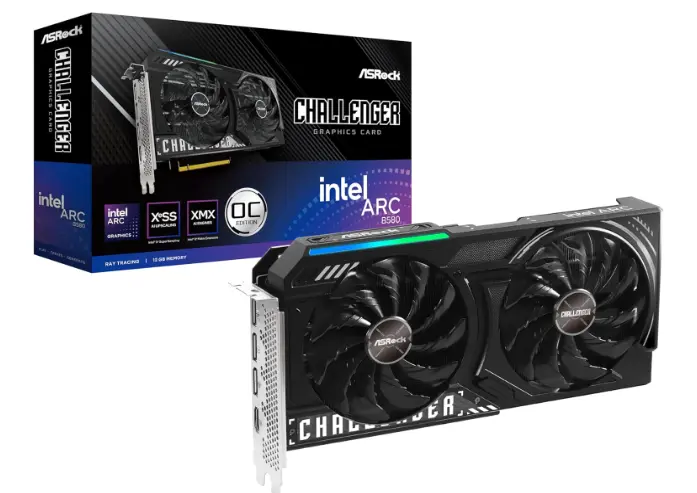
Design and Build Quality
The ASRock Challenger 12GB OC takes a relatively understated approach to graphics-card design. Instead of using an enormous triple-fan cooler, ASRock uses a compact dual-fan solution that keeps the card at only two slots thick.
Measuring 249 × 132 × 41 mm and weighing approximately 720 grams, it is considerably easier to fit into smaller cases than many oversized modern graphics cards.
The metal backplate adds structural support while also giving the card a more finished appearance. The design is especially appealing for builders who do not want a huge GPU occupying three expansion slots.
Cooling Performance
Cooling is one of the strongest aspects of the Challenger design.
ASRock uses two fans with its Striped Axial Fan design, a heatpipe-based heatsink, high-density metal welding, thermal paste designed for improved heat transfer, and a 0dB silent cooling system. The fans can stop when temperatures are low, reducing unnecessary noise during light workloads.
Independent user testing has reported temperatures around the mid-60s to low-70s Celsius depending on ambient conditions, workload, and case airflow. One review reported approximately 72°C under load, while another user reported roughly 65°C during long gaming sessions with ray tracing enabled. These results should be treated as real-world examples rather than guaranteed temperatures.
Overall, the dual-fan cooler appears well matched to the B580’s power level.
Factory Overclock
The Challenger OC is not simply a reference-clocked B580 with a different cooler.
ASRock specifies a 2740 MHz engine clock, while Intel lists the standard B580 configuration at 2670 MHz. The memory runs at 19 Gbps.
The factory overclock is relatively modest, but that’s not necessarily a weakness. Modern GPUs dynamically adjust clocks based on temperature, workload, and power limits, so real-world performance depends on much more than the advertised boost figure.
Memory and VRAM
The 12GB GDDR6 configuration is arguably the card’s most important specification.
The B580 provides a 192-bit memory interface and 19 Gbps memory speed, giving the GPU a theoretical memory bandwidth of approximately 456 GB/s. Intel lists the B580 at 456 GB/s bandwidth.
For modern games, 12GB is a comfortable capacity for a mid-range card. It gives users more breathing room than 8GB cards when playing at higher resolutions or using demanding texture settings.
Gaming Features
The B580 is built around Intel’s Xe2-HPG architecture and includes 20 Xe cores, 20 ray-tracing units, and 160 XMX engines.
XeSS 2 is another important part of the platform. Intel combines AI-based upscaling with additional technologies such as frame generation and low-latency functionality in supported games. ASRock also advertises XeSS support across more than 150 enabled games.
This means the card is not relying purely on traditional rasterization performance. Supported games can benefit from Intel’s modern upscaling and frame-generation ecosystem.
Connectivity
The display configuration is excellent for a mid-range GPU.
The card provides:
- 1 × DisplayPort 2.1 with support up to UHBR13.5
- 2 × DisplayPort 2.1 up to UHBR10
- 1 × HDMI 2.1a
It supports up to four displays and a digital maximum resolution of 7680 × 4320.
For a gaming PC with a high-refresh-rate monitor plus secondary displays, this is more than sufficient.
Specifications Table
The following table summarizes the most important hardware specifications of the ASRock Intel Arc B580 Challenger 12GB OC.
| Specification | ASRock Intel Arc B580 Challenger 12GB OC |
|---|---|
| GPU | Intel Arc B580 |
| Architecture | Xe2-HPG |
| Xe Cores | 20 |
| Ray Tracing Units | 20 |
| XMX Engines | 160 |
| VRAM | 12GB GDDR6 |
| Memory Interface | 192-bit |
| Memory Speed | 19 Gbps |
| Memory Bandwidth | 456 GB/s |
| GPU Clock | 2740 MHz |
| Bus Interface | PCIe 4.0 x8 |
| DirectX | 12 Ultimate |
| OpenGL | 4.6 |
| DisplayPort | 3 × DisplayPort 2.1 |
| HDMI | 1 × HDMI 2.1a |
| Power Connector | 1 × 8-pin |
| Recommended PSU | 650W |
| Cooling | Dual fan |
| Silent Mode | 0dB |
| Dimensions | 249 × 132 × 41 mm |
| Slot Thickness | 2-slot |
| Weight | 720 g |
| Maximum Digital Resolution | 7680 × 4320 |
Key Features at a Glance

- 12GB GDDR6 VRAM: Excellent capacity for modern 1080p and 1440p gaming.
- 2740 MHz OC Clock: A factory-overclocked configuration above the reference B580 clock.
- Dual-Fan Cooler: Designed to balance temperature control and noise.
- 0dB Silent Cooling: Fans can stop during low-temperature workloads.
- XeSS 2: AI-assisted upscaling and supported frame-generation technologies.
- Ray Tracing: Hardware ray-tracing acceleration is included.
- AV1 Media Engine: Useful for modern video recording, streaming, and content creation.
- DisplayPort 2.1: Excellent connectivity for high-resolution and high-refresh displays.
- Compact 2-Slot Design: Easier to install in smaller cases.
- 8-Pin Power: Straightforward power connection compared with larger multi-connector GPUs.
What to Look for When Choosing the ASRock Intel Arc B580 Challenger 12GB OC
Before purchasing the ASRock Intel Arc B580 Challenger 12GB OC, there are several factors worth checking.

1. CPU Compatibility
A balanced CPU is important. The B580 is capable enough that an old or weak processor can become a limiting factor, particularly at 1080p and high refresh rates.
A modern six-core CPU is a sensible starting point, while faster processors are beneficial for competitive gaming and high-FPS workloads.
2. Resizable BAR Support
Resizable BAR is particularly important for Intel Arc graphics.
Before buying, check your motherboard BIOS and CPU/platform compatibility. Make sure Resizable BAR is enabled when supported, because Arc performance can be negatively affected when the platform is improperly configured.
3. Power Supply
ASRock recommends a 650W PSU for this model. The card itself uses one 8-pin power connector.
A quality 650W unit is generally a sensible target for a typical gaming build, although the exact requirement depends on your CPU and the rest of the system.
4. Case Clearance
The card is only 249 mm long and two slots thick, which makes it relatively compact. Nevertheless, always check your case’s GPU clearance before purchasing.
5. Driver Support
Intel has made substantial progress with Arc drivers, but keeping the driver package current remains important. Intel regularly releases software updates aimed at game compatibility and performance improvements.
Quick Highlights Table
Here is a quick summary for readers who want the important points without going through the entire review.
| Category | Rating | Quick Take |
|---|---|---|
| 1080p Gaming | 4.5/5 | Excellent for high settings |
| 1440p Gaming | 4/5 | Strong with optimized settings |
| Ray Tracing | 4/5 | Good with upscaling |
| VRAM | 4.5/5 | 12GB is a strong advantage |
| Cooling | 4.5/5 | Effective dual-fan design |
| Noise | 4/5 | Generally quiet, especially at idle |
| Power Efficiency | 4/5 | Reasonable for its performance class |
| Creator Features | 4.5/5 | AV1 support is valuable |
| Build Quality | 4/5 | Solid compact construction |
| Overall Value | 4.5/5 | Strong when competitively priced |
Pros & Cons
The ASRock Intel Arc B580 Challenger 12GB OC combines a compact design with a strong feature set and generous memory capacity. Its main advantages center around 12GB VRAM, modern connectivity, cooling, and Intel’s growing software ecosystem. The main drawbacks are platform requirements and the occasional need for additional driver or BIOS troubleshooting compared with more mature GPU platforms.
Pros
- 12GB GDDR6 VRAM
- Strong 1080p and 1440p gaming potential
- Factory-overclocked 2740 MHz GPU clock
- Compact 2-slot design
- Effective dual-fan cooler
- 0dB silent cooling
- DisplayPort 2.1
- HDMI 2.1a
- Hardware ray tracing
- XeSS 2 support
- AV1 encode/decode
- Attractive price-to-performance potential
Cons
- PCIe 4.0 x8 interface
- Requires careful platform configuration for best Arc performance
- Driver maturity can still vary by game or application
- Cooling fans may become audible under heavy loads
- 650W recommended PSU
- Availability and pricing vary by market
Best Pick Based on Your Use Case

Best for 1080p Gaming
The ASRock Challenger B580 is an excellent choice for 1080p gamers who want high settings and strong frame rates without paying for a high-end GPU.
Best for 1440p Gaming
1440p is arguably where the card’s 12GB memory capacity becomes particularly attractive. Combining sensible graphics settings with XeSS can help maintain smooth gameplay in demanding titles.
Best for Content Creation
The B580 is worth considering for creators who work with video because Intel’s Arc platform includes hardware AV1 encoding and decoding.
Best for Small Gaming PCs
The compact 249 mm, two-slot design makes this model particularly appealing for smaller cases.
Best for Budget-Conscious Upgraders
If your current GPU is several generations old and your system has a compatible modern CPU and motherboard, the B580 can provide a substantial platform upgrade without requiring an enormous graphics card.
Real-World Performance
Gaming performance depends heavily on the game, resolution, graphics settings, CPU, driver version, and whether features such as XeSS are enabled.
In general, the B580 is best viewed as a 1080p-to-1440p gaming GPU rather than a 4K-focused graphics card. Intel specifically targets the B580 at 1080p and 1440p gaming, with the 12GB memory configuration helping it handle modern game assets.
1080p Performance
At 1080p, the B580 has enough graphics horsepower for high-quality gaming in a broad range of modern titles. Competitive games can benefit from the card’s ability to deliver high frame rates, particularly when paired with a capable CPU.
For demanding AAA games, users may need to adjust a few settings rather than simply selecting maximum presets.
1440p Performance
1440p is one of the strongest use cases for the B580.
The 12GB VRAM buffer is useful at this resolution, while XeSS can provide additional performance in supported games. Intel has also highlighted the B580’s 1440p performance improvements over the previous-generation Arc A750.
Ray Tracing Performance
The B580 includes dedicated ray-tracing hardware, and its modern Xe2 architecture is better suited to ray-traced workloads than simply relying on traditional rendering.
However, ray tracing remains demanding. For the best experience, use a combination of optimized settings and XeSS where supported instead of forcing maximum ray-tracing settings in every game.
Productivity and Creator Performance
The B580 is not only a gaming card. Intel’s media architecture supports modern video codecs, including AV1, while its XMX engines provide dedicated AI acceleration.
This makes the Challenger interesting for streamers, video editors, and users experimenting with local AI workloads.
Safety & Protection
The ASRock Challenger includes several hardware-oriented design features intended to improve durability and electrical stability.
ASRock specifies Smart Power Stage components, Japanese SP-Caps, premium power chokes, and a 2oz copper PCB. The manufacturer also states that its high-density glass-fabric PCB helps reduce gaps between PCB layers and protect against electrical shorts caused by humidity.
The card’s cooling design also helps protect the GPU from excessive temperatures. Proper case airflow remains important because a graphics card cannot dissipate heat effectively if the entire case is poorly ventilated.
For safe operation:
- Use a quality PSU.
- Connect the required 8-pin power cable securely.
- Keep GPU drivers updated.
- Maintain good case airflow.
- Avoid unnecessary manual overclocking.
- Monitor temperatures during extended workloads.
- Keep dust away from the fans and heatsink.
- Make sure the card is properly secured in the PCIe slot.
Long-Term Reliability Tips
A graphics card can remain reliable for years if it is kept cool, clean, and operated within sensible limits.
Keep Temperatures Under Control
Good airflow is one of the easiest ways to extend component longevity. Use at least a basic front-to-back airflow arrangement in your case.
Clean the Cooler
Dust buildup reduces airflow and increases fan speed. Periodically clean the graphics card and surrounding case area using appropriate PC-cleaning methods.
Avoid Aggressive Overclocking
The Challenger already comes factory overclocked. Additional tuning may produce only modest gains while increasing heat, power consumption, and potentially fan noise.
Update Drivers Carefully
Intel continues to release graphics software updates. Keep your drivers reasonably current, but when a major update causes an unexpected problem, don’t hesitate to investigate release notes and known issues before changing additional settings.
Monitor the System
Occasionally check GPU temperature, clock speed, power consumption, and fan behavior. Sudden changes can be an early indication of airflow, driver, or hardware issues.
Buying Recommendations
The ASRock Intel Arc B580 Challenger 12GB OC is easiest to recommend when its price is close to other mid-range B580 offerings and clearly competitive with alternative GPUs.
Choose it if you want:
- 12GB VRAM
- Strong 1080p gaming
- Capable 1440p performance
- Modern display connectivity
- AV1 encoding
- XeSS 2
- Compact dimensions
- A relatively quiet dual-fan cooler
- Good value from Intel’s current Arc generation
You may want to consider another GPU if you strongly prefer the most mature possible driver ecosystem, have an older platform without good Resizable BAR support, or find a competing GPU offering substantially better performance for the same price.
For a new gaming PC, however, the Challenger B580 is a compelling mid-range option because it balances memory capacity, features, physical size, and performance.
Final Verdict
The ASRock Intel Arc B580 Challenger 12GB OC is one of the more interesting mid-range Intel graphics cards because it focuses on the features that matter to modern PC gamers.
Its 12GB GDDR6 memory, 2740 MHz factory clock, compact two-slot design, dual-fan cooler, modern display outputs, XeSS 2 support, ray tracing, and AV1 media capabilities create a well-rounded package.
Cooling is another strong point. Independent testing has generally shown manageable temperatures, with examples around 65–72°C depending on workload and system configuration.
The biggest consideration is Intel’s platform ecosystem. A properly configured modern system with Resizable BAR and current drivers can get the most from the card. Users with older hardware may encounter more setup complexity.
Overall, if you are looking for a compact 12GB graphics card for 1080p and 1440p gaming, the ASRock Intel Arc B580 Challenger 12GB OC is a strong choice. It is especially attractive when priced competitively against comparable mid-range GPUs.
Overall Rating: 4.5/5
FAQs about ASRock Intel Arc B580 Challenger
Q1: Is the ASRock Intel Arc B580 Challenger 12GB OC good for gaming?
Ans: Yes. It is designed primarily for 1080p and 1440p gaming and offers 12GB of GDDR6 memory, hardware ray tracing, XeSS 2 support, and a factory-overclocked GPU clock of 2740 MHz.
Q2: How much VRAM does the ASRock Arc B580 Challenger have?
Ans: It has 12GB of GDDR6 VRAM connected through a 192-bit memory interface. The memory operates at 19 Gbps, providing approximately 456 GB/s of theoretical bandwidth.
Q3: What PSU does the ASRock Intel Arc B580 Challenger 12GB OC need?
Ans: ASRock recommends a 650W power supply and the card uses a single 8-pin power connector. A quality PSU is strongly recommended for stable operation.
Q4: Is the ASRock B580 Challenger good for 1440p gaming?
Ans: Yes. 1440p is one of the card’s best target resolutions. Its 12GB VRAM capacity is useful for modern games, while XeSS can provide additional performance in supported titles.
Q5: Does the ASRock Arc B580 Challenger support ray tracing?
Ans: Yes. The Intel Arc B580 includes dedicated ray-tracing hardware, with 20 ray-tracing units in the B580 configuration.
Q6: Does the ASRock Arc B580 Challenger support AV1?
Ans: Yes. Intel’s B-Series platform supports hardware AV1 encoding and decoding, making the card useful for modern streaming and video-production workflows.
Q7: Does the ASRock B580 Challenger have 0dB fan technology?
Ans: Yes. ASRock’s 0dB Silent Cooling system can stop the fans when temperatures are sufficiently low, reducing noise during light workloads.
Short Conclusion
The ASRock Intel Arc B580 Challenger 12GB OC is a well-balanced mid-range graphics card with plenty of VRAM, modern features, capable cooling, and a compact design. Its combination of 1080p and 1440p gaming performance, XeSS 2, ray tracing, AV1 support, and 12GB memory makes it a strong option for value-focused PC builders. As long as your system has proper Resizable BAR support and a quality PSU, the Challenger B580 is well worth considering for a modern gaming build.
If you have any questions about “ASRock Intel Arc B580 Challenger 12GB OC Review: The Best”, feel free to let us know in the comments.


