
Choosing the best GPU for Ryzen 5 9600X can dramatically improve your gaming, streaming, and content creation experience. AMD’s Ryzen 5 9600X is a modern 6-core, 12-thread Zen 5 processor designed to deliver exceptional single-core performance while maintaining excellent power efficiency. Thanks to its impressive IPC improvements and high boost clocks, this CPU can comfortably handle today’s most demanding games and productivity workloads.
However, even the fastest processor needs the right graphics card to unlock its full potential. Pairing the Ryzen 5 9600X with an entry-level GPU may leave gaming performance on the table, while combining it with an excessively powerful GPU may not always provide the best value depending on your monitor resolution and budget.
Whether you’re building a high-refresh-rate 1080p gaming PC, a powerful 1440p machine, or a future-ready 4K gaming setup, selecting the right graphics card is essential. Factors such as VRAM capacity, ray tracing performance, DLSS or FSR support, power efficiency, and overall price-to-performance all play important roles.
In this guide, we’ll compare the three best GPUs for Ryzen 5 9600X, explain which one suits different users, and help you make the smartest buying decision based on your gaming needs and budget.
Why It Matters to You
Selecting the right graphics card isn’t just about getting higher frame rates. It’s about creating a balanced system where every component works efficiently together.
The Ryzen 5 9600X is powerful enough to support modern upper-midrange and even high-end graphics cards without creating major CPU bottlenecks in most gaming scenarios. That means your GPU becomes the primary performance driver, especially at 1440p and 4K resolutions.
Choosing the right GPU gives you several benefits:
- Higher FPS in modern AAA games
- Better ray tracing performance
- Longer upgrade lifespan
- Improved streaming quality
- Faster video editing and rendering
- Better AI-powered features like DLSS and Frame Generation
- Reduced system bottlenecks
A balanced CPU and GPU combination also helps maintain smoother gameplay with more consistent frame times, especially in competitive esports titles.
Feature-by-Feature Comparison Table
Before diving into the detailed reviews, here’s a quick comparison of our top recommendations for the best GPU for Ryzen 5 9600X.
| Feature | NVIDIA RTX 5070 | AMD Radeon RX 9070 XT | NVIDIA RTX 5060 Ti 16GB |
|---|---|---|---|
| Best For | Premium 1440p Gaming | High FPS Gaming | Budget Gaming |
| VRAM | 12GB GDDR7 | 16GB GDDR6 | 16GB GDDR7 |
| Ray Tracing | Excellent | Very Good | Good |
| DLSS / FSR | DLSS 4 | FSR 4 | DLSS 4 |
| AI Features | Excellent | Good | Excellent |
| Power Consumption | Moderate | Moderate | Low |
| 1080p Gaming | Excellent | Excellent | Excellent |
| 1440p Gaming | Excellent | Excellent | Very Good |
| 4K Gaming | Good | Very Good | Moderate |
| Streaming | Excellent | Very Good | Excellent |
| Value | Excellent | Excellent | Very Good |
In-Depth Reviews: The Best GPUs for Ryzen 5 9600X

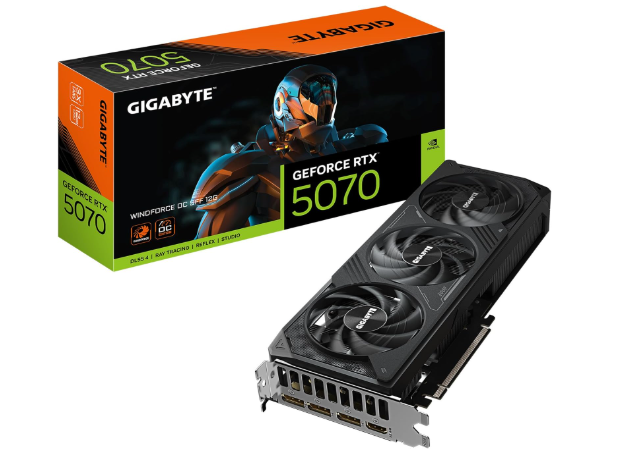
1. NVIDIA GeForce RTX 5070 — Best Overall GPU for Ryzen 5 9600X
The RTX 5070 is the ideal companion for AMD’s Ryzen 5 9600X. It delivers outstanding gaming performance across virtually every modern title while maintaining excellent power efficiency and offering access to NVIDIA’s latest AI-powered technologies.
Thanks to DLSS 4 and Multi Frame Generation, the RTX 5070 can achieve significantly higher frame rates than previous-generation cards, making it an outstanding option for gamers with high-refresh-rate monitors.
Why It Stands Out
The Ryzen 5 9600X provides enough processing power to keep the RTX 5070 fully utilized in most modern games. At 1440p, the combination produces exceptional gaming performance without noticeable CPU limitations.
This GPU also excels in creative applications, making it suitable for video editing, Blender rendering, AI workloads, and streaming.
Key Specifications
- 12GB GDDR7 memory
- DLSS 4 support
- Multi Frame Generation
- Advanced Ray Tracing
- AV1 hardware encoding
- PCIe 5.0 support
- Excellent power efficiency
Gaming Performance
At 1080p, expect frame rates well above 200 FPS in esports titles and well over 120 FPS in most modern AAA games with Ultra settings.
At 1440p, the RTX 5070 truly shines, consistently delivering 120–180 FPS depending on the game.
For 4K gaming, DLSS enables playable Ultra settings while maintaining excellent image quality.
Pros
- Outstanding 1440p performance
- Excellent ray tracing
- DLSS 4 support
- Great creator performance
- Low power consumption
- Future-ready features
Cons
- More expensive than budget options
- 12GB VRAM may eventually become limiting in some future 4K workloads
Best For
- Competitive gamers
- AAA gamers
- Streamers
- Content creators
- Long-term PC builders
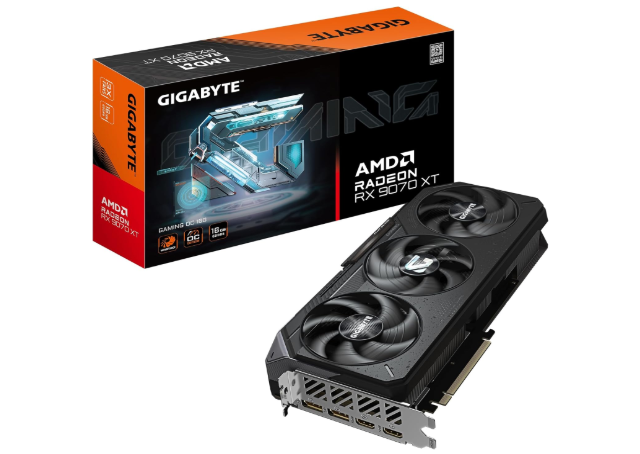
2. AMD Radeon RX 9070 XT — Best AMD GPU for Ryzen 5 9600X
If your priority is maximum rasterization performance and generous VRAM, the Radeon RX 9070 XT is one of the strongest pairings for the Ryzen 5 9600X. It delivers excellent value for gamers focused on native rendering performance, especially at 1440p and even entry-level 4K gaming.
One of the biggest advantages of the RX 9070 XT is its 16GB of VRAM, which provides additional headroom for modern games with high-resolution textures and demanding workloads. This makes it a compelling option for users who want a graphics card that will remain capable for years.
Why It Stands Out
The Ryzen 5 9600X complements the RX 9070 XT extremely well, allowing the GPU to reach its full gaming potential without significant CPU bottlenecks at higher resolutions. In many modern titles, this combination offers outstanding frame rates while maintaining smooth gameplay and excellent responsiveness.
AMD has also significantly improved its software ecosystem, with better driver stability and features such as FSR 4 for AI-assisted upscaling.
Key Specifications
- 16GB GDDR6 memory
- Advanced RDNA architecture
- FSR 4 support
- AV1 hardware encoding
- DisplayPort 2.1 support
- PCIe 5.0 compatibility
- Strong rasterization performance
Gaming Performance
At 1080p, the RX 9070 XT easily delivers well over 200 FPS in esports titles and exceeds 140 FPS in many demanding AAA games at Ultra settings.
For 1440p gaming, it consistently performs exceptionally well, often reaching between 120 and 170 FPS depending on the title and graphics settings.
At 4K, the additional VRAM becomes increasingly valuable. Many games remain comfortably playable at high or ultra settings, especially when FSR is enabled.
Productivity Performance
The RX 9070 XT is also capable in productivity workloads, particularly those optimized for AMD GPUs. It performs well in:
- Video editing
- 3D rendering
- Photo editing
- AI-assisted creative applications
- Game development
Although NVIDIA still leads in CUDA-dependent workflows, AMD continues to close the gap with improved software support.
Pros
- Outstanding 1440p performance
- Large 16GB VRAM
- Excellent native rendering
- Strong value
- Great longevity
- Modern connectivity
Cons
- Ray tracing still trails NVIDIA in some games
- Some professional software favors CUDA acceleration
Best For
- 1440p gamers
- Future-proof builds
- AMD enthusiasts
- High-refresh gaming
- Users who prioritize VRAM
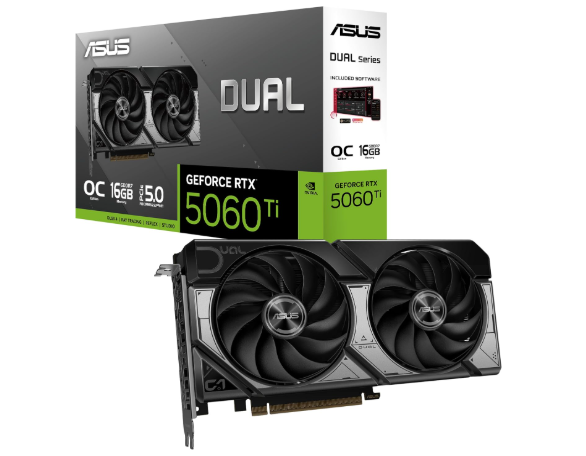
3. NVIDIA GeForce RTX 5060 Ti 16GB — Best Budget GPU for Ryzen 5 9600X
Not every Ryzen 5 9600X build needs a flagship graphics card. If you’re looking for the best balance of affordability, efficiency, and gaming performance, the RTX 5060 Ti 16GB is an excellent choice.
Despite its lower price, this GPU provides enough performance to handle modern games at high settings while also benefiting from NVIDIA’s latest AI technologies.
Why It Stands Out
The RTX 5060 Ti is particularly appealing because it combines:
- Low power consumption
- 16GB VRAM
- Excellent 1080p performance
- Strong 1440p capability
- DLSS 4 support
- Modern media encoder
The Ryzen 5 9600X has no trouble keeping this graphics card fully utilized, making the combination highly efficient and well-balanced.
Key Specifications
- 16GB GDDR7 memory
- DLSS 4
- Frame Generation
- AV1 encoding
- PCIe 5.0 support
- Low power requirements
- Excellent thermal efficiency
Gaming Performance
For 1080p gaming, the RTX 5060 Ti handles virtually every modern game at Ultra settings with excellent frame rates.
Competitive games such as Counter-Strike 2, Valorant, Apex Legends, Fortnite, and Rainbow Six Siege can easily exceed 200 FPS depending on settings.
At 1440p, it continues to perform very well, especially with DLSS enabled, delivering smooth gameplay in most modern AAA titles.
While 4K gaming is possible in lighter games or with DLSS, this GPU is best suited for 1080p and 1440p users.
Creator Features
Thanks to NVIDIA’s mature software ecosystem, creators benefit from:
- Faster video exports
- Better streaming quality
- AI noise removal
- NVIDIA Broadcast
- Hardware AV1 encoding
- Excellent compatibility with editing software
Pros
- Outstanding value
- 16GB VRAM
- Low power consumption
- Quiet operation
- DLSS 4 support
- Great for creators
Cons
- Limited native 4K performance
- Fewer CUDA cores than higher-end models
Best For
- Budget-conscious gamers
- Students
- First-time PC builders
- 1080p esports players
- Casual content creators
Quick Highlights Table
If you’re short on time, here’s a quick summary of which GPU fits different types of users.
| User Type | Recommended GPU |
|---|---|
| Best Overall | NVIDIA RTX 5070 |
| Best AMD Choice | Radeon RX 9070 XT |
| Best Budget Option | RTX 5060 Ti 16GB |
| Best for Ray Tracing | RTX 5070 |
| Best for Content Creators | RTX 5070 |
| Best 1440p Gaming | RX 9070 XT |
| Best Value | RTX 5060 Ti 16GB |
| Best Future-Proof Option | RX 9070 XT |
What to Look for When Choosing the Best GPU for Ryzen 5 9600X
Buying the best GPU for Ryzen 5 9600X isn’t simply about choosing the most expensive graphics card. Instead, you should focus on finding the right balance between performance, features, efficiency, and budget. Since the Ryzen 5 9600X is a capable Zen 5 processor, it can comfortably handle upper-midrange and even high-end GPUs without becoming a bottleneck in most gaming scenarios.
Here are the most important factors to consider before making your purchase.
1. Match Your Gaming Resolution
The resolution you play at has the biggest impact on GPU performance requirements.
- 1080p Gaming: An RTX 5060 Ti 16GB offers more than enough performance for high frame rates.
- 1440p Gaming: The RTX 5070 and RX 9070 XT provide the ideal balance of speed and visual quality.
- 4K Gaming: The RX 9070 XT performs particularly well thanks to its larger VRAM capacity, while the RTX 5070 benefits from DLSS 4 for smoother gameplay.
Buying a GPU designed for 4K gaming when you only own a 1080p monitor usually isn’t the best use of your budget.
2. VRAM Capacity
Modern games continue to demand more graphics memory, especially with Ultra textures and ray tracing enabled.
General recommendations include:
- 8GB: Entry-level gaming
- 12GB: Excellent for most modern games
- 16GB: Ideal for future-proofing and high-resolution gaming
The RX 9070 XT and RTX 5060 Ti both feature 16GB of VRAM, making them excellent long-term choices.
3. Ray Tracing Performance
If you enjoy visually stunning games with realistic lighting, reflections, and shadows, ray tracing matters.
Current ranking:
- RTX 5070
- RTX 5060 Ti
- RX 9070 XT
NVIDIA still maintains the lead in ray tracing performance, especially when paired with DLSS.
4. AI Upscaling Technologies
AI-assisted upscaling has become one of the most important gaming technologies.
NVIDIA offers:
- DLSS 4
- Frame Generation
- Multi Frame Generation
AMD provides:
- FSR 4
- Frame Generation
- Broad game compatibility
Both technologies improve frame rates, but DLSS generally provides better image reconstruction.
5. Power Supply Requirements
Before buying a GPU, verify that your power supply is sufficient.
Recommended PSU capacities:
| GPU | Recommended PSU |
|---|---|
| RTX 5060 Ti | 650W |
| RTX 5070 | 750W |
| RX 9070 XT | 750W–850W |
Choosing a quality 80+ Gold PSU helps ensure long-term stability.
6. Cooling Solution
Modern graphics cards generate significant heat.
Look for models with:
- Triple-fan coolers
- Large heatsinks
- Vapor chamber cooling
- Metal backplates
- Dual BIOS (if available)
Better cooling results in quieter operation and higher sustained boost clocks.
7. Creator Features
If you stream or edit videos, consider software support.
NVIDIA excels with:
- CUDA acceleration
- NVENC encoder
- NVIDIA Broadcast
- AI video enhancements
AMD performs well in many applications but still trails NVIDIA in some professional workloads.
8. Future-Proof Features
Buying a graphics card is often a multi-year investment.
Look for support for:
- PCIe 5.0
- AV1 encoding
- DisplayPort 2.1
- HDMI 2.1
- AI-assisted rendering
- Frame Generation
These features help your system stay relevant as games and software evolve.
9. Warranty and Customer Support
A longer warranty often reflects greater manufacturer confidence.
Look for:
- Three-year warranties or longer
- Reliable customer service
- Easy RMA process
- Frequent driver updates
Good support can save time and money if issues arise.
Best Pick Based on Your Use Case
Different users have different priorities. Here’s which GPU is the best choice depending on how you plan to use your Ryzen 5 9600X.
Best Overall
Winner: NVIDIA RTX 5070
The RTX 5070 offers the best all-around experience. It combines excellent gaming performance, strong ray tracing, AI-powered DLSS 4, efficient power consumption, and outstanding creator features. For most users, this is the easiest recommendation.
Perfect for:
- 1440p gaming
- Competitive gaming
- Streaming
- Content creation
- Long-term upgrades
Best AMD Option
Winner: Radeon RX 9070 XT
If your priority is maximum native gaming performance and plenty of VRAM, the RX 9070 XT is difficult to beat. Its 16GB memory buffer makes it particularly attractive for gamers who want extra longevity.
Perfect for:
- Native rendering
- High-refresh 1440p
- Entry-level 4K gaming
- Texture-heavy games
- Future-proof systems
Best Budget Choice
Winner: RTX 5060 Ti 16GB
For gamers who want excellent value, the RTX 5060 Ti delivers impressive performance without requiring a premium budget. Its combination of 16GB VRAM, DLSS 4, and low power consumption makes it one of the best midrange options available.
Perfect for:
- 1080p Ultra gaming
- Affordable 1440p gaming
- Students
- First-time builders
- Budget-conscious creators
Best for Ray Tracing
Winner: RTX 5070
With advanced RT cores and DLSS 4, the RTX 5070 consistently delivers the best ray-traced gaming experience among these three GPUs.
Ideal for games like:
- Cyberpunk 2077
- Alan Wake 2
- Black Myth: Wukong
- Portal RTX
- Indiana Jones and the Great Circle
Best for Streaming and Content Creation
Winner: RTX 5070
The combination of NVENC, AV1 encoding, CUDA acceleration, and widespread software support makes the RTX 5070 the strongest choice for creators using applications such as Adobe Premiere Pro, DaVinci Resolve, Blender, and OBS Studio.
Best Value for Money
Winner: RTX 5060 Ti 16GB
If you’re seeking the highest return on investment, the RTX 5060 Ti offers an excellent mix of modern features, efficient performance, and generous VRAM at a more accessible price point.
Best Long-Term Investment
Winner: Radeon RX 9070 XT
Its 16GB of VRAM and strong rasterization performance provide excellent longevity, making it a solid option for gamers who plan to keep their GPU for several years.
Real-World Performance
Synthetic benchmarks are useful, but they don’t always reflect how a GPU performs during everyday gaming or creative work. Fortunately, all three of our recommended GPUs pair exceptionally well with the Ryzen 5 9600X, delivering smooth gameplay, fast rendering, and excellent multitasking in real-world scenarios.
1080p Gaming
For competitive gamers using 1080p monitors with refresh rates of 144Hz, 240Hz, or even 360Hz, the Ryzen 5 9600X has more than enough processing power to keep these GPUs fed with data.
Typical performance at Ultra settings:
| Game | RTX 5070 | RX 9070 XT | RTX 5060 Ti 16GB |
|---|---|---|---|
| Counter-Strike 2 | 350+ FPS | 340+ FPS | 300+ FPS |
| Valorant | 450+ FPS | 430+ FPS | 400+ FPS |
| Fortnite (DX12) | 220+ FPS | 210+ FPS | 180+ FPS |
| Apex Legends | 240+ FPS | 235+ FPS | 200+ FPS |
| Rainbow Six Siege | 300+ FPS | 290+ FPS | 260+ FPS |
All three cards provide excellent performance for esports gaming, making them ideal for high-refresh-rate monitors.
1440p Gaming
The Ryzen 5 9600X truly shines when paired with a capable GPU at 1440p. At this resolution, the graphics card becomes the primary performance factor, allowing the CPU to stretch its legs without introducing noticeable bottlenecks.
In demanding AAA titles, both the RTX 5070 and RX 9070 XT comfortably deliver high frame rates at Ultra settings. The RTX 5060 Ti also performs admirably, especially when DLSS is enabled.
4K Gaming
Although the Ryzen 5 9600X isn’t specifically targeted at 4K enthusiasts, it has no trouble supporting high-end GPUs at this resolution because the workload shifts heavily to the graphics card.
- RTX 5070: Excellent 4K performance with DLSS 4 and Frame Generation.
- RX 9070 XT: Strong native 4K gaming thanks to its 16GB VRAM.
- RTX 5060 Ti: Suitable for lighter 4K workloads or games using DLSS.
Streaming Performance
Gamers who stream on platforms like Twitch or YouTube will appreciate the hardware encoding capabilities of these GPUs.
The RTX 5070 and RTX 5060 Ti include NVIDIA’s latest NVENC encoder with AV1 support, offering exceptional stream quality while keeping CPU usage low.
The RX 9070 XT also supports AV1 encoding and performs well for streaming, though NVIDIA’s software ecosystem remains slightly more polished for content creators.
Video Editing and Creative Work
If you use your PC for more than gaming, the GPU becomes increasingly important.
- RTX 5070: Outstanding for Adobe Premiere Pro, Blender, DaVinci Resolve, and AI-assisted workflows.
- RX 9070 XT: Excellent for general editing, photo work, and GPU-accelerated rendering.
- RTX 5060 Ti: Great choice for hobbyists and aspiring creators seeking strong performance without overspending.
Safety & Protection
Installing a new graphics card involves more than simply plugging it into your motherboard. Taking a few precautions can help protect your investment and ensure stable operation.
Use a Reliable Power Supply
A quality PSU is essential for system stability.
Choose a power supply that offers:
- 80+ Gold certification or better
- High-quality capacitors
- Adequate wattage
- Built-in protection against overvoltage, overcurrent, and short circuits
Avoid using generic or low-quality power supplies, as they can cause instability or even damage components.
Maintain Proper Airflow
High-performance GPUs generate significant heat.
For optimal cooling:
- Install at least two intake fans and one exhaust fan.
- Keep cables organized to improve airflow.
- Clean dust filters regularly.
- Ensure enough clearance around the GPU.
Good airflow helps maintain lower temperatures, quieter operation, and more consistent boost clocks.
Install the Latest Drivers
Graphics card manufacturers frequently release driver updates that improve:
- Game compatibility
- Stability
- Performance
- Security
- Feature support
Checking for updates regularly ensures you get the best experience from your GPU.
Protect Against Static Electricity
When installing hardware:
- Turn off the power supply.
- Unplug the PC.
- Touch a grounded metal surface before handling components.
- Hold the graphics card by its edges.
- Avoid touching the gold PCIe contacts.
These simple steps reduce the risk of electrostatic discharge damaging sensitive electronics.
Internal and External Performance
Understanding the difference between internal and external performance helps explain why some GPUs deliver a smoother overall experience.
| Internal Performance | External Performance |
|---|---|
| GPU architecture | Gaming FPS |
| Shader performance | Visual quality |
| Memory bandwidth | Monitor compatibility |
| VRAM capacity | Streaming quality |
| AI accelerators | Creator performance |
| Ray tracing hardware | User experience |
| Cache design | Power efficiency in daily use |
Internal Performance
Internal performance refers to the hardware capabilities inside the graphics card, including:
- GPU core architecture
- Clock speeds
- VRAM
- Cache
- Tensor or AI cores
- Ray tracing accelerators
The RTX 5070 leads in AI features and ray tracing, while the RX 9070 XT stands out with its large VRAM and strong rasterization performance.
External Performance
External performance is what users experience every day.
This includes:
- Higher frame rates
- Better image quality
- Faster exports
- Quieter operation
- Lower temperatures
- Stable gameplay
- Reduced loading times
A well-balanced combination of the Ryzen 5 9600X and any of the recommended GPUs provides an excellent real-world experience.
Long-Term Reliability Tips
A graphics card is a long-term investment, and proper care can extend its lifespan.
Keep Temperatures Under Control
Aim for GPU temperatures below 80°C during extended gaming sessions. Clean your PC regularly and ensure unrestricted airflow.
Update Drivers
New drivers often include performance optimizations, bug fixes, and compatibility improvements for the latest games.
Avoid Excessive Overclocking
While moderate overclocking can boost performance, pushing voltages too high may reduce component longevity.
Clean Dust Regularly
Dust buildup restricts airflow and raises temperatures.
Every few months:
- Clean fans
- Dust heatsinks
- Replace clogged filters
- Check airflow paths
Use a GPU Support Bracket
Many modern graphics cards are large and heavy.
A support bracket helps prevent GPU sag, reducing stress on the PCIe slot and motherboard over time.
Invest in a Quality PSU
Stable power delivery minimizes the risk of crashes and hardware damage, especially during intensive workloads.
Buying Recommendations
Choosing the best GPU for Ryzen 5 9600X ultimately depends on your budget, monitor resolution, and intended use.
Buy the RTX 5070 if you:
- Want the best overall experience
- Play at 1440p Ultra settings
- Enjoy ray tracing
- Stream regularly
- Edit videos or create content
- Plan to keep your GPU for several years
Buy the RX 9070 XT if you:
- Prefer AMD hardware
- Value larger VRAM capacity
- Focus on native rendering performance
- Play demanding AAA games at 1440p or 4K
- Want excellent long-term value
Buy the RTX 5060 Ti 16GB if you:
- Have a tighter budget
- Primarily game at 1080p or 1440p
- Want DLSS 4 and Frame Generation
- Need a power-efficient GPU
- Are building your first gaming PC
Final Verdict
The Ryzen 5 9600X is one of the best mid-range gaming processors available, offering outstanding single-core performance, excellent efficiency, and enough processing power to pair with a wide range of modern graphics cards.
Among the three GPUs reviewed, the NVIDIA GeForce RTX 5070 stands out as the best overall choice. It delivers exceptional 1440p gaming performance, industry-leading ray tracing, powerful AI features, and excellent creator tools, making it the most well-rounded option for most users.
For gamers who prioritize raw rasterization performance and extra VRAM, the AMD Radeon RX 9070 XT is an outstanding alternative that offers excellent value and impressive longevity.
If you’re looking for the best balance between affordability and modern features, the RTX 5060 Ti 16GB is the clear winner. It handles today’s games with ease, includes DLSS 4 support, and offers enough VRAM to remain relevant for years.
No matter which option you choose, pairing it with the Ryzen 5 9600X will result in a balanced, powerful PC capable of delivering an exceptional gaming and productivity experience.
FAQ Section
Q1: Which is the best GPU for Ryzen 5 9600X?
Ans: The NVIDIA GeForce RTX 5070 is the best overall GPU for the Ryzen 5 9600X due to its outstanding gaming performance, excellent ray tracing, DLSS 4 support, and strong productivity features.
Q2: Will the Ryzen 5 9600X bottleneck an RTX 5070?
Ans: No. The Ryzen 5 9600X pairs extremely well with the RTX 5070, especially at 1440p and 4K resolutions, where GPU performance is the primary limiting factor.
Q3: Is the RX 9070 XT better than the RTX 5070?
Ans: It depends on your priorities. The RX 9070 XT generally offers stronger native rasterization performance and more VRAM, while the RTX 5070 leads in ray tracing, DLSS 4, and creator-focused applications.
Q4: Is 16GB VRAM worth it for gaming?
Ans: Yes. A 16GB graphics card provides additional headroom for future games, high-resolution textures, and demanding workloads, making it a more future-proof investment.
Q5: What power supply is recommended for these GPUs?
Ans: A quality 650W PSU is sufficient for the RTX 5060 Ti, while the RTX 5070 and RX 9070 XT are best paired with a reliable 750W to 850W 80+ Gold power supply.
Q6: Is the Ryzen 5 9600X good for streaming?
Ans: Absolutely. Combined with a modern GPU featuring AV1 hardware encoding, the Ryzen 5 9600X delivers excellent streaming performance while maintaining smooth gameplay.
Q7: Which GPU offers the best value for money?
Ans: The RTX 5060 Ti 16GB offers the best value thanks to its strong gaming performance, generous VRAM, DLSS 4 support, and competitive pricing.
Q8: What is the best GPU for Ryzen 5 9600x?
Ans: The NVIDIA GeForce RTX 5070 is the best GPU for the Ryzen 5 9600X, offering exceptional 1440p gaming, strong ray tracing, DLSS 4, AI features, creator performance, excellent efficiency, and outstanding long-term value.
Short Conclusion
Finding the best GPU for Ryzen 5 9600X comes down to matching your graphics card to your gaming resolution, workload, and budget. For most users, the RTX 5070 is the top recommendation thanks to its excellent all-around performance and advanced features. If you want more VRAM and strong native rendering, the RX 9070 XT is an excellent AMD alternative. Meanwhile, the RTX 5060 Ti 16GB delivers outstanding value for gamers seeking modern features without stretching their budget. Any of these three GPUs will pair exceptionally well with the Ryzen 5 9600X, ensuring a fast, balanced, and future-ready PC for gaming, streaming, and content creation.
If you have any questions about “Best GPU for Ryzen 5 9600X: Top 3 GPU for Gaming”, feel free to let us know through your comments.


