
The Arctic Liquid Freezer III Pro 420 is a high-end all-in-one liquid CPU cooler designed for enthusiasts who want serious thermal performance without moving to a custom water-cooling loop. Its defining feature is the enormous 420mm radiator, paired with three 140mm fans and Arctic’s updated pump and VRM-focused cooling design. That combination makes it particularly interesting for powerful CPUs that can produce substantial heat during gaming, rendering, compiling, and other sustained workloads.
This Arctic Liquid Freezer III Pro 420 review looks beyond the headline radiator size to examine what the cooler actually offers. We’ll cover its specifications, key features, installation considerations, cooling performance, acoustics, safety, long-term reliability, and compatibility. We’ll also look at which types of users can realistically benefit from a 420mm AIO and when a smaller cooler may make more sense.
For enthusiasts building a high-performance desktop, the main question is simple: does the Liquid Freezer III Pro 420 justify its large footprint? Let’s break it down.
Why It Matters to You
CPU temperatures directly affect sustained performance, fan noise, and how aggressively a processor can maintain its boost clocks. This becomes increasingly important with modern high-core-count processors that can consume significant power under heavy workloads.
The Arctic Liquid Freezer III Pro 420 targets this segment with considerably more radiator surface area than conventional 240mm or 280mm AIO coolers.
Its large radiator can dissipate substantial heat, while the three 140mm fans can move a large amount of air at relatively moderate speeds. The integrated VRM fan is another useful feature because it provides airflow around the CPU socket rather than focusing exclusively on the processor.
However, bigger isn’t automatically better for every PC. A 420mm radiator requires a compatible case, and its physical dimensions can make installation more demanding.
In-Depth Review of Arctic Liquid Freezer III Pro 420
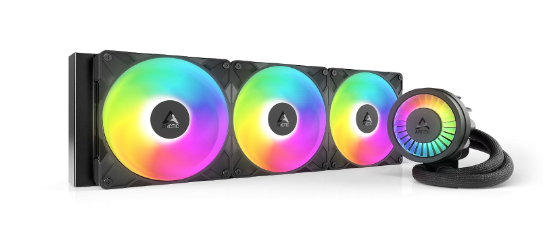
The Liquid Freezer III Pro 420 sits toward the performance-oriented end of Arctic’s AIO lineup. It builds on the Liquid Freezer III platform while using Arctic’s newer high-performance fan design and pump configuration.
The first thing that stands out is the 420mm radiator. Instead of three 120mm fans, the cooler uses three 140mm fans. This provides a large cooling surface while allowing the fans to operate at useful airflow levels without necessarily requiring extremely high rotational speeds.
The pump assembly is also distinctive. Arctic combines the CPU cold plate, pump, and VRM fan into a relatively integrated design. The VRM fan is intended to provide localized airflow around the motherboard’s voltage-regulation area.
Cooling Design
The cold plate is designed to cover modern CPU heat-producing areas effectively, while the pump circulates coolant through the radiator loop.
The 420mm radiator gives the cooler considerable thermal capacity. For CPUs with high sustained power consumption, that extra radiator area can help maintain lower temperatures during long workloads.
Fan Performance
Three 140mm fans provide the airflow required to cool the radiator. Their larger diameter means they can move significant air while avoiding the extremely high RPMs sometimes required by smaller fans.
For a performance-oriented PC, this combination can provide an attractive balance between cooling capacity and acoustic performance.
Pump and VRM Cooling
The pump is integrated directly into the CPU block, while the small VRM fan adds airflow around the socket area.
This is particularly interesting for motherboards with heavily loaded VRMs or systems operating at high sustained CPU power. The additional airflow isn’t a replacement for a well-ventilated case, but it can complement the motherboard’s existing cooling.
Installation Experience
Installation is one area where the Liquid Freezer III family deserves attention. Arctic uses its own mounting approach, so users should carefully follow the supplied instructions and make sure the mounting hardware matches their CPU socket.
The 420mm radiator also needs considerable space inside the case. Before purchasing, check radiator length, thickness, fan clearance, motherboard heatsink clearance, RAM clearance, and front/top mounting support.
For a first-time PC builder, a smaller 280mm or 360mm AIO may be physically easier to work with.
Specifications Table
Here is a simplified overview of the major specifications to consider before buying the cooler.
| Specification | Arctic Liquid Freezer III Pro 420 |
|---|---|
| Cooler Type | All-in-One liquid CPU cooler |
| Radiator Size | 420mm |
| Radiator Fans | 3 × 140mm |
| Fan Type | High-performance 140mm PWM fans |
| Pump | Integrated AIO pump |
| VRM Fan | Yes |
| CPU Compatibility | Multiple modern Intel and AMD sockets |
| Radiator Material | Aluminum |
| CPU Contact | Copper cold plate |
| Control | PWM |
| Cooling Focus | High-performance CPUs |
| Recommended Case | Large ATX/full-tower or compatible chassis |
| Lighting | Configuration-dependent; designed primarily around cooling |
| Use Case | Gaming, workstation, rendering, enthusiast PCs |
Exact socket support and included mounting hardware can vary by revision or package, so verify Arctic’s current compatibility list before purchase.
Key Features at a Glance
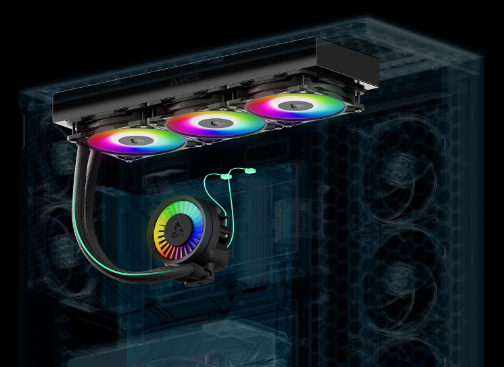
The Arctic Liquid Freezer III Pro 420 focuses heavily on cooling performance rather than unnecessary extras.
- 420mm radiator for high thermal capacity
- Three 140mm fans for radiator airflow
- Integrated CPU pump and VRM fan
- High-performance cooling design for demanding processors
- PWM fan and pump control
- Large radiator surface area
- Designed for sustained workloads
- Compatible with a range of modern CPU platforms
- Suitable for enthusiast gaming and workstation systems
- Arctic’s focus on practical thermal performance rather than excessive lighting
What to Look for When Choosing the Arctic Liquid Freezer III Pro 420
Choosing an AIO cooler isn’t simply about selecting the biggest radiator available. You should consider several factors.
1. CPU Power Consumption
A high-end 420mm cooler makes the most sense when paired with a processor capable of producing substantial heat.
For a low-power CPU, the additional cooling capacity may not provide enough practical benefit to justify the larger installation requirements.
2. Case Compatibility
This is perhaps the most important consideration.
A 420mm radiator is significantly larger than a typical 240mm or 280mm AIO. Your case needs to support a 420mm radiator and three 140mm fans in the desired mounting location.
3. Radiator Thickness
Don’t check only radiator length. Radiator thickness plus fan thickness determines how much internal space the installation consumes.
This can affect RAM, motherboard heatsinks, GPU clearance, and other components.
4. Noise Requirements
Large fans can deliver substantial airflow without always requiring very high RPM. However, the actual noise level depends on fan curves, pump settings, case airflow, and CPU power.
5. CPU Socket
Always confirm that your motherboard socket is supported by the specific mounting kit included with the cooler.
Quick Highlights Table
The following table summarizes where the Liquid Freezer III Pro 420 stands.
| Category | Arctic Liquid Freezer III Pro 420 |
|---|---|
| Cooling Capacity | Excellent for high-power CPUs |
| Radiator Size | Very Large |
| Fan Size | 140mm |
| Sustained Workloads | Excellent |
| Gaming | Excellent |
| Heavy Rendering | Excellent |
| Noise Potential | Good to excellent with optimized curves |
| Installation Difficulty | Moderate |
| Case Requirements | High |
| VRM Cooling | Included |
| Best For | Enthusiast/high-performance systems |
| Portability | Poor |
| Small Cases | Not recommended |
Buying Guide: What to Look for
Before purchasing the Arctic Liquid Freezer III Pro 420, check your complete system rather than only the CPU.
Check the Case First
Look at your case’s official radiator compatibility chart. A case might advertise 420mm radiator support in one position but still have clearance limitations with certain motherboard or RAM configurations.
Consider Your CPU
If you’re running a processor that rarely reaches high sustained power consumption, a 420mm AIO may be excessive.
On the other hand, high-end CPUs used for long rendering, simulation, video production, software compilation, or heavy multitasking can benefit more from a large radiator.
Think About Upgrade Plans
If you intend to upgrade to a significantly more powerful CPU later, purchasing a high-capacity cooler can make sense if your case supports it.
Don’t Ignore Case Airflow
Even an excellent AIO depends on the case to exhaust the heat it removes from the CPU.
A front-mounted radiator, for example, can influence GPU temperatures depending on the case configuration. A top-mounted radiator may provide a different balance between CPU and GPU cooling.
Pros & Cons of Arctic Liquid Freezer III Pro 420
The Arctic Liquid Freezer III Pro 420 review shows a cooler designed primarily around thermal capacity and sustained performance. Its strengths are closely connected to its large physical size.
Pros
- Excellent cooling potential
- Huge 420mm radiator
- Three 140mm fans
- Strong choice for high-power CPUs
- Integrated VRM fan
- Suitable for demanding sustained workloads
- Large thermal headroom
- Performance-focused design
Cons
- Requires a large compatible case
- Installation can be more involved than smaller AIOs
- Physically much larger than 240mm and 280mm alternatives
- May be unnecessary for lower-power CPUs
- Large radiator can complicate component clearance
- Not ideal for compact PC builds
Best Pick Based on Your Use Case
Best for High-End Gaming
The Liquid Freezer III Pro 420 is well suited to a high-end gaming PC when the case has enough room for the radiator.
Its cooling capacity can help maintain temperatures during long gaming sessions, particularly with high-performance processors.
Best for Content Creation
For video editing, 3D rendering, encoding, and other CPU-intensive tasks, the large radiator becomes more meaningful.
These workloads can keep the processor under high load for extended periods, allowing the cooler’s additional thermal capacity to make better use of its size.
Best for Workstations
Workstations running compilation, simulation, data processing, or other sustained workloads can also benefit from the cooler.
Not Ideal for Compact PCs
If you’re building a compact or space-conscious system, this isn’t the obvious choice.
A 420mm radiator requires significant internal volume, so a 240mm or 280mm solution may be more practical.
Real-World Performance
The Liquid Freezer III Pro 420 is fundamentally designed for sustained thermal performance.
In gaming workloads, actual temperatures will depend heavily on the CPU, motherboard power limits, ambient temperature, case airflow, and fan curve. Therefore, there isn’t one temperature number that accurately represents every system.
With a suitable high-power CPU, the 420mm radiator gives the cooler substantial thermal capacity. During extended workloads such as rendering or CPU stress testing, the large radiator has more opportunity to dissipate accumulated heat than smaller AIO designs.
Gaming
Gaming workloads generally fluctuate rather than keeping every CPU core at maximum utilization continuously.
As a result, the cooler should have considerable thermal headroom with appropriate hardware.
Productivity
Long-running productivity workloads are where the large radiator can become particularly useful.
Rendering, encoding, compilation, and other sustained CPU workloads generate heat continuously, allowing the larger cooling system to demonstrate its advantage.
Thermals
Temperature results should always be compared using the same ambient temperature, CPU power settings, motherboard configuration, thermal paste, and fan profile.
For that reason, the Liquid Freezer III Pro 420 should be viewed as a high-capacity cooling platform, rather than assuming a specific temperature result applies universally.
Noise
Noise depends heavily on fan speed and pump settings.
Because the cooler uses three 140mm fans, it has considerable airflow potential. Running an optimized fan curve can help avoid unnecessarily high fan speeds during lighter workloads while allowing the system to increase cooling capacity under heavy CPU loads.
Safety & Protection
Liquid cooling introduces additional components compared with a conventional air cooler, so proper installation matters.
Check Mounting Pressure
The CPU block should be installed evenly and securely. Uneven mounting can reduce thermal contact.
Inspect Tubing and Connections
Before powering on the system, check that the tubes and radiator connections are secure and that nothing has been damaged during installation.
Monitor CPU Temperatures
Use motherboard monitoring software or hardware-monitoring applications to keep an eye on CPU temperature.
A sudden and unusual temperature increase can indicate a mounting, pump, airflow, or control problem.
Maintain Good Case Airflow
Radiator performance depends on airflow. Make sure intake and exhaust fans are arranged sensibly and that dust buildup doesn’t significantly restrict airflow.
Follow Socket-Specific Instructions
Different CPU platforms can require different mounting hardware or installation procedures. Follow Arctic’s instructions for the exact platform being used.
Long-Term Reliability Tips
A high-end AIO can provide years of useful service when installed and maintained properly.
Keep dust under control: Clean radiator fins and case filters periodically.
Monitor temperatures: A gradual increase in temperatures over time can indicate dust accumulation, changing fan behavior, or another cooling issue.
Avoid unnecessary pump adjustments: Use sensible pump-control settings rather than constantly changing them.
Check fan operation: Make sure all three radiator fans continue operating normally.
Watch for unusual sounds: New rattling, grinding, or persistent abnormal pump noise deserves attention.
Maintain good airflow: Don’t allow cables, dust filters, or other components to unnecessarily obstruct radiator airflow.
Don’t bend tubing excessively: During installation, avoid putting unnecessary stress on the cooler’s tubes and fittings.
Buying Recommendations
The Arctic Liquid Freezer III Pro 420 makes the most sense when you have a high-performance CPU and a case specifically capable of accommodating a 420mm radiator.
It’s particularly relevant for enthusiasts who prioritize sustained CPU cooling and want substantial thermal headroom for demanding workloads.
However, buyers should resist choosing it solely because the radiator is larger. If your CPU has relatively modest thermal requirements or your case has limited space, a smaller AIO can provide a more practical system.
Before purchasing, verify:
- Your CPU socket compatibility
- 420mm radiator support
- Radiator thickness clearance
- 140mm fan clearance
- RAM clearance
- Motherboard heatsink clearance
- GPU and radiator positioning
- Case airflow configuration
- Included mounting hardware
Final Verdict
The Arctic Liquid Freezer III Pro 420 is built for users who want serious CPU cooling capacity and have a chassis large enough to accommodate it.
Its biggest advantage is straightforward: a large 420mm radiator combined with three 140mm fans provides substantial thermal capacity for demanding processors. The integrated VRM fan and performance-oriented design add further value for enthusiast systems.
Its biggest limitation is also straightforward: size.
This is not a cooler designed around compactness or minimal installation requirements. Its physical dimensions mean that compatibility needs to be checked carefully before purchase.
For a powerful gaming or workstation PC with adequate case space, the Liquid Freezer III Pro 420 is a compelling high-capacity AIO option. For smaller systems or lower-power processors, a smaller cooler may be more appropriate.
FAQs About Arctic Liquid Freezer III Pro 420
Q1: Is the Arctic Liquid Freezer III Pro 420 good for gaming?
Ans: Yes. Its large radiator and three 140mm fans provide substantial cooling capacity, making it suitable for high-performance gaming systems with compatible cases.
Q2: Is a 420mm AIO better than a 360mm AIO?
Ans: A 420mm AIO has a larger radiator and uses 140mm fans, giving it significant cooling capacity. However, actual performance depends on the CPU, fans, pump, case airflow, and power settings.
Q3: Does the Liquid Freezer III Pro 420 fit every PC case?
Ans: No. The 420mm radiator requires a case specifically designed to support this radiator size. Always check the manufacturer’s radiator compatibility and clearance specifications.
Q4: Is the Arctic Liquid Freezer III Pro 420 good for high-end CPUs?
Ans: It is designed with high-performance CPUs in mind and provides substantial thermal capacity for processors that generate significant heat during sustained workloads.
Q5: Does the Arctic Liquid Freezer III Pro 420 have a VRM fan?
Ans: Yes. The Liquid Freezer III design includes a small fan integrated around the CPU block to provide additional airflow toward the motherboard’s VRM area.
Q6: Is the Liquid Freezer III Pro 420 noisy?
Ans: Noise depends on fan speed, pump settings, CPU workload, case airflow, and the selected fan curve. Its 140mm fans provide the potential for high airflow without relying exclusively on extremely high RPM.
Q7: Is the Arctic Liquid Freezer III Pro 420 difficult to install?
Ans: Installation is more involved than using a basic air cooler, and the large radiator requires careful planning. Following Arctic’s platform-specific installation instructions and checking case clearance beforehand can make the process easier.
Short Conclusion
The Arctic Liquid Freezer III Pro 420 is a performance-focused AIO for enthusiasts who need substantial CPU cooling capacity. Its 420mm radiator, three 140mm fans, and integrated VRM cooling make it particularly suitable for powerful gaming and workstation systems. Its main trade-off is physical size, so case compatibility should be confirmed before buying.


