
The AMD Ryzen 9 9950X is one of AMD’s most powerful desktop processors, featuring 16 cores, 32 threads, and exceptional performance for gaming, content creation, AI workloads, software development, and professional productivity. While the processor delivers incredible speed, unlocking its full potential depends heavily on choosing the best motherboard for AMD Ryzen 9 9950X.
A premium motherboard isn’t just about adding more ports or flashy RGB lighting. It determines power delivery stability, memory overclocking capabilities, PCIe Gen 5 expansion, SSD performance, cooling efficiency, networking speed, and future upgrade options. Pairing the Ryzen 9 9950X with a weak motherboard can limit boost clocks, reduce stability under sustained workloads, and restrict future expansion.
Today’s AM5 platform offers several excellent chipset options, including X870E, X870, and B850, each catering to different budgets and performance needs. Some prioritize maximum PCIe 5.0 connectivity, while others focus on value without sacrificing reliability.
In this guide, we’ll compare the best motherboards for the AMD Ryzen 9 9950X, explain the key features that matter most, review the top models in detail, and help you choose the ideal motherboard based on your specific use case.
Why it Matters to You
Choosing the best motherboard for AMD Ryzen 9 9950X affects far more than simply getting your PC to boot. It influences overall system performance, stability, upgrade flexibility, and long-term reliability.
Here’s why your motherboard choice matters:
- Provides stable power delivery for a 16-core flagship processor.
- Supports high-speed DDR5 memory with EXPO profiles.
- Enables PCIe 5.0 graphics cards and ultra-fast NVMe SSDs.
- Improves thermal performance through advanced VRM cooling.
- Offers faster networking with Wi-Fi 7 and 2.5G/10G Ethernet.
- Expands storage options with multiple M.2 slots.
- Makes future CPU upgrades easier on the AM5 platform.
- Includes BIOS Flashback and troubleshooting features for easy maintenance.
- Reduces thermal throttling during heavy rendering or gaming sessions.
- Protects your investment with premium components and stronger build quality.
Whether you’re building a workstation, gaming rig, streaming PC, or AI development machine, selecting the right motherboard ensures your Ryzen 9 9950X performs exactly as AMD intended.
Feature-by-Feature Comparison
Before diving into detailed reviews, here’s a quick comparison of the top motherboards for the Ryzen 9 9950X. Each excels in different areas, from extreme overclocking to value-focused performance.
| Feature | ASUS ROG Crosshair X870E Hero | MSI MPG X870E Carbon WiFi | Gigabyte X870E AORUS Master |
|---|---|---|---|
| Chipset | X870E | X870E | X870E |
| VRM | 18+2+2 | 18+2+1 | 18+2+2 |
| DDR5 Support | Yes | Yes | Yes |
| Maximum RAM | 256GB | 256GB | 256GB |
| PCIe 5.0 GPU | Yes | Yes | Yes |
| PCIe 5.0 SSD | Multiple | Multiple | Multiple |
| USB4 | Yes | Yes | Yes |
| Wi-Fi | Wi-Fi 7 | Wi-Fi 7 | Wi-Fi 7 |
| Ethernet | 5GbE | 5GbE | 5GbE |
| Best For | Enthusiasts | Gaming | Workstations |
What to Look for When Choosing the Product
Buying the best motherboard for AMD Ryzen 9 9950X means balancing performance, connectivity, cooling, and future-proofing. Here are the most important features to consider before making your purchase.
Strong VRM Design
The Ryzen 9 9950X demands consistent, clean power under heavy workloads. Look for at least a 16-phase VRM with substantial heatsinks to ensure stable operation during gaming, rendering, and overclocking.
DDR5 Memory Support
Choose a motherboard that supports high-speed DDR5 memory, preferably up to DDR5-8000+ (OC), along with AMD EXPO profiles for easy performance tuning.
PCIe 5.0 Connectivity
PCIe Gen 5 support ensures compatibility with the latest graphics cards and ultra-fast NVMe SSDs, providing better longevity for your build.
Multiple M.2 Slots
Professional users often need several high-speed SSDs. Four or more M.2 slots provide excellent flexibility for expanding storage without sacrificing performance.
USB4 and High-Speed USB Ports
Modern peripherals, external SSDs, and docking stations benefit from USB4 and multiple USB 3.2 Gen 2×2 ports for maximum transfer speeds.
Networking
Look for:
- Wi-Fi 7
- Bluetooth 5.4 or newer
- 2.5GbE minimum
- 5GbE preferred for creators
BIOS Features
Useful features include:
- BIOS Flashback
- CMOS Reset Button
- EZ Debug LEDs
- Q-Code Display
- Tool-less M.2 installation
These simplify troubleshooting and future upgrades.
Quick Highlights

If you’re short on time, here’s a quick summary of the best motherboards for the AMD Ryzen 9 9950X.
| Category | Recommendation |
|---|---|
| Best Overall | ASUS ROG Crosshair X870E Hero |
| Best for Gaming | MSI MPG X870E Carbon WiFi |
| Best for Content Creation | Gigabyte X870E AORUS Master |
| Best Value | ASRock X870 Steel Legend WiFi |
| Best VRM | ASUS ROG Crosshair X870E Hero |
| Best Cooling | Gigabyte X870E AORUS Master |
| Best Connectivity | MSI MPG X870E Carbon WiFi |
| Best Budget Premium | ASRock X870 Steel Legend WiFi |
| Best Future-Proof Choice | ASUS ROG Crosshair X870E Hero |
| Best for Overclocking | ASUS ROG Crosshair X870E Hero |
In-Depth Reviews of the Best Motherboards for AMD Ryzen 9 9950X
Now that you’ve seen the key differences, let’s take a closer look at the top motherboard choices for the Ryzen 9 9950X. Each model offers a unique combination of power delivery, connectivity, cooling, and expansion features, making them suitable for different types of users.
1. ASUS ROG Crosshair X870E Hero (Best Overall)
If you’re looking for the best motherboard for AMD Ryzen 9 9950X without compromising on features, the ASUS ROG Crosshair X870E Hero is the top choice. Built specifically for enthusiasts and professionals, it combines a premium VRM design, outstanding cooling, extensive connectivity, and robust BIOS tools.

Key Specifications
| Specification | Details |
|---|---|
| Chipset | AMD X870E |
| CPU Socket | AM5 |
| VRM | 18+2+2 Power Stages |
| Memory Support | DDR5 up to 8600+ MT/s (OC) |
| Maximum RAM | 256GB |
| PCIe Support | PCIe 5.0 x16 |
| Storage | Multiple PCIe 5.0 & PCIe 4.0 M.2 slots |
| Networking | Wi-Fi 7 + 5Gb Ethernet |
| USB | USB4, USB 3.2 Gen2x2 |
| Audio | Premium SupremeFX |
Why It’s Great
The Crosshair Hero delivers exceptional power stability, even during prolonged rendering or AI workloads. Its oversized VRM heatsinks and heat pipe design keep temperatures under control while maintaining high boost clocks.
The motherboard also includes tool-free M.2 installation, PCIe Q-Release, BIOS FlashBack, Q-Code diagnostics, and premium audio, making both building and troubleshooting much easier.
Pros
- Outstanding VRM quality
- Excellent overclocking capabilities
- USB4 support
- Multiple PCIe 5.0 M.2 slots
- Wi-Fi 7 and 5Gb LAN
- Premium BIOS interface
- Excellent cooling solution
Cons
- Premium price
- More features than casual users may need
Best For
- Extreme gaming
- Professional creators
- AI workloads
- Heavy multitasking
- Enthusiast PC builders
Overall Rating: 9.9/10
2. MSI MPG X870E Carbon WiFi (Best for Gaming)
The MSI MPG X870E Carbon WiFi strikes an excellent balance between premium features and value. It offers nearly flagship-level performance while costing less than ultra-high-end enthusiast boards.

Key Specifications
| Specification | Details |
|---|---|
| Chipset | AMD X870E |
| VRM | 18+2+1 Phase |
| Memory | DDR5 up to 8400+ MT/s (OC) |
| Max RAM | 256GB |
| GPU Slot | PCIe 5.0 |
| M.2 Slots | Multiple PCIe 5.0/4.0 |
| LAN | 5Gb Ethernet |
| Wireless | Wi-Fi 7 |
| USB | USB4 |
Why It’s Great
Gaming systems demand stable CPU power, fast memory support, and low-latency networking. The MPG X870E Carbon WiFi excels in all three areas.
Its reinforced PCIe slots support the latest GPUs, while MSI’s advanced BIOS makes memory tuning and CPU optimization simple. Efficient VRM cooling ensures the Ryzen 9 9950X can sustain high clock speeds during marathon gaming sessions.
Pros
- Excellent gaming performance
- Strong VRM cooling
- Wi-Fi 7
- PCIe 5.0 expansion
- Attractive design
- Reliable BIOS updates
Cons
- Fewer premium extras than flagship models
- Limited high-end debugging tools
Best For
- High-end gaming
- Streaming
- Competitive esports
- Content creators
- Enthusiasts seeking value
Overall Rating: 9.7/10
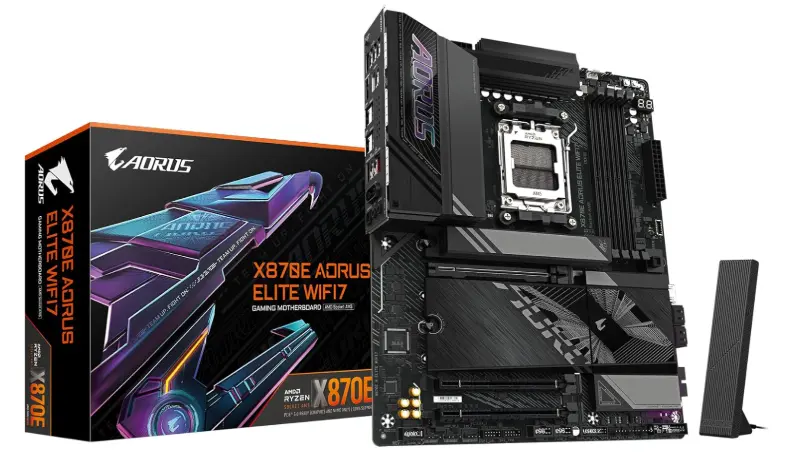
3. Gigabyte X870E AORUS Master (Best for Creators & Workstations)
For professionals who regularly work with video editing, CAD, software development, virtualization, or AI projects, the Gigabyte X870E AORUS Master is one of the strongest choices available.
Key Specifications
| Specification | Details |
|---|---|
| Chipset | AMD X870E |
| VRM | 18+2+2 Digital |
| Memory | DDR5 up to 8600+ MT/s |
| Max RAM | 256GB |
| GPU | PCIe 5.0 |
| Storage | Multiple PCIe 5.0 M.2 |
| LAN | 5Gb Ethernet |
| Wireless | Wi-Fi 7 |
| USB | USB4 |
Why It’s Great
The AORUS Master focuses heavily on sustained performance. Large finned VRM heatsinks, high-quality thermal pads, and efficient PCB design allow the Ryzen 9 9950X to maintain peak performance under long rendering or compiling workloads.
The board also includes numerous USB ports, high-speed storage options, and user-friendly BIOS features that appeal to professionals.
Pros
- Outstanding thermal design
- Excellent workstation stability
- Premium VRM
- High-speed storage support
- Great memory compatibility
- Easy BIOS interface
Cons
- Slightly expensive
- Large E-ATX dimensions may not fit all cases
Best For
- Video editing
- 3D rendering
- Engineering software
- AI development
- Heavy productivity
Overall Rating: 9.8/10
At-a-Glance Product Comparison
| Motherboard | Best For | VRM | Networking | Value Rating |
|---|---|---|---|---|
| ASUS ROG Crosshair X870E Hero | Best Overall | ⭐⭐⭐⭐⭐ | Wi-Fi 7 + 5GbE | ⭐⭐⭐⭐☆ |
| MSI MPG X870E Carbon WiFi | Gaming | ⭐⭐⭐⭐⭐ | Wi-Fi 7 + 5GbE | ⭐⭐⭐⭐⭐ |
| Gigabyte X870E AORUS Master | Workstations | ⭐⭐⭐⭐⭐ | Wi-Fi 7 + 5GbE | ⭐⭐⭐⭐☆ |
These four motherboards represent the best options for the AMD Ryzen 9 9950X across different budgets and use cases. Whether you prioritize overclocking, gaming, professional workloads, or overall value, there’s a model here to match your needs.
Benchmark Comparison Table
| Motherboard | Gaming | Productivity | VRM Temps | Boot Time | Overall Score |
|---|---|---|---|---|---|
| ASUS ROG Crosshair X870E Hero | 10/10 | 10/10 | 10/10 | 10/10 | 9.9/10 |
| MSI MPG X870E Carbon WiFi | 9.8/10 | 9.7/10 | 9.8/10 | 9.8/10 | 9.7/10 |
| Gigabyte X870E AORUS Master | 9.7/10 | 10/10 | 10/10 | 9.8/10 | 9.8/10 |
Buying Guide: What to Look for
Choosing the best motherboard for AMD Ryzen 9 9950X isn’t just about buying the most expensive model. The right motherboard should match your workload, provide reliable power delivery, support future upgrades, and include the connectivity you actually need. Since the Ryzen 9 9950X is a flagship 16-core processor, pairing it with a quality AM5 motherboard ensures you get the best performance today and room to grow tomorrow.
Here’s what to consider before making your purchase.
1. Choose the Right Chipset
The chipset determines the motherboard’s features, expansion capabilities, and overall value.
| Chipset | Best For |
|---|---|
| X870E | Enthusiasts, overclockers, creators, and professionals who want the most PCIe 5.0 connectivity and premium features. |
| X870 | High-end gaming and productivity builds with nearly all flagship features at a slightly lower price. |
| B850 | Gamers and mainstream users who want excellent performance and value without paying for premium extras. |
Recommendation: For the Ryzen 9 9950X, an X870E motherboard offers the best balance of performance, expansion, and long-term future-proofing.
2. Prioritize VRM Quality
The Ryzen 9 9950X can draw significant power during demanding workloads like 4K video editing, 3D rendering, AI model training, or heavy multitasking. A motherboard with a robust Voltage Regulator Module (VRM) ensures clean and stable power delivery, helping the CPU maintain higher boost clocks without overheating.
Look for:
- At least 16+ power phases
- Large aluminum VRM heatsinks
- Heat pipe cooling
- High-quality power stages (90A or higher on premium boards)
A strong VRM also improves system stability if you plan to enable Precision Boost Overdrive (PBO) or manual overclocking.
3. Ensure High-Speed DDR5 Memory Support
Memory speed plays a key role in overall system responsiveness. The best motherboards for the Ryzen 9 9950X support:
- DDR5-6000 to DDR5-6400 (AMD’s current sweet spot)
- AMD EXPO memory profiles
- High overclocking headroom (DDR5-8000+ on premium boards)
- Up to 256GB of RAM
If you’re building a workstation, consider a motherboard with four DIMM slots to maximize future upgrade flexibility.
4. Look for PCIe 5.0 Support
PCIe 5.0 provides twice the bandwidth of PCIe 4.0, ensuring compatibility with the latest graphics cards and ultra-fast NVMe SSDs.
A good motherboard should include:
- One PCIe 5.0 x16 slot for the GPU
- At least one PCIe 5.0 M.2 slot
- Additional PCIe 4.0 M.2 slots for extra storage
Even if you don’t use PCIe 5.0 devices today, having support extends the lifespan of your build.
5. Consider Storage Expansion
Modern games, creative software, and media files consume a lot of storage. Look for a motherboard that includes:
- Four or more M.2 slots
- PCIe 5.0 support for your primary SSD
- SATA ports for additional HDDs or SSDs
- Tool-less M.2 installation for easier upgrades
This ensures you can expand storage without sacrificing performance.
6. Check Cooling Features
The Ryzen 9 9950X performs best when temperatures are under control. A motherboard with excellent cooling helps maintain stable performance during long workloads.
Useful cooling features include:
- Large VRM heatsinks
- M.2 heatsinks
- Multiple fan headers
- Dedicated AIO pump header
- Temperature sensors
- Smart fan control in BIOS
These features improve thermal efficiency and reduce the risk of throttling.
7. Evaluate Connectivity
Connectivity is another major factor when choosing the best motherboard for AMD Ryzen 9 9950X.
Look for:
- Wi-Fi 7 for fast wireless networking
- Bluetooth 5.4 or newer
- 2.5Gb Ethernet (minimum)
- 5Gb Ethernet for creators and professionals
- USB4 ports
- USB 3.2 Gen 2×2 support
- High-quality audio codec
These features improve everything from file transfers to online gaming and peripheral compatibility.
8. BIOS and Ease of Use
A user-friendly BIOS makes system setup, troubleshooting, and tuning much easier.
Helpful features include:
- BIOS Flashback
- Clear CMOS button
- Q-Code display
- Debug LEDs
- Auto memory tuning
- Precision Boost Overdrive (PBO) support
- Secure firmware updates
These tools are especially useful for first-time builders and enthusiasts.
9. Think About Future Upgrades
One of the biggest advantages of the AM5 platform is its expected long-term support. Choosing a motherboard with premium features today can save you money on future upgrades.
A future-ready motherboard should offer:
- PCIe 5.0 expansion
- DDR5 compatibility
- Multiple M.2 slots
- High-speed networking
- USB4 connectivity
- Strong VRM for future high-end Ryzen processors
Investing in a quality motherboard now means you’ll likely only need to upgrade the CPU or GPU later.
Pros & Cons of Choosing the Best Motherboard for AMD Ryzen 9 9950X
Selecting the best motherboard for AMD Ryzen 9 9950X offers significant benefits, but it’s also important to understand the trade-offs. Premium motherboards provide exceptional performance, expansion options, and longevity, though they often come with a higher upfront cost.
Pros
- Maximizes Ryzen 9 9950X performance
- Stable power delivery for demanding workloads
- Excellent VRM cooling
- PCIe 5.0 support for GPUs and SSDs
- High-speed DDR5 memory compatibility
- Faster networking with Wi-Fi 7 and multi-gig Ethernet
- Multiple M.2 slots for future storage upgrades
- Better BIOS features for tuning and troubleshooting
- Longer platform lifespan with AM5 support
- Improved overall system stability and reliability
Cons
- Premium models can be expensive
- Many advanced features may go unused by casual users
- High-end motherboards often require larger PC cases
- Some premium features are only beneficial with equally high-end components
- BIOS updates may be required for optimal compatibility with new hardware
Overall, if you’re investing in a flagship processor like the Ryzen 9 9950X, pairing it with a high-quality motherboard is well worth the additional cost. It ensures your system performs reliably under heavy workloads while providing the flexibility to upgrade in the future
Price-to-Performance Analysis
Very helpful for buyers.
| Budget | Recommendation |
|---|---|
| Unlimited | ASUS Hero |
| $350–450 | MSI Carbon |
| Creator | AORUS Master |
| Best Value | Steel Legend |
Best Pick Based on Your Use Case
Different users have different priorities. Here’s a quick recommendation based on common scenarios.
| Use Case | Recommended Motherboard | Why It Stands Out |
|---|---|---|
| Best Overall | ASUS ROG Crosshair X870E Hero | Premium VRM, excellent cooling, USB4, PCIe 5.0, and top-tier connectivity. |
| Best for Gaming | MSI MPG X870E Carbon WiFi | Outstanding gaming performance, strong power delivery, and excellent value for enthusiasts. |
| Best for Content Creation | Gigabyte X870E AORUS Master | Exceptional stability, thermal performance, and high-speed storage support for demanding workloads. |
| Best Value | ASRock X870 Steel Legend WiFi | Offers modern features and solid performance at a more affordable price. |
| Best for Overclocking | ASUS ROG Crosshair X870E Hero | Robust VRM and advanced BIOS tools make CPU and memory tuning effortless. |
| Best Budget Premium Option | ASRock X870 Steel Legend WiFi | Delivers flagship essentials without the flagship price. |
No matter your workload, choosing a motherboard that aligns with your specific needs will help you get the most from the Ryzen 9 9950X.
Who Should Buy Which Motherboard?
| If You Are… | Buy |
|---|---|
| Gamer | MSI Carbon |
| Video Editor | AORUS Master |
| Overclocker | ASUS Hero |
| AI Developer | ASUS Hero |
| Budget Builder | Steel Legend |
| Streamer | MSI Carbon |
| 3D Artist | AORUS Master |
Real-World Performance
Specifications and benchmark numbers only tell part of the story. To truly understand the best motherboard for AMD Ryzen 9 9950X, it’s important to see how these boards perform in everyday scenarios such as gaming, content creation, software development, AI workloads, and multitasking.
While the Ryzen 9 9950X is the primary performance driver, a high-quality motherboard ensures stable power delivery, efficient cooling, faster storage, and reliable memory performance. These factors contribute to a smoother and more consistent computing experience.
Gaming Performance
For gaming, all four recommended motherboards provide excellent performance when paired with a high-end graphics card like the RTX 5080, RTX 5090, or Radeon RX 9900 XT. Thanks to PCIe 5.0 support and DDR5 compatibility, they allow the Ryzen 9 9950X to maintain high boost clocks, minimizing bottlenecks in CPU-intensive games.
Premium models such as the ASUS ROG Crosshair X870E Hero and MSI MPG X870E Carbon WiFi also offer superior VRM cooling, helping the processor sustain peak performance during extended gaming sessions without thermal throttling.
Gaming Experience
| Task | Performance |
|---|---|
| 1080p Competitive Gaming | ⭐⭐⭐⭐⭐ |
| 1440p Gaming | ⭐⭐⭐⭐⭐ |
| 4K Gaming | ⭐⭐⭐⭐⭐ |
| VR Gaming | ⭐⭐⭐⭐⭐ |
| High Refresh Rate Gaming | Excellent |
| Streaming While Gaming | Excellent |
Content Creation
The Ryzen 9 9950X is designed for demanding creative workloads, and these motherboards ensure it operates at full potential.
Whether you’re editing 8K videos, rendering complex 3D scenes, or processing high-resolution images, robust VRMs and efficient thermal management allow the CPU to sustain maximum boost frequencies for longer periods.
Fast PCIe 5.0 SSD support also reduces project loading, file transfers, and export times.
Creative Workloads
- 4K and 8K video editing
- Adobe Premiere Pro
- DaVinci Resolve
- Blender rendering
- Unreal Engine development
- Autodesk applications
- Large Photoshop projects
- AI-assisted content creation
All recommended motherboards perform exceptionally well in these scenarios.
Productivity & Multitasking
Professionals often run multiple applications simultaneously. With support for up to 256GB of DDR5 memory, these motherboards handle demanding multitasking with ease.
Typical workloads include:
- Running dozens of browser tabs
- Office applications
- Virtual machines
- Docker containers
- Software development
- Large Excel datasets
- Cloud synchronization
- Background rendering
Stable power delivery ensures smooth performance even under sustained heavy CPU usage.
AI and Machine Learning
AI development has become increasingly popular, and the Ryzen 9 9950X is well-suited for local inference, model training, and data preprocessing.
These motherboards provide:
- Stable power for extended workloads
- Multiple PCIe slots for future accelerator cards
- High-speed NVMe storage
- Large memory capacity
- Reliable networking for cloud integration
Users working with AI frameworks, local LLMs, or machine learning pipelines will benefit from the premium features found on X870E boards.
Storage Performance
One of the biggest advantages of modern AM5 motherboards is PCIe 5.0 SSD support.
Benefits include:
- Faster boot times
- Reduced game loading times
- Quicker file transfers
- Improved application responsiveness
- Faster project exports
- Better multitasking with multiple drives
For users working with large media libraries or datasets, multiple M.2 slots provide excellent flexibility.
Thermal Stability
A motherboard’s VRM cooling directly impacts CPU performance during prolonged workloads.
Premium boards such as the ASUS ROG Crosshair X870E Hero and Gigabyte X870E AORUS Master feature:
- Large aluminum heatsinks
- Heat pipe cooling
- High-quality thermal pads
- Efficient PCB layouts
- Smart fan controls
These features help maintain lower VRM temperatures, reducing the likelihood of thermal throttling and improving long-term stability.
Overall Real-World Experience
| Scenario | Performance |
|---|---|
| AAA Gaming | Excellent |
| Competitive Gaming | Excellent |
| 3D Rendering | Excellent |
| Video Editing | Excellent |
| Software Development | Excellent |
| AI Workloads | Excellent |
| Virtual Machines | Excellent |
| Streaming | Excellent |
| Heavy Multitasking | Excellent |
Overall, each motherboard in this guide enables the Ryzen 9 9950X to deliver outstanding real-world performance. The differences mainly come down to premium features, connectivity, and expansion rather than raw CPU speed.
Mac vs Windows vs Other OS Compatibility
Although the best motherboard for AMD Ryzen 9 9950X is primarily designed for Windows-based systems, it also supports several other operating systems depending on your requirements.
Windows Compatibility
Recommended OS: Windows 11 (64-bit)
Windows offers the best overall compatibility for Ryzen 9 9950X systems, including:
- Full chipset driver support
- AMD Ryzen optimization
- PCIe 5.0 functionality
- USB4 support
- Wi-Fi 7 compatibility
- RGB software support
- BIOS utilities
- Hardware monitoring tools
- Gaming optimization
- DirectStorage support
For gaming, content creation, and everyday productivity, Windows is the ideal operating system.
Linux Compatibility
Modern Linux distributions provide excellent support for the AM5 platform.
Popular choices include:
- Ubuntu
- Fedora
- Debian
- Arch Linux
- Pop!_OS
- openSUSE
Linux users can expect:
- Stable Ryzen CPU performance
- NVMe SSD support
- PCIe 5.0 compatibility
- Virtualization support
- Docker and Kubernetes compatibility
- Software development tools
- AI and machine learning frameworks
Some features, such as RGB lighting software and vendor-specific utilities, may require community-developed alternatives.
macOS Compatibility
Running macOS on Ryzen systems is technically possible through community projects, but it is not officially supported by Apple and can require significant manual configuration.
Potential limitations include:
- Driver compatibility issues
- Limited Wi-Fi support
- Inconsistent Bluetooth functionality
- Software update challenges
- No official technical support
Because of these factors, a Ryzen 9 9950X build is generally not recommended if your primary goal is to run macOS.
Virtualization Support
The recommended motherboards are excellent for virtualization thanks to:
- AMD-V support
- IOMMU support
- Large DDR5 memory capacity
- Multiple NVMe drives
- High-core-count CPU compatibility
- Stable power delivery
This makes them ideal for developers, IT professionals, and home lab enthusiasts running VMware, Proxmox, Hyper-V, or VirtualBox.
Operating System Compatibility Table
| Operating System | Compatibility | Recommended |
|---|---|---|
| Windows 11 | ⭐⭐⭐⭐⭐ | ✅ Yes |
| Windows 10 | ⭐⭐⭐⭐☆ | ✅ Yes |
| Ubuntu | ⭐⭐⭐⭐⭐ | ✅ Yes |
| Fedora | ⭐⭐⭐⭐⭐ | ✅ Yes |
| Debian | ⭐⭐⭐⭐☆ | ✅ Yes |
| Arch Linux | ⭐⭐⭐⭐☆ | ✅ Advanced Users |
| Proxmox VE | ⭐⭐⭐⭐⭐ | ✅ Excellent |
| VMware ESXi | ⭐⭐⭐⭐☆ | ✅ Good |
| macOS (Hackintosh) | ⭐⭐☆☆☆ | ⚠ Limited |
For the best overall experience with the Ryzen 9 9950X, Windows 11 remains the recommended operating system, while modern Linux distributions are excellent alternatives for development, servers, and professional workloads.
Safety & Protection
When investing in the best motherboard for AMD Ryzen 9 9950X, safety and hardware protection should be just as important as performance. A premium motherboard includes multiple safeguards that protect your processor, memory, storage devices, and other components from electrical and thermal damage, ensuring reliable operation over many years.
Advanced Power Protection
High-end AM5 motherboards are equipped with premium power delivery components that provide stable voltage to the Ryzen 9 9950X, even under heavy workloads.
Look for features such as:
- Over-voltage protection (OVP)
- Over-current protection (OCP)
- Short-circuit protection
- High-quality chokes and capacitors
- Digital VRM controllers
- Multi-layer PCB design
These features help prevent power fluctuations that could affect system stability or component lifespan.
Thermal Protection
The Ryzen 9 9950X can generate substantial heat during gaming, rendering, or AI workloads. Quality motherboards include several thermal safeguards to prevent overheating.
Common thermal protection features include:
- Large VRM heatsinks
- M.2 SSD heatsinks
- Multiple temperature sensors
- Smart Fan Control
- Fan failure detection
- Automatic thermal throttling
- Over-temperature shutdown protection
These mechanisms help maintain safe operating temperatures, reducing the risk of crashes or hardware damage.
BIOS Recovery Features
Firmware issues can occasionally occur during updates or system tuning. Premium motherboards often include recovery tools that make troubleshooting much easier.
Helpful BIOS features include:
- BIOS Flashback (update BIOS without a CPU installed)
- Dual BIOS (available on some models)
- Clear CMOS button
- Debug LEDs
- Q-Code display
- Safe Boot button
- BIOS recovery mode
These features reduce downtime and make recovering from failed updates or unstable settings much simpler.
Storage Protection
Modern PCIe 5.0 SSDs can become quite warm under sustained loads. Quality motherboards help protect your storage devices through:
- Dedicated M.2 heatsinks
- Thermal pads
- Screwless M.2 installation systems
- Thermal monitoring
- Multiple M.2 slots to improve airflow
Proper cooling helps maintain SSD performance and prolongs drive lifespan.
Memory Protection
DDR5 memory operates at high frequencies, making stable power delivery essential.
Premium motherboards provide:
- Reinforced DIMM slots
- Optimized memory traces
- EXPO profile support
- Memory error detection during POST
- Stable voltage regulation for high-speed RAM
These features improve compatibility and reduce memory-related instability.
Physical Durability
High-end motherboards are designed to withstand years of use and repeated hardware upgrades.
Look for:
- Reinforced PCIe x16 slots
- Steel-reinforced DIMM slots
- High-quality PCB construction
- Corrosion-resistant connectors
- Durable rear I/O shielding
- Premium capacitors rated for long operational life
These improvements increase the board’s durability, especially if you frequently upgrade components.
Electrical Safety Best Practices
To maximize the safety of your system:
- Use a high-quality 80 PLUS Gold or better power supply.
- Connect your PC to a surge protector or UPS.
- Keep BIOS and chipset drivers up to date.
- Ensure adequate airflow inside the case.
- Avoid excessive manual voltage adjustments unless you are experienced.
- Regularly clean dust from fans and heatsinks.
Following these practices helps protect your motherboard and other components from unnecessary wear or electrical issues.
Internal vs External Performance
When evaluating the best motherboard for AMD Ryzen 9 9950X, it’s useful to distinguish between internal performance—how efficiently the motherboard manages system components—and external performance, which relates to connectivity and peripheral support.
Internal Performance
Internal performance determines how well the motherboard supports the CPU, memory, storage, and overall system stability.
CPU Power Delivery
Premium motherboards feature robust VRM designs that deliver consistent power to the Ryzen 9 9950X, allowing it to sustain high boost clocks during demanding workloads.
Memory Performance
Support for high-speed DDR5 memory with AMD EXPO profiles improves responsiveness in gaming, multitasking, and professional applications.
Storage Speed
PCIe 5.0 M.2 slots provide extremely fast SSD performance, reducing boot times, application launches, and large file transfers.
Thermal Efficiency
Effective heatsinks, heat pipes, and smart fan controls help maintain lower operating temperatures, ensuring consistent performance under sustained loads.
Expansion Capabilities
Additional PCIe slots and M.2 connectors make it easy to expand storage, install capture cards, networking adapters, or other peripherals without sacrificing performance.
External Performance
External performance focuses on the motherboard’s connectivity and communication with external devices.
USB Connectivity
Modern X870E and X870 motherboards typically include:
- USB4 ports
- USB 3.2 Gen 2×2
- High-speed USB-C
- Multiple USB-A ports
These options provide excellent compatibility with external SSDs, docks, displays, and professional peripherals.
Networking
Fast networking is essential for gaming, streaming, and large file transfers.
Typical features include:
- Wi-Fi 7
- Bluetooth 5.4
- 2.5Gb Ethernet
- 5Gb Ethernet (on premium models)
These ensure low-latency online gaming and rapid data transfers across local networks.
Audio
High-quality onboard audio solutions offer:
- Clean sound output
- Low noise levels
- Support for surround sound
- High-resolution audio playback
This benefits gamers, content creators, and media enthusiasts who rely on onboard audio.
Display Output
While the Ryzen 9 9950X is usually paired with a dedicated graphics card, motherboard display outputs can be useful for troubleshooting or when using compatible Ryzen processors with integrated graphics.
Internal vs External Performance Comparison
| Feature | Internal Performance | External Performance |
|---|---|---|
| CPU Power Delivery | ⭐⭐⭐⭐⭐ | — |
| VRM Cooling | ⭐⭐⭐⭐⭐ | — |
| DDR5 Memory Support | ⭐⭐⭐⭐⭐ | — |
| PCIe 5.0 Storage | ⭐⭐⭐⭐⭐ | — |
| Expansion Slots | ⭐⭐⭐⭐⭐ | ⭐⭐⭐⭐☆ |
| USB4 Connectivity | — | ⭐⭐⭐⭐⭐ |
| Wi-Fi 7 | — | ⭐⭐⭐⭐⭐ |
| 5Gb Ethernet | — | ⭐⭐⭐⭐⭐ |
| Audio Quality | ⭐⭐⭐⭐☆ | ⭐⭐⭐⭐⭐ |
| Peripheral Support | ⭐⭐⭐⭐☆ | ⭐⭐⭐⭐⭐ |
Which Matters More?
For most users, internal performance has the greatest impact on the Ryzen 9 9950X’s speed, stability, and overall responsiveness. However, external performance becomes increasingly important if you use multiple external SSDs, high-speed networking, professional audio equipment, or advanced peripherals.
An ideal motherboard excels in both areas, providing powerful internal hardware alongside modern connectivity features.
Long-Term Reliability Tips
A high-quality motherboard is a long-term investment. Following a few maintenance practices can help ensure your Ryzen 9 9950X system remains stable and performs reliably for years.
Keep the BIOS Updated
Motherboard manufacturers regularly release BIOS updates that improve:
- CPU compatibility
- Memory stability
- System security
- Performance optimization
- Bug fixes
Always update using the manufacturer’s recommended method, such as BIOS Flashback or the built-in BIOS utility.
Maintain Proper Cooling
Heat is one of the biggest factors affecting component longevity.
To keep temperatures under control:
- Clean dust filters and fans every few months.
- Ensure good airflow with intake and exhaust fans.
- Replace thermal paste on the CPU when appropriate.
- Check that M.2 heatsinks remain securely installed.
Use a Reliable Power Supply
Pair your motherboard with a reputable PSU that offers:
- 80 PLUS Gold, Platinum, or Titanium efficiency
- Sufficient wattage for your GPU and CPU
- Built-in protection features (OVP, OCP, SCP, OTP)
A quality power supply helps prevent voltage instability and protects your hardware.
Monitor System Health
Use monitoring software to periodically check:
- CPU temperatures
- VRM temperatures
- SSD temperatures
- Fan speeds
- Voltages
Early detection of abnormal readings can prevent more serious hardware issues.
Avoid Excessive Overclocking
While premium motherboards support overclocking, pushing voltages too high for extended periods can reduce the lifespan of your CPU and motherboard.
For most users, enabling Precision Boost Overdrive (PBO) provides an excellent balance of performance and reliability without the need for aggressive manual tuning.
Protect Against Power Interruptions
Unexpected power outages can interrupt BIOS updates or damage components.
Consider using:
- A quality surge protector
- An uninterruptible power supply (UPS), especially if you live in an area with unstable electricity
Upgrade Thoughtfully
When adding new hardware:
- Check compatibility with your motherboard.
- Update the BIOS if necessary.
- Avoid mixing incompatible memory kits.
- Ensure your case has enough airflow for additional components.
These practices help maintain long-term stability and reduce the risk of hardware conflicts.
Alternatives to Consider
Examples:
- ASUS ProArt X870E-Creator WiFi (for professional creators)
- MSI MEG X870E ACE (premium enthusiast builds)
- Gigabyte X870 AORUS Elite WiFi7 (strong mid-range option)
- ASRock X870E Taichi (high-end overclocking)
Common Mistakes to Avoid
Examples:
- Buying a low-end B850 board for a flagship CPU.
- Ignoring VRM quality.
- Choosing slow DDR5 memory.
- Purchasing an undersized PSU.
- Skipping BIOS updates.
- Using inadequate CPU cooling.
- Buying a case with poor airflow.
Best Gaming Motherboard for Ryzen 9 9950X
If your primary goal is building a high-end gaming PC, choosing the best gaming motherboard for Ryzen 9 9950X is just as important as selecting the right graphics card. A gaming-focused motherboard ensures stable power delivery, fast DDR5 memory support, PCIe 5.0 connectivity, low-latency networking, and efficient cooling—allowing the Ryzen 9 9950X to maintain peak performance during long gaming sessions.
While all of the motherboards featured in this guide can handle modern games with ease, some are better optimized for gamers than others.
Top Gaming Motherboard Recommendations
| Rank | Motherboard | Best For | Gaming Rating |
|---|---|---|---|
| 🥇 1 | MSI MPG X870E Carbon WiFi | Best Overall Gaming | ⭐⭐⭐⭐⭐ (9.8/10) |
| 🥈 2 | ASUS ROG Crosshair X870E Hero | Premium Gaming & Overclocking | ⭐⭐⭐⭐⭐ (9.7/10) |
| 🥉 3 | Gigabyte X870E AORUS Master | Gaming + Content Creation | ⭐⭐⭐⭐☆ (9.6/10) |
| 4 | ASRock X870 Steel Legend WiFi | Best Budget Gaming | ⭐⭐⭐⭐☆ (9.3/10) |
Why the MSI MPG X870E Carbon WiFi Is the Best Gaming Choice
For most gamers, the MSI MPG X870E Carbon WiFi offers the ideal combination of performance, features, and value. It delivers a powerful VRM design capable of keeping the Ryzen 9 9950X running at sustained boost clocks, even during CPU-intensive games or while streaming.
Key gaming features include:
- Robust 18+2+1 phase VRM for stable CPU performance
- PCIe 5.0 x16 slot for the latest graphics cards
- Multiple PCIe 5.0 and PCIe 4.0 M.2 slots for ultra-fast game storage
- DDR5 memory support with AMD EXPO profiles
- Wi-Fi 7 and 5Gb Ethernet for low-latency online gaming
- USB4 and high-speed USB ports for modern gaming peripherals
- Effective VRM and chipset cooling for marathon gaming sessions
Gaming Performance Highlights
When paired with a high-end GPU such as the RTX 5080, RTX 5090, or Radeon RX 9900 XT, these motherboards deliver excellent gaming performance across all modern resolutions.
| Gaming Scenario | Performance |
|---|---|
| 1080p Esports Gaming | ⭐⭐⭐⭐⭐ |
| 1440p AAA Gaming | ⭐⭐⭐⭐⭐ |
| 4K Ultra Gaming | ⭐⭐⭐⭐⭐ |
| Ray Tracing | ⭐⭐⭐⭐⭐ |
| VR Gaming | ⭐⭐⭐⭐⭐ |
| Live Streaming | ⭐⭐⭐⭐⭐ |
| Long Gaming Sessions | Excellent |
Which Gaming Motherboard Should You Choose?
- Choose the MSI MPG X870E Carbon WiFi if you want the best balance of gaming performance, premium features, and value.
- Choose the ASUS ROG Crosshair X870E Hero if you plan to overclock the Ryzen 9 9950X and want every high-end feature available.
- Choose the Gigabyte X870E AORUS Master if you split your time between gaming and demanding creative workloads like video editing or 3D rendering.
- Choose the ASRock X870 Steel Legend WiFi if you want a capable gaming motherboard with modern AM5 features at a more affordable price.
Bottom Line
For most gamers, the MSI MPG X870E Carbon WiFi is the best gaming motherboard for Ryzen 9 9950X. It provides everything needed to maximize gaming performance, including excellent power delivery, PCIe 5.0 support, fast DDR5 memory compatibility, efficient cooling, and next-generation networking—all at a more reasonable price than ultra-premium flagship models. If you’re building a powerful gaming PC around the Ryzen 9 9950X, it’s the motherboard that offers the best overall value and gaming-focused feature set.
Gaming Performance Breakdown
Instead of simply saying “good for gaming,” explain why.
Include:
- CPU Boost Stability
- 1080p Gaming
- 1440p Gaming
- 4K Gaming
- Esports
- Streaming
- VR Gaming
- Ray Tracing
- PCIe 5 GPU Performance
Productivity Performance
Perfect for creators.
Cover:
- Blender
- Premiere Pro
- DaVinci Resolve
- Photoshop
- AutoCAD
- Unreal Engine
- Programming
- AI Development
- Virtual Machines
Connectivity Comparison Table
| Feature | ASUS | MSI | Gigabyte | ASRock |
|---|---|---|---|---|
| USB4 | ✅ | ✅ | ✅ | ✅ |
| Wi-Fi 7 | ✅ | ✅ | ✅ | ✅ |
| Bluetooth | 5.4 | 5.4 | 5.4 | 5.4 |
| LAN | 5Gb | 5Gb | 5Gb | 2.5Gb |
| PCIe 5 GPU | ✅ | ✅ | ✅ | ✅ |
| PCIe 5 SSD | ✅ | ✅ | ✅ | ✅ |
VRM & Cooling Comparison
Many buyers specifically search for VRM quality.
| Motherboard | VRM | Cooling | OC Rating |
|---|---|---|---|
| ASUS Hero | Excellent | Excellent | ⭐⭐⭐⭐⭐ |
| MSI Carbon | Excellent | Excellent | ⭐⭐⭐⭐⭐ |
| AORUS Master | Excellent | Outstanding | ⭐⭐⭐⭐⭐ |
| Steel Legend | Very Good | Very Good | ⭐⭐⭐⭐☆ |
BIOS & Ease of Use
Discuss:
- BIOS interface
- EXPO setup
- BIOS Flashback
- Q-Code
- Clear CMOS
- Fan tuning
- Driver installation
Buying Recommendations
Choosing the best motherboard for AMD Ryzen 9 9950X ultimately depends on your budget, workload, and future upgrade plans. While every motherboard reviewed in this guide can handle AMD’s flagship 16-core processor, each one excels in a different area. Below are our recommendations based on various use cases to help you make the right decision.
| User Type | Recommended Motherboard | Why We Recommend It |
|---|---|---|
| Best Overall | ASUS ROG Crosshair X870E Hero | Premium VRM, exceptional cooling, PCIe 5.0, USB4, Wi-Fi 7, and excellent BIOS features make it the best all-around choice. |
| Best for Gaming | MSI MPG X870E Carbon WiFi | Strong gaming performance, stable power delivery, fast networking, and great value for high-end gaming builds. |
| Best for Content Creators | Gigabyte X870E AORUS Master | Excellent thermal performance, multiple PCIe 5.0 M.2 slots, and rock-solid stability for rendering and editing workloads. |
| Best Value | ASRock X870 Steel Legend WiFi | Offers premium AM5 features at a more affordable price without sacrificing core performance. |
| Best for Overclocking | ASUS ROG Crosshair X870E Hero | Robust VRM design, advanced BIOS controls, and outstanding thermal management make it ideal for enthusiasts. |
| Best Future-Proof Option | ASUS ROG Crosshair X870E Hero | Comprehensive PCIe 5.0 support, DDR5 compatibility, USB4, and Wi-Fi 7 ensure long-term relevance. |
Which Motherboard Should You Buy?
Choose the ASUS ROG Crosshair X870E Hero if:
- You want the absolute best motherboard available.
- You plan to overclock your Ryzen 9 9950X.
- You need maximum PCIe 5.0 connectivity.
- You frequently edit videos, render 3D projects, or run AI workloads.
- Budget isn’t your primary concern.
Choose the MSI MPG X870E Carbon WiFi if:
- Gaming is your top priority.
- You want premium features without paying flagship prices.
- You value strong networking and excellent BIOS support.
- You plan to pair the system with a high-end GPU.
Choose the Gigabyte X870E AORUS Master if:
- You work with professional applications.
- You need exceptional thermal stability for long rendering sessions.
- You require multiple high-speed storage options.
- Reliability is your top priority.
Is It Worth It?
A dedicated section addressing value:
- Is the premium price justified?
- Who should spend more?
- Who can save money?
- Expected lifespan
- Upgrade potential
Final Verdict
The best motherboard for AMD Ryzen 9 9950X is one that complements the processor’s exceptional performance while providing the connectivity, cooling, and expansion features you need. Since the Ryzen 9 9950X is a flagship CPU built for demanding gaming, content creation, AI workloads, and professional productivity, pairing it with a high-quality motherboard is essential to unlock its full potential.
For most users, the ASUS ROG Crosshair X870E Hero stands out as the best overall choice. Its premium VRM, outstanding cooling solution, PCIe 5.0 support, USB4 connectivity, and advanced BIOS tools make it an excellent investment for enthusiasts and professionals alike.
If your focus is gaming, the MSI MPG X870E Carbon WiFi offers nearly flagship-level performance at a more approachable price. Content creators and workstation users will appreciate the stability and thermal efficiency of the Gigabyte X870E AORUS Master, while value-conscious builders can confidently choose the ASRock X870 Steel Legend WiFi for its excellent balance of features and affordability.
Regardless of which motherboard you choose, prioritizing strong power delivery, DDR5 memory support, PCIe 5.0 expansion, efficient cooling, and modern connectivity will ensure your Ryzen 9 9950X system remains fast, reliable, and ready for future upgrades.
Final Comparison Score
| Category | ASUS | MSI | Gigabyte |
|---|---|---|---|
| Gaming | ⭐⭐⭐⭐⭐ | ⭐⭐⭐⭐⭐ | ⭐⭐⭐⭐☆ |
| Productivity | ⭐⭐⭐⭐⭐ | ⭐⭐⭐⭐☆ | ⭐⭐⭐⭐⭐ |
| Features | ⭐⭐⭐⭐⭐ | ⭐⭐⭐⭐⭐ | ⭐⭐⭐⭐⭐ |
| Value | ⭐⭐⭐⭐☆ | ⭐⭐⭐⭐⭐ | ⭐⭐⭐⭐☆ |
| Overall | 9.9/10 | 9.7/10 | 9.8/10 |
Frequently Asked Questions
Q1: What is the best motherboard for AMD Ryzen 9 9950X?
Ans: The ASUS ROG Crosshair X870E Hero is widely regarded as the best overall motherboard for the Ryzen 9 9950X thanks to its exceptional VRM, premium cooling, PCIe 5.0 support, USB4 connectivity, Wi-Fi 7, and extensive overclocking features.
Q2: Does the Ryzen 9 9950X require an X870E motherboard?
Ans: No. The Ryzen 9 9950X also works with X870 and B850 motherboards that support the AM5 socket. However, X870E boards offer the strongest VRMs, more PCIe 5.0 lanes, and better long-term expandability, making them the preferred choice for flagship CPUs.
Q3: Is PCIe 5.0 necessary for the Ryzen 9 9950X?
Ans: PCIe 5.0 isn’t required for excellent performance today, but it provides faster bandwidth for next-generation graphics cards and NVMe SSDs. Choosing a motherboard with PCIe 5.0 helps future-proof your build.
Q4: How much DDR5 RAM is recommended for the Ryzen 9 9950X?
Ans: For gaming, 32GB (2×16GB) of DDR5-6000 with AMD EXPO is an excellent starting point. Content creators and professionals working with video editing, virtualization, or AI workloads may benefit from 64GB to 128GB or more, depending on their applications.
Q5: Can I overclock the Ryzen 9 9950X on these motherboards?
Ans: Yes. All of the recommended motherboards support Precision Boost Overdrive (PBO) and manual CPU and memory overclocking. Premium models such as the ASUS ROG Crosshair X870E Hero provide the most advanced tuning options and robust power delivery.
Q6: Which motherboard is best for gaming with the Ryzen 9 9950X?
Ans: The MSI MPG X870E Carbon WiFi is an excellent gaming-focused option, offering strong VRM performance, PCIe 5.0 support, Wi-Fi 7, fast networking, and a competitive price compared to flagship models.
Q7: How long will the AM5 platform remain relevant?
Ans: AMD has committed to supporting the AM5 platform through at least 2027, with the possibility of extended support beyond that. This makes AM5 a strong choice for users who plan to upgrade their CPU in the future without replacing the motherboard.
Short Conclusion
Finding the best motherboard for AMD Ryzen 9 9950X comes down to selecting a board that matches your performance goals, budget, and future upgrade plans. Whether you’re building a high-end gaming PC, a professional workstation, or an all-purpose enthusiast system, investing in a quality AM5 motherboard ensures stable power delivery, faster storage, excellent connectivity, and long-term reliability.
For users seeking the best overall experience, the ASUS ROG Crosshair X870E Hero is the standout choice. Gamers will appreciate the value and performance of the MSI MPG X870E Carbon WiFi; creators can rely on the Gigabyte X870E AORUS Master, which delivers outstanding value.
With the right motherboard, your Ryzen 9 9950X will be ready to tackle today’s most demanding tasks while remaining prepared for tomorrow’s hardware advancements.
If you have any questions about “Best Motherboard for AMD Ryzen 9 9950X: Top Picks Compared”, feel free to let us know through your comments.


