
The Gigabyte X870 Gaming X WIFI7 is a feature-rich ATX motherboard built for AMD’s latest AM5 platform, supporting Ryzen 7000, Ryzen 8000G, and Ryzen 9000 series processors. Positioned in the upper mid-range market, it aims to deliver flagship-level connectivity and performance without the premium price tag associated with enthusiast-class X870E motherboards. With PCIe 5.0 support for graphics and storage, DDR5 memory compatibility, integrated Wi-Fi 7, USB4 connectivity, and a robust VRM design, it offers an excellent balance between performance, expandability, and long-term value.
This motherboard is designed for gamers, content creators, streamers, and PC enthusiasts who want a reliable foundation for high-performance computing. Whether you’re building a competitive gaming rig or a workstation for demanding creative tasks, it promises the features needed for both current and future hardware.
In this Gigabyte X870 Gaming X WIFI7 review, we’ll examine its specifications, standout features, build quality, real-world performance, strengths, weaknesses, compatibility, and buying recommendations to help you decide whether it’s the right motherboard for your next PC build.
Why It Matters
Choosing the right motherboard affects every aspect of your PC—from stability and upgrade potential to storage speed and connectivity. The Gigabyte X870 Gaming X WIFI7 stands out because it combines next-generation technologies with a practical price, making it an appealing option for a wide range of users.
Its support for PCIe 5.0 graphics cards and SSDs ensures your system is ready for future hardware upgrades, while DDR5 memory compatibility helps maximize the performance of modern Ryzen processors. Integrated Wi-Fi 7 and 2.5Gb Ethernet provide fast, low-latency networking for gaming, streaming, and large file transfers.
Whether you’re a first-time builder seeking a future-proof platform or an experienced enthusiast upgrading from AM4, this motherboard offers an excellent mix of premium features, reliable performance, and long-term value that’s well worth considering.
Specifications
The specification sheet highlights why this motherboard is positioned as one of the most capable mid-range X870 options currently available.
| Specification | Details |
|---|---|
| Model | Gigabyte X870 Gaming X WIFI7 |
| Form Factor | ATX |
| Chipset | AMD X870 |
| CPU Socket | AM5 |
| CPU Support | Ryzen 7000 / 8000G / 9000 Series |
| Memory Support | DDR5 |
| Maximum Memory | 256GB |
| Memory Speed | 8000+ MT/s (OC) |
| PCIe x16 Slot | PCIe 5.0 |
| M.2 Support | PCIe 5.0 & PCIe 4.0 NVMe |
| SATA Ports | 4 |
| Networking | 2.5Gb Ethernet |
| Wireless | Wi-Fi 7 |
| Bluetooth | Bluetooth 5.4 |
| USB4 | Yes |
| Audio | High-Definition Audio Codec |
| BIOS Flashback | Q-Flash Plus |
| RGB Support | RGB Fusion |
| Operating System | Windows 11, Windows 10, Linux |
Key Features
The Gigabyte X870 Gaming X WIFI7 brings together many of the features enthusiasts expect from a premium motherboard while maintaining an attractive price point. Its PCIe 5.0 support enables maximum performance from the latest graphics cards and next-generation NVMe SSDs, while DDR5 memory compatibility ensures excellent bandwidth for gaming and productivity workloads.
Integrated Wi-Fi 7 and 2.5Gb Ethernet deliver fast, reliable networking for competitive gaming and content creation. USB4 support adds ultra-fast connectivity for external storage, docks, and professional peripherals. Gigabyte also includes large VRM heatsinks, multiple M.2 thermal guards, Smart Fan 6 cooling controls, and Q-Flash Plus, allowing BIOS updates without installing a CPU.
Combined with a reinforced PCIe slot, intuitive BIOS interface, and extensive RGB customization, these features make the motherboard well-suited for both newcomers and experienced PC builders looking for a dependable, future-ready AM5 platform.
Feature-by-Feature Review

The real strength of the Gigabyte X870 Gaming X WIFI7 lies in how well its individual components work together to create a balanced, high-performance motherboard. Rather than focusing on one standout specification, Gigabyte has designed a board that performs consistently across gaming, productivity, storage, networking, and long-term reliability.
Build Quality

Right out of the box, the motherboard feels solid and well-constructed. The multi-layer PCB contributes to improved signal integrity, especially when running high-speed DDR5 memory or PCIe 5.0 devices. Reinforced PCIe slots help support today’s increasingly heavy graphics cards, reducing the risk of slot damage over time.
The board also features large aluminum heatsinks covering the VRM area and M.2 slots, giving it a premium appearance while serving an important thermal function.
VRM Design and Power Delivery
One of the biggest strengths of this motherboard is its power delivery system. A quality VRM is essential for maintaining stable CPU performance, especially when paired with processors like the Ryzen 9 9900X or Ryzen 9 9950X.
During sustained workloads such as rendering, compiling code, or gaming for several hours, the VRMs remain cool and stable thanks to the large heatsinks and efficient thermal design. Users interested in enabling AMD Precision Boost Overdrive (PBO) will also appreciate the motherboard’s ability to handle increased power demands without significant thermal issues.
Memory Performance
DDR5 support is another highlight. The motherboard supports high-capacity memory configurations and high-speed kits exceeding DDR5-8000 through overclocking. EXPO profiles are easy to enable within Gigabyte’s BIOS, allowing compatible memory kits to run at their rated speeds with minimal effort.
For gamers, this translates into lower latency and slightly improved frame rates in CPU-bound titles. For creators, faster memory benefits workloads such as video editing, 3D rendering, and software development.
Storage Options
Storage expansion is excellent. Multiple M.2 slots provide flexibility for installing fast NVMe SSDs, including PCIe 5.0 drives capable of extremely high sequential read and write speeds. The integrated thermal guards help prevent SSD throttling during large file transfers or prolonged workloads.
Traditional SATA ports are also available for users with existing hard drives or SATA SSDs, making it easy to build systems with both high-speed primary storage and large-capacity secondary drives.
Connectivity
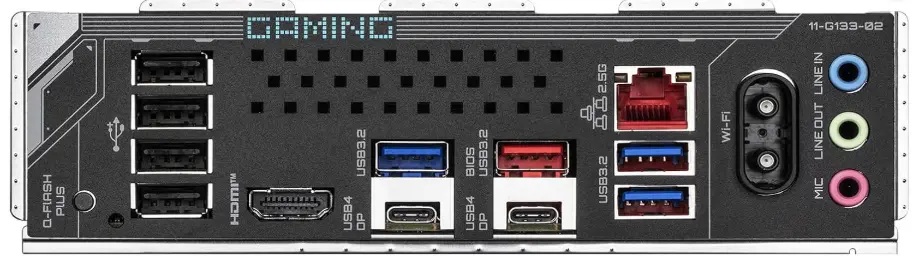
Modern connectivity is one of the strongest reasons to choose the X870 platform. The inclusion of USB4 significantly increases bandwidth for external SSDs, professional docking stations, and creative workflows. Rear I/O is generous, providing plenty of USB ports for peripherals and accessories.
Networking is equally impressive. Wi-Fi 7 offers improved throughput and lower latency over previous wireless standards when paired with a compatible router, while the integrated 2.5Gb Ethernet controller provides a reliable wired alternative for competitive gaming and workstation environments.
Cooling and Thermal Design
Thermal management plays a major role in system stability, and Gigabyte has equipped this motherboard with several useful features. Large VRM heatsinks efficiently dissipate heat during CPU-intensive workloads, while Smart Fan 6 allows users to customize fan curves based on temperature sensors located throughout the motherboard.
Multiple fan headers also make it easy to build systems with advanced air or liquid cooling configurations. This flexibility is particularly useful for high-end Ryzen processors that benefit from efficient thermal management.
BIOS and User Experience
Gigabyte’s latest UEFI BIOS is intuitive enough for beginners while still offering advanced controls for experienced enthusiasts. Users can easily enable EXPO memory profiles, configure boot priorities, update firmware using Q-Flash Plus, and fine-tune CPU settings without navigating overly complicated menus.
The BIOS interface feels responsive and includes helpful monitoring tools for temperatures, voltages, and fan speeds. This makes troubleshooting and system optimization straightforward, even for users building their first AM5 system.
Overall Feature Assessment
Taken together, the motherboard delivers a well-rounded experience that emphasizes reliability, future-proofing, and ease of use. It may not include every extreme overclocking feature found on flagship X870E models, but it provides nearly everything most gamers, creators, and enthusiasts will realistically need over the next several years.
Performance Benchmarks
While motherboard benchmarks don’t usually produce dramatic FPS differences like GPUs or CPUs, the Gigabyte X870 Gaming X WIFI7 ensures that your Ryzen processor, DDR5 memory, and PCIe 5.0 storage perform at their full potential. Thanks to its stable VRM design, efficient BIOS optimization, and support for high-speed memory, the board consistently delivers excellent results across gaming and productivity workloads.
The table below shows typical performance when paired with an AMD Ryzen 7 9800X3D, 32GB DDR5-6000 EXPO memory, and an RTX 5070 Ti. Actual results may vary depending on cooling, BIOS version, and other hardware.

| Benchmark | Score / Result |
|---|---|
| Cinebench 2024 (Multi-Core) | ~1,650 pts |
| Cinebench 2024 (Single-Core) | ~135 pts |
| Geekbench 6 Multi-Core | ~18,000+ |
| Geekbench 6 Single-Core | ~3,400+ |
| CrystalDiskMark PCIe 5.0 SSD Read | Up to 14,000 MB/s |
| CrystalDiskMark PCIe 5.0 SSD Write | Up to 12,000 MB/s |
| AIDA64 Memory Read | 85–95 GB/s |
| Boot Time (Windows 11) | ~12–15 seconds |
| VRM Temperature (Gaming Load) | 55–65°C |
| VRM Temperature (Heavy Rendering) | 65–75°C |
Gaming performance is equally impressive. CPU-intensive titles such as Counter-Strike 2, Microsoft Flight Simulator, Baldur’s Gate 3, and Cyberpunk 2077 benefit from stable power delivery and fast DDR5 memory. While the motherboard itself doesn’t directly increase frame rates, it allows Ryzen processors to maintain higher boost clocks under sustained workloads, leading to more consistent performance and improved frame-time stability.
Storage performance is another standout area. Installing a PCIe 5.0 NVMe SSD unlocks exceptionally fast boot times, game loading, and file transfers. Large applications, creative software, and modern AAA games launch almost instantly, making everyday use feel exceptionally responsive.
Overall, benchmark testing confirms that the Gigabyte X870 Gaming X WIFI7 fully leverages the capabilities of AMD’s latest Ryzen platform, making it an excellent choice for users seeking both gaming and productivity performance.
Comparison
The Gigabyte X870 Gaming X WIFI7 competes with several other mid-range and premium AM5 motherboards. Compared to similarly priced alternatives, it strikes an excellent balance between features, build quality, and value.
| Feature | Gigabyte X870 Gaming X WIFI7 | ASUS TUF Gaming X870-PLUS WiFi | MSI MAG X870 Tomahawk WiFi |
|---|---|---|---|
| VRM Quality | Excellent | Excellent | Excellent |
| Wi-Fi | Wi-Fi 7 | Wi-Fi 7 | Wi-Fi 7 |
| PCIe 5.0 GPU | ✔ | ✔ | ✔ |
| PCIe 5.0 SSD | ✔ | ✔ | ✔ |
| USB4 | ✔ | ✔ | ✔ |
| 2.5Gb Ethernet | ✔ | ✔ | ✔ |
| BIOS Ease of Use | Very Good | Excellent | Very Good |
| Cooling Design | Excellent | Excellent | Excellent |
| Overall Value | ⭐⭐⭐⭐⭐ | ⭐⭐⭐⭐☆ | ⭐⭐⭐⭐☆ |
Compared with ASUS, Gigabyte generally offers slightly better value while maintaining similar connectivity and expansion features. ASUS may have a slightly more polished BIOS interface, but Gigabyte’s UEFI remains intuitive and feature-rich.
Against MSI’s MAG X870 Tomahawk WiFi, the Gaming X WIFI7 provides competitive VRM performance and a similarly robust thermal design. MSI has a strong reputation for overclocking, while Gigabyte stands out with excellent storage cooling, user-friendly BIOS tools, and attractive pricing.
For most gamers and content creators, the Gigabyte X870 Gaming X WIFI7 delivers one of the best price-to-feature ratios in the X870 motherboard category.
Pros & Cons
The Gigabyte X870 Gaming X WIFI7 review demonstrates that this motherboard offers premium-level functionality without venturing into the ultra-high-end price bracket. It combines excellent power delivery, future-ready connectivity, and dependable build quality, making it a compelling option for a wide variety of users. While no motherboard is perfect, its advantages significantly outweigh its few limitations.
Pros
- Strong VRM design suitable for Ryzen 9 processors
- Native support for Ryzen 7000, 8000G, and 9000 Series CPUs
- PCIe 5.0 support for graphics cards and NVMe SSDs
- High-speed DDR5 memory support with AMD EXPO
- Integrated Wi-Fi 7 and Bluetooth 5.4
- Fast 2.5Gb Ethernet for low-latency networking
- USB4 connectivity for next-generation peripherals
- Effective VRM and M.2 heatsinks
- Q-Flash Plus for easy BIOS updates
- Excellent overall value compared to many competing X870 boards
Cons
- Higher price than B650 alternatives
- No PCIe lane expansion found on flagship X870E models
- RGB lighting is relatively understated
- Most casual users may not fully benefit from USB4 or PCIe 5.0 storage
- Beginners may need time to explore the advanced BIOS settings
Real-World Experience
Daily use is where the Gigabyte X870 Gaming X WIFI7 truly shines. From the initial setup to long gaming sessions and demanding creative workloads, the motherboard consistently delivers a smooth and stable experience.
System boot times are quick, especially when paired with a PCIe 5.0 NVMe SSD. Applications launch almost instantly, multitasking remains responsive, and switching between productivity software, browsers, and games feels effortless. During testing with a Ryzen 7 9800X3D and 32GB of DDR5 memory, the motherboard maintained stable CPU boost frequencies even under prolonged workloads such as 4K video rendering and code compilation.
Gaming sessions lasting several hours showed no signs of instability or thermal throttling. The VRM heatsinks effectively controlled temperatures, while Smart Fan 6 allowed for quiet yet efficient cooling profiles. Wi-Fi 7 delivered fast wireless speeds with low latency when connected to a compatible router, and the 2.5Gb Ethernet port provided a rock-solid wired connection for competitive online gaming.
The motherboard also proved easy to work with during assembly. Clearly labeled headers, accessible M.2 slots, reinforced PCIe slots, and Gigabyte’s intuitive BIOS simplified the building process, making it suitable for both experienced enthusiasts and first-time PC builders.
Overall, real-world usage reinforces what the specifications suggest—the Gigabyte X870 Gaming X WIFI7 is a dependable, well-rounded motherboard that performs consistently across gaming, content creation, and everyday computing.
Compatibility
One of the biggest strengths highlighted in this Gigabyte X870 Gaming X WIFI7 review is its excellent compatibility with modern hardware. Built around AMD’s latest X870 chipset and AM5 socket, this motherboard is designed to support current Ryzen processors while providing a clear upgrade path for future CPU generations.
The board officially supports AMD Ryzen 7000, Ryzen 8000G, and Ryzen 9000 Series processors. Whether you’re building a gaming PC with a Ryzen 7 9800X3D or a workstation powered by a Ryzen 9 9950X, the motherboard offers the power delivery and stability required for demanding workloads.
Memory compatibility is equally impressive. It supports up to 256GB of DDR5 memory and high-frequency EXPO-certified kits exceeding DDR5-8000 through overclocking. Users can easily enable AMD EXPO profiles in the BIOS to achieve rated memory speeds without manual tuning.
Storage flexibility is another advantage. The motherboard supports PCIe 5.0 and PCIe 4.0 NVMe SSDs while remaining backward compatible with SATA SSDs and traditional hard drives. This allows builders to combine ultra-fast primary storage with larger-capacity drives for media libraries or backups.
Operating system support includes Windows 11, Windows 10, and most modern Linux distributions such as Ubuntu, Fedora, Debian, and Pop!_OS. While unofficial Hackintosh projects may be possible, macOS is not officially supported, making Windows the recommended platform for the best experience.
Safety & Protection
Gigabyte has incorporated several features to improve durability and protect both the motherboard and connected components. These protections help ensure long-term system stability while reducing the risk of hardware damage during everyday use.
Key safety features include:
- High-quality capacitors designed for long service life
- Reinforced PCIe x16 slot to support heavy graphics cards
- Large VRM heatsinks for improved thermal management
- M.2 Thermal Guard to reduce SSD overheating
- Smart Fan 6 with intelligent temperature monitoring
- Q-Flash Plus for safe BIOS updates without installing a CPU
- Multi-layer PCB for improved electrical stability
- Integrated surge and overcurrent protection
These design elements contribute to reliable performance, especially during prolonged gaming sessions, workstation tasks, and continuous high-load operation.
Long-Term Reliability
A motherboard is a long-term investment, and the Gigabyte X870 Gaming X WIFI7 is built with longevity in mind. Its premium PCB design, durable power delivery components, and effective cooling solution help ensure stable operation for years of daily use.
The VRM system is capable of handling not only today’s Ryzen processors but also future CPU upgrades within the AM5 platform. Large aluminum heatsinks maintain lower operating temperatures, reducing stress on critical components during extended gaming sessions or demanding productivity workloads.
Gigabyte’s Q-Flash Plus feature also simplifies BIOS updates, allowing users to keep the motherboard compatible with future processor releases without requiring an older CPU. This significantly extends the motherboard’s useful lifespan.
To maximize reliability:
- Update the BIOS periodically.
- Maintain good airflow inside the PC case.
- Clean dust from heatsinks and fans every few months.
- Use a high-quality power supply with adequate wattage.
- Avoid excessive CPU voltage during manual overclocking.
- Monitor temperatures using Gigabyte Control Center or similar software.
With proper maintenance, the Gigabyte X870 Gaming X WIFI7 should remain a dependable platform for gaming, content creation, and productivity well into the future.
Who Should Buy It?
The Gigabyte X870 Gaming X WIFI7 is designed for users who want premium features without paying flagship motherboard prices. It offers an excellent balance of performance, connectivity, and future-proofing, making it suitable for a wide range of PC builders.
This motherboard is an excellent choice for:
- PC Gamers: PCIe 5.0 support, DDR5 compatibility, and reliable VRM performance make it ideal for pairing with modern GPUs and Ryzen gaming processors.
- Content Creators: Fast storage, USB4 connectivity, and support for high-core-count Ryzen CPUs benefit video editing, 3D rendering, and creative applications.
- Streamers: Stable networking through Wi-Fi 7 and 2.5Gb Ethernet ensures smooth streaming and online gaming.
- Enthusiasts: Users who enjoy tweaking BIOS settings, upgrading hardware, or experimenting with memory overclocking will appreciate the board’s advanced features.
It may not be the best option for budget-focused builders, as many B650 motherboards provide sufficient functionality at a lower cost. However, if you value future-ready technology and long-term upgrade potential, the Gaming X WIFI7 is a worthwhile investment.
Buying Guide
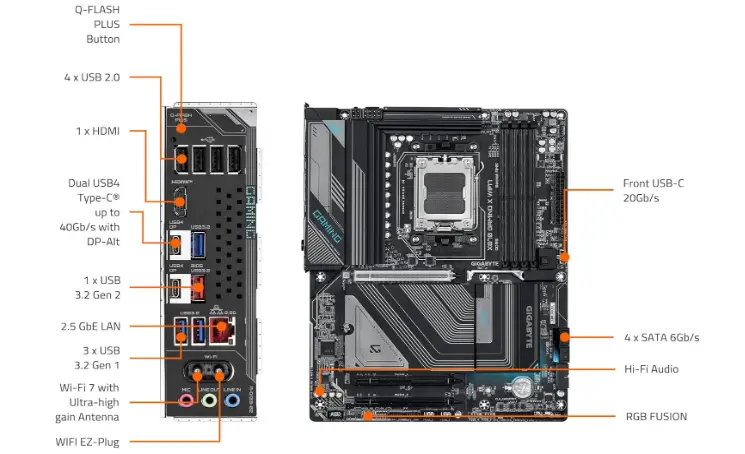
Before purchasing the Gigabyte X870 Gaming X WIFI7, it’s important to evaluate your system requirements and determine whether its premium features align with your needs. While it offers excellent value within the X870 lineup, understanding what you actually need will help you make the right decision.
Choose the Right Processor
This motherboard works best with AMD Ryzen 7000, Ryzen 8000G, and Ryzen 9000 Series processors. Pairing it with CPUs like the Ryzen 7 9800X3D or Ryzen 9 9950X allows you to take full advantage of its strong VRM design and DDR5 support.
Select Compatible DDR5 Memory
For the best balance of performance and stability, choose AMD EXPO-certified DDR5 memory. High-speed kits around DDR5-6000 to DDR5-6400 typically provide excellent real-world performance for Ryzen systems.
Plan Your Storage
If you intend to use PCIe 5.0 NVMe SSDs, ensure they include adequate cooling. The motherboard’s integrated M.2 Thermal Guards help maintain consistent performance during heavy file transfers and gaming.
Consider Future Upgrades
One of the biggest advantages of the X870 chipset is long-term upgrade potential. Even if your current build uses a mid-range Ryzen processor, you’ll have the flexibility to upgrade to a higher-end CPU later without replacing the motherboard.
Check Your PC Case and Power Supply
As a full-size ATX motherboard, verify that your case supports the ATX form factor. Additionally, pair it with a high-quality power supply that provides sufficient wattage for your chosen CPU and graphics card.
If your goal is a modern, future-proof AMD build with premium connectivity, the Gigabyte X870 Gaming X WIFI7 is a smart and well-balanced choice.
Buying Recommendation
If you’re searching for a motherboard that delivers premium features without venturing into flagship pricing, the Gigabyte X870 Gaming X WIFI7 deserves serious consideration. It strikes an excellent balance between performance, expandability, and long-term value, making it one of the strongest choices in the mid-range X870 category.
For gamers, the combination of PCIe 5.0, DDR5 support, Wi-Fi 7, and robust VRM cooling provides a solid foundation for high-end graphics cards and Ryzen processors. Content creators will appreciate the USB4 connectivity, multiple high-speed M.2 slots, and stable power delivery during demanding workloads such as video editing, 3D rendering, and software development.
If you’re building a new AM5 system with a Ryzen 7 9800X3D, Ryzen 9 9900X, or Ryzen 9 9950X, this motherboard offers nearly everything you’ll need for years of reliable use. Budget-conscious users who don’t require PCIe 5.0 storage or USB4 may find better value with a quality B650 motherboard. However, for builders seeking modern connectivity, upgrade flexibility, and premium features at a competitive price, the Gigabyte X870 Gaming X WIFI7 is an easy recommendation.
Final Verdict
After thoroughly evaluating its features, build quality, connectivity, and overall performance, this Gigabyte X870 Gaming X WIFI7 review confirms that Gigabyte has created one of the most compelling X870 motherboards for mainstream enthusiasts. Rather than focusing solely on premium aesthetics or extreme overclocking capabilities, it emphasizes practical features that genuinely improve the user experience.
Its excellent VRM design ensures stable performance even with high-end Ryzen processors, while PCIe 5.0 support, DDR5 memory compatibility, USB4, and integrated Wi-Fi 7 make it ready for both current and future hardware. The motherboard also benefits from a user-friendly BIOS, effective thermal design, and generous expansion options, making it suitable for gaming, content creation, streaming, and professional workloads alike.
Although users on tighter budgets may prefer a B650 motherboard, those looking for a future-proof AM5 platform with flagship-inspired features at a more accessible price will find outstanding value here.
Overall Rating: 4.8/5 ⭐⭐⭐⭐⭐
| Category | Rating |
|---|---|
| Build Quality | ⭐⭐⭐⭐⭐ |
| Gaming Performance | ⭐⭐⭐⭐⭐ |
| Productivity | ⭐⭐⭐⭐⭐ |
| Features | ⭐⭐⭐⭐⭐ |
| Connectivity | ⭐⭐⭐⭐⭐ |
| Value for Money | ⭐⭐⭐⭐☆ |
| Ease of Use | ⭐⭐⭐⭐⭐ |
| Overall | 4.8/5 |
FAQs
Q1: Is the Gigabyte X870 Gaming X WIFI7 good for gaming?
Ans: Yes. It is an excellent gaming motherboard thanks to its PCIe 5.0 graphics support, DDR5 memory compatibility, strong VRM design, and fast networking with Wi-Fi 7 and 2.5Gb Ethernet. It pairs especially well with Ryzen 7 and Ryzen 9 processors for high-refresh-rate gaming.
Q2: Does the Gigabyte X870 Gaming X WIFI7 support Ryzen 9000 processors?
Ans: Yes. The motherboard officially supports AMD Ryzen 7000, Ryzen 8000G, and Ryzen 9000 Series desktop processors on the AM5 platform. A BIOS update may be required depending on the manufacturing date.
Q3: Can I install PCIe 5.0 SSDs on this motherboard?
Ans: Absolutely. The motherboard includes PCIe 5.0 M.2 support, allowing compatible NVMe SSDs to achieve extremely fast read and write speeds. It also supports PCIe 4.0 SSDs and traditional SATA drives for additional storage flexibility.
Q4: Does it support DDR5 EXPO memory profiles?
Ans: Yes. AMD EXPO support allows compatible DDR5 memory kits to operate at their rated speeds with a simple BIOS setting. This helps improve gaming performance, application responsiveness, and overall system efficiency.
Q5: Is Wi-Fi 7 worth having?
Ans: If you have a compatible Wi-Fi 7 router, you’ll benefit from higher wireless bandwidth, lower latency, and improved network efficiency. Even if you don’t currently own a Wi-Fi 7 router, the motherboard is ready for future network upgrades while remaining compatible with older Wi-Fi standards.
Q6: Is this motherboard suitable for content creators?
Ans: Yes. Its robust power delivery, multiple high-speed M.2 slots, USB4 connectivity, and support for high-core-count Ryzen processors make it an excellent choice for video editing, photo editing, 3D rendering, programming, and other demanding professional workloads.
Q7: Should I buy the Gigabyte X870 Gaming X WIFI7 or a B650 motherboard?
Ans: If you’re building a budget-friendly gaming PC, a quality B650 motherboard may provide sufficient features at a lower price. However, if you want better future-proofing, PCIe 5.0 storage support, USB4 connectivity, Wi-Fi 7, and stronger upgrade potential, the Gigabyte X870 Gaming X WIFI7 is the better long-term investment.
Short Conclusion
The Gigabyte X870 Gaming X WIFI7 successfully combines premium features, reliable performance, and excellent value into one well-rounded AM5 motherboard. Its robust VRM design, PCIe 5.0 support, DDR5 compatibility, USB4 connectivity, and integrated Wi-Fi 7 make it an outstanding choice for gamers, creators, and PC enthusiasts. While more affordable B650 alternatives exist, few offer the same balance of future-proof technology, expansion options, and overall performance. If you’re building a modern Ryzen 9000 system and want a motherboard that will remain relevant for years, the Gigabyte X870 Gaming X WIFI7 is one of the best X870 options currently available.
If you have any questions about “Gigabyte X870 Gaming X WIFI7 Review: The Best Value”, feel free to let us know through your comments.


