
When most gamers think about building a gaming PC, mainstream desktop CPUs from Intel Core or AMD Ryzen usually come first. However, Xeon processors can still make sense for a particular type of enthusiast: users who want a workstation-class platform capable of handling gaming alongside demanding workloads such as video editing, 3D rendering, virtualization, software development, or content creation.
Finding the best Xeon processor for gaming is more complicated than simply choosing the model with the most cores. Gaming performance often depends heavily on single-thread performance, clock speed, memory latency, platform compatibility, and GPU balance. Many older Xeon processors offer impressive core counts but relatively low frequencies, which can limit frame rates in CPU-sensitive games.
For this guide, three Xeon options stand out for different reasons: the Intel Xeon W-2295, Intel Xeon W-3275, and Intel Xeon E5-2697 v4. The W-2295 is particularly attractive because of its strong clock speeds and 18-core design. The W-3275 offers an enormous 28-core/56-thread configuration for users who combine gaming with serious workstation workloads. Meanwhile, the E5-2697 v4 remains interesting for budget-conscious builders who can obtain compatible used hardware at a very low price.
The important point is that these processors should not be judged like modern gaming CPUs. Their biggest advantage is the combination of gaming capability and workstation-oriented features—not maximum FPS per dollar.
Intel lists the Xeon W-2295 with 18 cores, 36 threads, a 3.0 GHz base frequency, up to 4.6 GHz turbo frequency, 24.75 MB cache, and a 165W TDP. The W-3275 steps up to 28 cores and 56 threads, with up to 4.6 GHz Turbo Boost Max frequency and a 205W TDP.
Why it Matters to You
Choosing a Xeon for gaming only makes sense when you understand what you are gaining—and what you are giving up.
The first advantage is multitasking capability. A high-core-count Xeon can run a game while simultaneously handling streaming, recording, rendering, compiling, virtual machines, or other heavy applications. This can make a Xeon workstation extremely versatile.
The second advantage is platform flexibility for workstation users. Xeon workstation platforms were designed around features such as ECC memory support and large memory capacities. For example, the W-2295 supports DDR4-2933 memory, up to four memory channels, and ECC memory. The W-3275 supports DDR4-2933, six memory channels, ECC, and up to 1TB of memory under Intel’s listed specifications.
However, there is an important downside: gaming does not automatically benefit from more cores. A 28-core Xeon isn’t necessarily faster in games than a modern 8-core gaming CPU. Many games still respond more strongly to fast individual cores, high instructions-per-clock performance, and low memory latency.
This is why the W-2295 is arguably the most balanced choice among the three. Its 3.0 GHz base frequency and up to 4.6 GHz turbo provide a stronger gaming-oriented frequency profile than many older Xeons.
In-Depth Reviews of the Best Xeon Processor for Gaming

The best Xeon processor for gaming should balance strong clock speeds, core count, and workstation capabilities. The Intel Xeon W-2295 stands out with 18 cores, 36 threads, and high boost frequencies, making it a strong choice for gaming and multitasking. The W-3275 suits demanding workstation workloads, while the E5-2697 v4 remains an affordable used option for budget-conscious builders.
1. Intel Xeon W-2295 — Best Overall Xeon for Gaming
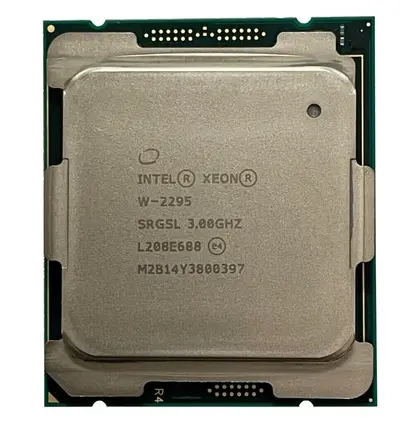
The Intel Xeon W-2295 is the Xeon I would choose for a gaming-focused workstation when using this particular class of hardware.
It belongs to Intel’s Cascade Lake Xeon W family and features 18 cores and 36 threads. Its 3.0 GHz base frequency can reach up to 4.6 GHz through Turbo Boost, while Intel lists a 4.8 GHz Turbo Boost Max Technology 3.0 frequency. It also includes 24.75 MB of cache and carries a 165W TDP.
For gaming, the biggest attraction is not the 18-core count. Instead, it is the combination of relatively strong per-core performance and high boost clocks. This gives it a better foundation for games that are sensitive to CPU speed.
Independent benchmark data also shows the W-2295 substantially ahead of the older E5-2697 v4 in both single-thread and multi-thread performance. PassMark’s comparison, updated in July 2026 reports a CPU Mark score of roughly 30,759 for the W-2295 versus 21,319 for the E5-2697 v4, while its single-thread rating is also significantly higher.
That difference matters in gaming because CPU-heavy titles can benefit from stronger single-thread performance.
The W-2295 is also a compelling choice for users who stream, edit videos, run development tools, or perform other demanding tasks alongside gaming. Its 36 threads provide considerable headroom.
Pros:
- 18 cores and 36 threads
- Up to 4.6 GHz maximum turbo frequency
- Up to 4.8 GHz Turbo Boost Max frequency listed by Intel
- Stronger single-thread performance than older E5 Xeons
- ECC memory support
- Excellent multitasking capability
- Good workstation/gaming balance
Cons:
- 165W TDP
- Requires an expensive workstation-class platform
- Older architecture compared with current desktop CPUs
- Not the best choice if gaming is your only workload
Best for: Enthusiasts who want a workstation that can also serve as a capable gaming PC.
2. Intel Xeon W-3275 — Best for Extreme Multitasking

If your definition of the best Xeon processor includes heavy workstation workloads, the Intel Xeon W-3275 is the most powerful option in this group.
The W-3275 provides a huge 28 cores and 56 threads. Intel specifies a 2.50 GHz base frequency, up to 4.40 GHz maximum turbo frequency, and a 4.60 GHz Turbo Boost Max Technology 3.0 frequency. It includes 38.5 MB of cache and has a substantial 205W TDP.
For gaming alone, the additional cores do not automatically make it the fastest choice. In fact, its lower base clock compared with the W-2295 means the W-2295 can be more attractive when gaming performance is the primary priority.
But the W-3275 becomes extremely interesting when gaming is only one part of your workload.
Imagine playing a demanding game while recording high-quality footage, running a virtual machine, compiling software, streaming, and encoding video in the background. The W-3275’s 56 threads give you substantial processing capacity for these scenarios.
Its six-channel DDR4-2933 memory support and ECC capability also reinforce its workstation credentials. Intel lists support for up to 1TB of memory with the W-3275.
The major drawback is power consumption. A 205W TDP means you need serious cooling and a capable power supply, especially when the CPU is paired with a powerful graphics card.
Pros:
- 28 cores and 56 threads
- Up to 4.6 GHz Turbo Boost Max frequency
- 38.5 MB cache
- Six-channel DDR4-2933 memory support
- ECC memory support
- Excellent heavy multitasking performance
- Ideal for workstation-heavy systems
Cons:
- 205W TDP
- Expensive workstation platform
- Overkill for gaming-only PCs
- Older CPU architecture
- Requires strong cooling
Best for: Gamers who also use their PCs as serious rendering, development, virtualization, or content-creation workstations.
3. Intel Xeon E5-2697 v4 — Best Budget Used Xeon Option

The Intel Xeon E5-2697 v4 is the oldest processor in this comparison, but it remains popular among budget workstation builders because used Xeon hardware can sometimes be found at attractive prices.
It features 18 cores and 36 threads, a 2.30 GHz base frequency, and a maximum turbo frequency of 3.60 GHz. It also has a large 45 MB cache and a 145W TDP.
The problem for gaming is immediately apparent: its maximum clock speed is substantially lower than the W-2295’s.
That does not mean it cannot game. With an appropriate GPU, the E5-2697 v4 can still run many games. But if you are building specifically for gaming, its lower single-thread performance makes it harder to recommend over newer Xeon W options.
Its greatest advantage is price-to-platform value on the used market. If you already own a compatible LGA2011-3 motherboard and DDR4 ECC memory, upgrading to an E5-2697 v4 can be an inexpensive way to add substantial multi-core capability.
Intel lists the processor as discontinued, with its servicing updates having ended in 2022, so buyers should approach used examples carefully.
Pros:
- 18 cores and 36 threads
- 45 MB cache
- 145W TDP
- Can be inexpensive on the used market
- Good for inexpensive workstation builds
- Useful if you already own an LGA2011-3 platform
Cons:
- Only up to 3.6 GHz turbo
- Much older architecture
- Lower single-thread performance
- Discontinued
- Not ideal for modern CPU-heavy gaming
- Used hardware condition can vary
Best for: Budget builders upgrading an existing compatible Xeon workstation rather than building a new gaming PC from scratch.
Feature-by-Feature Comparison Table
The following table summarizes the important specifications when comparing these three Xeon processors for gaming and workstation use. Intel’s official specifications show clear differences in core count, clock speed, memory architecture, and power requirements.
| Feature | Xeon W-2295 | Xeon W-3275 | Xeon E5-2697 v4 |
|---|---|---|---|
| Architecture | Cascade Lake | Cascade Lake | Broadwell |
| Cores | 18 | 28 | 18 |
| Threads | 36 | 56 | 36 |
| Base Clock | 3.0 GHz | 2.5 GHz | 2.3 GHz |
| Max Turbo | 4.6 GHz | 4.4 GHz | 3.6 GHz |
| Turbo Boost Max | Up to 4.8 GHz | Up to 4.6 GHz | No |
| Cache | 24.75 MB | 38.5 MB | 45 MB |
| Memory | DDR4-2933 | DDR4-2933 | DDR4 |
| Memory Channels | 4 | 6 | 4 |
| ECC Support | Yes | Yes | Yes |
| TDP | 165W | 205W | 145W |
| PCIe Generation | 3.0 | 3.0 | 3.0 |
| Gaming Suitability | Excellent for Xeon | Very Good | Fair |
| Workstation Performance | Excellent | Extreme | Good |
| Overall Pick | Best Overall | Best Heavy Workstation | Best Used Budget |
Quick Highlights Table
If you want the short version, these are the main reasons to choose each processor.
| Category | Winner | Why |
|---|---|---|
| Best Overall Gaming Xeon | W-2295 | Strong clock speeds and 18C/36T |
| Best Multitasking | W-3275 | 28C/56T |
| Best Used Budget Option | E5-2697 v4 | Affordable existing-platform upgrades |
| Best Single-Thread Potential | W-2295 | Higher clocks and newer architecture |
| Best Heavy Workstation | W-3275 | Huge core/thread capacity |
| Lowest TDP | E5-2697 v4 | 145W |
| Best Newer Xeon Platform Choice | W-2295 | Strong balance of gaming and workstation performance |
Buying Guide: What to Look for when choosing the Best Xeon CPU for Gaming
1. Prioritize Clock Speed
For gaming, clock speed and architecture matter enormously.
A processor with 28 cores is not automatically faster than an 18-core processor in games. If most of your games use only a handful of CPU threads heavily, additional cores may provide little benefit.
That is why the W-2295 is so attractive. Its 3.0 GHz base frequency and high turbo behavior make it more gaming-friendly than many older high-core-count Xeons.
2. Check the Motherboard First
Xeon compatibility is not simply about buying the CPU.
The W-2295 uses the LGA2066 platform, while the E5-2697 v4 belongs to the LGA2011-3 generation. The motherboard must support the exact processor and BIOS configuration.
For a used system, verify the motherboard model, BIOS version, memory type, and CPU support before buying.
3. Don’t Ignore Cooling
Xeon processors can consume substantial power under sustained workloads.
The W-2295 is rated at 165W, while the W-3275 reaches 205W.
A basic cooler designed for a low-power desktop CPU is not appropriate for a high-power workstation Xeon.
4. Consider Your GPU
Your graphics card determines how much CPU performance you actually need.
At 4K, many gaming workloads become heavily GPU-limited. At 1080p with a high-refresh monitor and powerful GPU, CPU limitations become more visible.
Therefore, a Xeon that appears relatively slow in CPU benchmarks may still deliver an enjoyable 1440p or 4K gaming experience when paired with an appropriate GPU.
5. Consider Used Hardware Carefully
Older Xeons are often purchased second-hand. Inspect the CPU, motherboard, memory, and cooling solution before committing to a build.
A cheap processor is not necessarily a cheap PC if the compatible motherboard and ECC memory cost significantly more.
Best Pick Based on Your Use Case
Best for Gaming: Xeon W-2295
Choose the W-2295 if gaming is your primary purpose but you also want workstation-level multitasking.
Its 18 cores, 36 threads, and high turbo frequency create the best overall balance in this comparison.
Best for Gaming + Rendering: Xeon W-3275
If you regularly render videos, work with 3D applications, compile large projects, or run virtual machines, the W-3275’s 28 cores and 56 threads are extremely useful.
Best for a Cheap Existing Workstation: Xeon E5-2697 v4
If you already have an LGA2011-3 workstation and simply want more CPU capability without replacing the entire platform, the E5-2697 v4 can make sense.
However, it should be considered an inexpensive used-platform option rather than a top-tier modern gaming CPU.
Real-World Performance
Real-world gaming performance depends heavily on the GPU, resolution, game engine, RAM configuration, and graphics settings. Therefore, synthetic CPU scores should not be interpreted as direct FPS results.
The W-2295 is the strongest gaming-oriented choice here because it combines high boost frequencies with 18 cores. PassMark’s current comparison data shows it substantially ahead of the E5-2697 v4 in both overall CPU Mark and single-thread performance.
The difference becomes particularly relevant in CPU-sensitive games, competitive titles, simulation games, strategy games, and situations where you target very high refresh rates.
The W-3275 can deliver excellent overall processing capability, but its additional cores are more valuable outside gaming. Its 28-core configuration is particularly useful when the PC is doing multiple demanding jobs simultaneously.
The E5-2697 v4 is the weakest gaming option of the three, primarily because its maximum turbo frequency is only 3.6 GHz.
For GPU-heavy gaming at 1440p and 4K, however, the difference between these CPUs can become less noticeable because the graphics card often becomes the primary performance limitation.
For 1080p high-refresh gaming, the W-2295 is the more sensible choice.
Safety & Protection
A high-performance Xeon gaming workstation needs more than just a capable CPU.
Use adequate cooling: Make sure the cooler is rated for the processor’s thermal output. This is particularly important for the 205W W-3275.
Use a quality power supply: A workstation Xeon paired with a high-end GPU can produce substantial system power demand. Choose a reputable PSU with sufficient continuous capacity rather than relying on a cheap high-wattage model.
Monitor temperatures: Check CPU temperatures during extended gaming and workstation workloads. Sustained high temperatures can cause thermal throttling and reduce long-term reliability.
Maintain airflow: Keep front intake and rear/top exhaust paths clear. Dust buildup can dramatically reduce cooling performance.
Avoid aggressive overclocking: Xeon workstation platforms are generally purchased for stability rather than extreme overclocking. Maintaining reasonable operating conditions is more valuable for a machine intended to run continuously.
Protect the system from power problems: A quality surge protector or UPS can be especially useful for workstation systems containing expensive CPUs, GPUs, storage, and motherboards.
Long-Term Reliability Tips
A Xeon workstation can remain useful for years when properly maintained.
Start with regular dust cleaning. Dust accumulated around heatsinks, fans, and filters reduces airflow and can increase operating temperatures.
Next, monitor CPU and VRM temperatures. If temperatures gradually increase over time, inspect the cooler, fans, thermal interface material, and case airflow.
It is also important to use reliable memory. ECC support is one of the major workstation advantages of these Xeon platforms. Intel specifies ECC support for both the W-2295 and W-3275.
For used systems, test the memory and CPU stability before relying on the computer for important work.
Keep the operating system, graphics drivers, chipset components, and motherboard firmware appropriately updated when supported. However, don’t update firmware blindly on an old workstation. Verify compatibility first.
Finally, don’t ignore the power supply. An aging PSU can become a major reliability risk, particularly when the system contains a high-power Xeon and gaming GPU.
Buying Recommendations
If you are building a Xeon gaming system from scratch, the Xeon W-2295 is the recommendation I would prioritize from this group.
It offers a better combination of gaming-friendly clock speeds, high core count, workstation capabilities, and multitasking performance than the older E5 platform.
The W-3275 is the better choice if gaming is only one component of your workload. Its 28 cores and 56 threads make it much more compelling for professional workloads than for gaming alone. Intel’s specifications confirm its six-channel DDR4-2933 memory support, ECC capability, and 205W TDP.
The E5-2697 v4 should mainly be considered when buying used hardware or upgrading an existing LGA2011-3 workstation. Its 18-core/36-thread configuration is still useful, but its 3.6 GHz maximum turbo frequency puts it behind the W-2295 for gaming.
Before buying any of them, calculate the total platform cost. CPU price alone can be misleading. Motherboard, ECC RAM, cooler, PSU, storage, and GPU can determine whether a Xeon build is actually good value.
If your only goal is gaming, compare the complete Xeon system against a modern mainstream gaming platform before spending money. A newer desktop CPU can often deliver better gaming performance with a simpler and more efficient platform.
Final Verdict
The Intel Xeon W-2295 is the best Xeon processor for gaming among the three CPUs compared here.
Its 18 cores and 36 threads provide substantial multitasking capability, while its 3.0 GHz base clock and high turbo frequencies make it considerably more suitable for gaming than many older Xeons. Intel lists up to 4.6 GHz maximum turbo and up to 4.8 GHz through Turbo Boost Max Technology 3.0 for this processor.
The Xeon W-3275 takes second place for gaming but first place for extreme workstation workloads. Its 28 cores and 56 threads are ideal for users who render, compile, encode, virtualize, or perform other highly parallel tasks while also gaming.
The Xeon E5-2697 v4 is the budget choice. It can still be useful when purchased inexpensively with an existing compatible platform, but its older architecture and 3.6 GHz maximum turbo make it difficult to recommend as the foundation of a new gaming PC.
Ultimately, Xeon makes the most sense for a gaming workstation, not a pure gaming machine. If you need a computer that can game and perform serious professional workloads, these processors remain interesting. If maximum FPS is your only objective, modern gaming-focused desktop CPUs are generally the better direction.
FAQs about Best Xeon CPU for Gaming
Q1: What is the best Xeon processor for gaming?
Ans: The Intel Xeon W-2295 is the best overall choice among the Xeon processors compared here. Its 18 cores, 36 threads, 3.0 GHz base frequency, and high turbo frequency provide a strong balance between gaming and workstation performance.
Q2: Is Xeon good for gaming?
Ans: Yes, Xeon processors can be good for gaming, but they are usually better suited to users who need both gaming and workstation performance. Many modern desktop gaming CPUs provide better gaming-focused performance and platform efficiency.
Q3: Is the Xeon W-2295 good for gaming?
Ans: Yes. The W-2295 is one of the more gaming-friendly Xeon options because it combines 18 cores and 36 threads with a 3.0 GHz base frequency and up to 4.6 GHz maximum turbo frequency.
Q4: Is the Xeon W-3275 better than the W-2295 for gaming?
Ans: Not necessarily. The W-3275 has more cores—28 compared with 18—but gaming does not always benefit from additional cores. The W-2295’s higher base frequency and strong boost behavior make it a more balanced gaming choice, while the W-3275 is better for extremely demanding workstation workloads.
Q5: Is the Xeon E5-2697 v4 still good for gaming?
Ans: It can still handle gaming, particularly with a suitable GPU, but it is no longer an ideal choice for a new gaming-focused build. Its maximum turbo frequency is only 3.6 GHz, and its older Broadwell architecture limits its gaming performance compared with newer Xeon W processors.
Q6: Can I use ECC RAM with Xeon processors?
Ans: Yes. ECC memory is supported by workstation Xeons such as the W-2295 and W-3275. However, you must also use a compatible motherboard and memory configuration that supports ECC functionality.
Q7: Should I buy a Xeon specifically for gaming in 2026?
Ans: Only if you also need workstation capabilities. For gaming alone, a modern mainstream desktop CPU will generally provide a more appropriate platform. A Xeon becomes attractive when you want gaming combined with rendering, virtualization, video production, development, or other heavily threaded workloads.
Short Conclusion
The best Xeon processor for gaming is the Intel Xeon W-2295 because it provides the strongest balance of gaming-friendly clock speeds, 18 cores, 36 threads, and workstation features. The W-3275 is better for extreme multitasking, while the E5-2697 v4 is mainly worth considering as a low-cost used upgrade. For a gaming workstation, Xeon can still be a powerful and versatile choice—but for pure gaming, modern gaming-focused CPUs remain the smarter option.
If you have any questions about “Best Xeon Processor for Gaming: Top 3 Xeon CPUs Compared”, feel free to let us know in the comments.


