
Choosing the best motherboard for Ryzen 9 9950X3D is important because this processor is designed for users who want exceptional gaming performance without sacrificing productivity. AMD’s Ryzen 9 9950X3D combines 16 Zen 5 cores, 32 threads, a boost clock of up to 5.7 GHz, and 128MB of total L3 cache through its second-generation 3D V-Cache technology. It also has a 170W default TDP, making a strong motherboard platform an important part of a high-end PC build.
The good news is that you do not necessarily need the most expensive motherboard available. AMD officially supports the Ryzen 9 9950X3D on several AM5 chipsets, including B650/B650E, X670/X670E, B850, X870, and X870E.
For a premium 9950X3D build, however, X870E and X870 motherboards are particularly attractive because they offer modern connectivity, PCIe 5.0 support, fast DDR5 memory support, USB4 on many models, and strong VRM designs. After comparing current options, the ASRock Phantom Gaming X870E Nova WiFi, ASUS ROG Crosshair X870E Hero, and MSI MAG X870 Tomahawk WiFi stand out for different types of buyers. The Nova is an excellent all-around choice, the Crosshair Hero is aimed at enthusiasts, and the Tomahawk provides a more affordable route to a capable 9950X3D system.
Why It Matters to You
The motherboard does not directly determine how many frames your Ryzen 9 9950X3D produces, but it determines how effectively the rest of your system can operate around the processor.
The 9950X3D is a 16-core/32-thread flagship CPU with a 170W default TDP. It supports AMD EXPO memory overclocking, Precision Boost Overdrive, Curve Optimizer, PCIe 5.0, and DDR5 memory.
That means your motherboard needs to provide several things.
First, strong power delivery is essential. A quality VRM helps deliver stable power to the CPU during gaming, rendering, compiling, streaming, and other sustained workloads. You should also look for substantial VRM heatsinks because power-delivery components generate heat under heavy loads.
Second, memory support matters. The 9950X3D uses DDR5 rather than DDR4, and a motherboard with good memory training and EXPO support can make high-speed memory configuration easier.
Third, connectivity can make a major difference. High-end X870E boards can provide multiple M.2 slots, PCIe 5.0 storage, fast Ethernet, Wi-Fi 7, USB4, and numerous high-speed USB ports.
Finally, the motherboard determines how flexible your system will be several years from now. If you plan to add several NVMe drives, high-speed networking, capture cards, expansion cards, or multiple USB devices, buying a well-equipped board now can prevent expensive upgrades later.
In-Depth Reviews of the Best Motherboard for Ryzen 9 9950X3D

The Best Motherboard for Ryzen 9 9950X3D should combine strong VRM performance, excellent DDR5 support, PCIe 5.0 connectivity, fast storage options, and reliable cooling. Premium X870E boards offer maximum features for enthusiasts, while X870 models deliver excellent value for gaming-focused builds. Choosing the right motherboard ensures stable performance, future upgrade flexibility, efficient power delivery, and long-term reliability for demanding workloads.
1. ASRock Phantom Gaming X870E Nova WiFi — Best Overall
The ASRock Phantom Gaming X870E Nova WiFi is one of the strongest choices for the Ryzen 9 9950X3D if you want a premium feature set without moving all the way into ultra-expensive flagship territory.
Its X870E chipset makes it particularly well suited to a high-end AM5 system. The board uses a substantial 20+2+1-phase power design, supports DDR5-8200-class memory overclocking, and includes five M.2 slots according to current specifications. It also provides Wi-Fi 7 and 5GbE networking.
That combination is excellent for a 9950X3D workstation/gaming PC.
The five M.2 slots are especially useful if you want to separate your operating system, games, projects, scratch files, and media libraries across multiple NVMe drives. This can make the board considerably more practical for creators and power users than motherboards with only two or three M.2 sockets.
Its networking hardware is another advantage. A 5GbE connection gives the board more headroom than conventional 1GbE networking, while Wi-Fi 7 provides a modern wireless option for compatible routers.
The Nova WiFi is also a good fit for users who want strong VRM performance without paying for unnecessary flagship extras. Currently lists it as its best overall motherboard for the Ryzen 9 9950X3D.
Best for: High-end gaming, content creation, multiple NVMe drives, and balanced premium builds.

Pros:
- Strong 20+2+1-phase VRM design
- X870E platform
- Five M.2 slots
- Wi-Fi 7
- 5GbE networking
- Excellent overall feature balance
Cons:
- More expensive than mainstream X870 boards
- Premium features may be unnecessary for basic gaming PCs
- Large feature set can be overkill for users with simple storage requirements
2. ASUS ROG Crosshair X870E Hero — Best Premium Enthusiast Choice
If you want a motherboard that matches the premium nature of the Ryzen 9 9950X3D, the ASUS ROG Crosshair X870E Hero deserves serious consideration.
The Crosshair series is designed around enthusiast-level systems, and the X870E Hero provides the kind of platform you would expect from a high-end AM5 motherboard: powerful VRM hardware, extensive connectivity, strong memory support, and enthusiast-oriented BIOS features.
It is particularly attractive for users who enjoy tuning their hardware. The Ryzen 9 9950X3D supports Precision Boost Overdrive and Curve Optimizer, so having a motherboard with extensive firmware controls can be useful for enthusiasts who want to optimize performance, temperatures, power consumption, or fan behavior.
The Crosshair X870E Hero also makes sense for a premium workstation where connectivity matters as much as raw gaming performance. High-end motherboard buyers often need several fast USB connections, multiple storage options, high-speed networking, and expansion flexibility.
For buyers who simply want the cheapest motherboard that can run a 9950X3D, however, the Hero is excessive. Its value becomes clearer when you actually use its enthusiast-level features.
Best for: Enthusiasts, premium gaming PCs, overclocking/tuning, creators, and long-term high-end builds.

Pros:
- Premium X870E platform
- Excellent power-delivery capabilities
- Strong BIOS and enthusiast features
- Extensive connectivity
- Excellent match for a flagship CPU
- Designed for high-end systems
Cons:
- Expensive
- More features than most gamers need
- Premium price can be better spent on GPU, memory, storage, or cooling
Tom’s Hardware currently places ASUS’s ROG Crosshair X870E Glacial at the top of its X870E high-end motherboard category, highlighting the broader strength of ASUS’s flagship X870E lineup.
3. MSI MAG X870 Tomahawk WiFi — Best Value
The MSI MAG X870 Tomahawk WiFi is the motherboard to consider when you want the Ryzen 9 9950X3D but do not want your motherboard to consume a huge portion of the build budget.
Unlike an ultra-premium X870E motherboard, the Tomahawk focuses on delivering the important features without loading the board with expensive enthusiast extras.
That makes it particularly attractive for gaming-focused builds.
If your priority is a powerful GPU, 32GB or 64GB of DDR5, a large NVMe SSD, and a quality cooling system, spending less on the motherboard can leave more money available for components that have a more obvious impact on gaming.
The Tomahawk is also a good reminder that the 9950X3D does not require a $700–$1,000 motherboard. AMD officially supports the processor across a broad range of AM5 chipsets, including X870, X870E, B850, B650, and B650E.
The key is choosing a board with appropriate power delivery, cooling, memory support, BIOS compatibility, and connectivity.
Best for: Gaming-focused buyers, value-conscious enthusiasts, and high-performance PCs where the budget should prioritize the GPU.
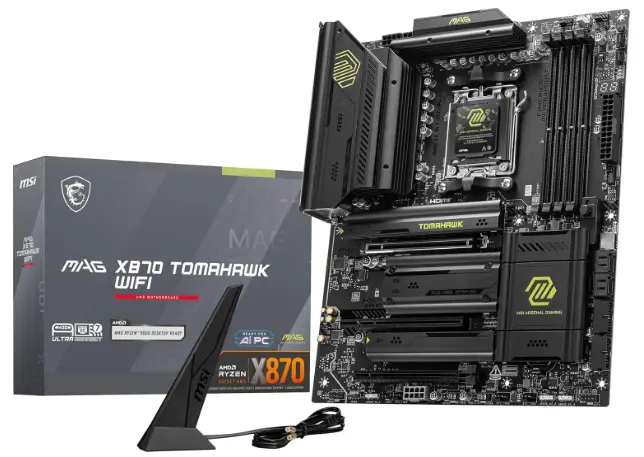
Pros:
- Excellent price-to-feature balance
- X870 platform
- Strong power delivery for the CPU
- Modern connectivity
- Good choice for gaming systems
- Leaves more budget for GPU and cooling
Cons:
- Fewer premium features than flagship X870E boards
- Not designed for extreme enthusiast builds
- Expansion and storage options may not satisfy workstation users
Feature-by-Feature Comparison Table
The three boards target different buyers, so comparing their major characteristics makes the decision easier.
| Feature | ASRock X870E Nova WiFi | ASUS ROG Crosshair X870E Hero | MSI MAG X870 Tomahawk WiFi |
|---|---|---|---|
| Chipset | X870E | X870E | X870 |
| Best For | Overall | Premium Enthusiast | Value |
| CPU Socket | AM5 | AM5 | AM5 |
| CPU Support | Ryzen 9000/8000/7000 family | Ryzen 9000/8000/7000 family | Ryzen 9000/8000/7000 family |
| VRM | 20+2+1 phase | High-end enthusiast design | Strong mainstream design |
| Memory | DDR5 | DDR5 | DDR5 |
| EXPO | Yes | Yes | Yes |
| PCIe 5.0 | Yes | Yes | Yes |
| M.2 | Up to 5 | Multiple premium M.2 options | Multiple M.2 options |
| Networking | 5GbE + Wi-Fi 7 | Premium wired/wireless networking | Wi-Fi 7 + wired LAN |
| Ideal User | Gamer + Creator | Enthusiast/Creator | Gamer |
| Value | Excellent | Premium | Excellent |
Specifications and feature availability can vary by BIOS revision and regional board revision, so always verify the exact model before purchasing.
Quick Highlights Table
If you want a faster buying decision, use these simple recommendations:
| Category | Winner | Why |
|---|---|---|
| Best Overall | ASRock X870E Nova WiFi | Excellent balance of VRM, storage, networking, and price |
| Best Premium | ASUS ROG Crosshair X870E Hero | Enthusiast features and premium platform |
| Best Value | MSI MAG X870 Tomahawk WiFi | Strong performance without flagship pricing |
| Best for Storage | ASRock X870E Nova WiFi | Five M.2 slots |
| Best for Enthusiasts | ASUS ROG Crosshair X870E Hero | Advanced tuning and premium hardware |
| Best Gaming Value | MSI MAG X870 Tomahawk WiFi | Keeps more budget available for GPU |
Best Motherboard for AMD Ryzen 9 9950X3D Gaming
For gaming, the best motherboard for AMD Ryzen 9 9950X3D should provide strong VRM power delivery, reliable DDR5 memory support, PCIe 5.0 connectivity, fast storage, and excellent cooling. The MSI MAG X870 Tomahawk WiFi is a great value-focused option, while the ASRock X870E Nova WiFi offers more premium features and expansion. Both can pair exceptionally well with the 9950X3D, allowing gamers to build a powerful system without sacrificing stability, upgrade flexibility, or modern connectivity.
Buying Guide: What to Look for when choosing the Best Motherboard for Ryzen 9 9950X3D
1. VRM and Power Delivery
For a 16-core Ryzen 9 processor, do not treat VRM quality as an afterthought.
The Ryzen 9 9950X3D has a 170W default TDP and can sustain demanding workloads.
A motherboard with a strong VRM and large heatsinks gives you greater confidence during long rendering, encoding, compiling, or gaming sessions.
You do not need to chase the highest phase count possible. Quality power stages, controller design, heatsinking, PCB design, and firmware behavior are all important.
2. X870 vs X870E
Both X870 and X870E can be excellent choices.
X870E generally makes more sense when you need maximum connectivity, additional PCIe resources, multiple high-speed storage devices, and a premium expansion platform.
X870 is often the smarter choice for a gaming-focused system.
For example, the MSI MAG X870 Tomahawk can make more sense than an expensive X870E flagship if your system uses one graphics card, two or three SSDs, and conventional peripherals.
3. DDR5 Memory Support
The Ryzen 9 9950X3D requires DDR5 memory because it uses the AM5 platform. AMD officially lists DDR5 as the system memory type and supports EXPO memory technology.
For most users, a well-tested DDR5 EXPO kit is more important than chasing an extreme memory frequency.
A good 32GB kit is sufficient for many gaming systems, while 64GB makes more sense for content creation, virtual machines, large projects, and heavy multitasking.
4. M.2 Storage
Think about how many SSDs you will actually install.
A gaming PC may only need two M.2 drives. A creator workstation could easily benefit from four or five.
The ASRock X870E Nova is particularly attractive here because it provides five M.2 sockets.
5. Networking
Wi-Fi 7 is increasingly common on premium AM5 boards.
If you use wired networking, pay attention to Ethernet speed. A 2.5GbE port is already plenty for most homes, while 5GbE or 10GbE becomes useful for high-speed NAS systems and professional networks.
6. BIOS Features
Look for features such as BIOS Flashback, debug LEDs, clear CMOS controls, easy memory training, and convenient fan controls.
These features may not increase FPS, but they can save hours when building or troubleshooting a PC.
Best Pick Based on Your Use Case
Best for Gaming
MSI MAG X870 Tomahawk WiFi
For a gaming-focused 9950X3D system, the Tomahawk is the sensible choice if it allows you to put more of your budget toward a powerful GPU.
Best for Gaming + Productivity
ASRock Phantom Gaming X870E Nova WiFi
The Nova is the strongest all-around recommendation for users who play demanding games but also use their PC for video editing, 3D rendering, software development, streaming, or other professional workloads.
Best for Enthusiasts
ASUS ROG Crosshair X870E Hero
Choose the Crosshair when motherboard features themselves are part of the appeal. It is designed for users who enjoy BIOS tuning, premium connectivity, system customization, and enthusiast hardware.
Best for Multiple SSDs
ASRock Phantom Gaming X870E Nova WiFi
Five M.2 sockets make this board particularly attractive for large storage configurations.
Best Premium Workstation
ASUS ROG Crosshair X870E Hero
If you are building an expensive workstation around the 9950X3D, the Crosshair provides the premium platform and expansion capabilities expected from an enthusiast motherboard.
Real-World Performance
A motherboard generally does not transform the Ryzen 9 9950X3D into a significantly faster CPU than another motherboard with an equally capable power design and properly configured BIOS.
Instead, the motherboard’s influence becomes visible in consistency, temperatures, connectivity, memory behavior, storage performance, and sustained workloads.
The X870E Aorus Xtreme X3D AI Top, for example, demonstrated how motherboard firmware and memory configuration can influence performance. Tom’s Hardware reported exceptionally strong results after enabling EXPO, with improved memory bandwidth and latency contributing to very strong gaming and productivity results.
This illustrates an important point: motherboard selection is about more than the VRM phase count printed on a specification sheet.
For gaming, the Ryzen 9 9950X3D paired with a powerful GPU is likely to be the primary performance driver. At high resolutions, GPU performance can dominate the result.
For productivity, the 16-core/32-thread configuration becomes more important. Long rendering or encoding workloads place more sustained demand on the CPU and motherboard power system.
Storage-heavy workloads benefit from boards with multiple high-speed M.2 slots.
Overall, all three recommended boards are capable of supporting the 9950X3D effectively when properly configured.
Safety & Protection
A high-end CPU deserves a motherboard with appropriate protection features.
Look for:
- Over-temperature protection
- Over-current protection
- Over-voltage protection
- VRM thermal monitoring
- CPU temperature monitoring
- BIOS recovery or Flashback
- Debug LEDs
- Quality heatsinks
- Secure PCIe slot mechanisms
- M.2 heatsinks
- Proper fan and pump headers
The motherboard should also be installed in a case with good airflow.
Remember that the Ryzen 9 9950X3D has a maximum operating temperature specification of 95°C, according to AMD.
That does not mean the CPU should constantly sit at its thermal limit. A capable liquid cooler or high-end air cooler, depending on your workload and case, is important for maintaining stable performance.
Also pay attention to PSU quality. A motherboard cannot compensate for an inadequate or poor-quality power supply.
Long-Term Reliability Tips
A motherboard can last for many years if you build and maintain the system properly.
Keep the BIOS Updated
AMD’s AM5 platform continues to receive BIOS and AGESA improvements. Updating the BIOS can improve compatibility, memory behavior, stability, and CPU support.
However, do not update BIOS firmware casually during a critical task. Use the manufacturer’s official instructions and avoid interrupting power during the update.
Maintain Good Airflow
Even the strongest VRM can become hot inside a poorly ventilated case.
Use front or bottom intake fans and rear/top exhaust fans where appropriate. Keep dust filters clean.
Avoid Excessive Voltage
The Ryzen 9 9950X3D supports tuning technologies such as Precision Boost Overdrive and Curve Optimizer, but more voltage is not automatically better.
For a long-term system, prioritize stability and temperatures over chasing the last few percentage points of performance.
Use Quality Memory
Choose a reputable DDR5 kit with an appropriate EXPO profile. If the system becomes unstable after enabling EXPO, test memory stability rather than assuming the motherboard or CPU is defective.
Keep SSD Temperatures Under Control
PCIe 5.0 NVMe drives can generate considerable heat during sustained transfers. Use the motherboard’s M.2 heatsinks where available and ensure airflow reaches the storage area.
Buying Recommendations
If you want the best motherboard for Ryzen 9 9950X3D overall, start with the ASRock Phantom Gaming X870E Nova WiFi. It provides an unusually strong combination of power delivery, storage, networking, and expansion.
If budget is not a major concern and you want a premium enthusiast motherboard, choose the ASUS ROG Crosshair X870E Hero. It is the better match for buyers who actually intend to use its advanced features.
If you want excellent performance while keeping the motherboard budget under control, choose the MSI MAG X870 Tomahawk WiFi.
A good rule is to spend according to your complete system rather than buying the most expensive motherboard simply because you have a flagship CPU.
For example, a $350–$450 motherboard combined with a substantially stronger GPU can often create a better gaming PC than a $700+ motherboard paired with a weaker GPU.
For a creator, however, extra M.2 slots, faster networking, USB connectivity, and expansion can justify paying more.
Final Verdict
The ASRock Phantom Gaming X870E Nova WiFi is our overall choice for the best motherboard for Ryzen 9 9950X3D. It provides the right combination of high-end power delivery, X870E capabilities, extensive storage support, Wi-Fi 7, and fast networking without going all the way into ultra-premium flagship pricing. also currently identifies the Nova as its best overall motherboard for the 9950X3D.
The ASUS ROG Crosshair X870E Hero is the premium alternative. It is ideal for enthusiasts who want advanced motherboard features, extensive connectivity, and a motherboard that matches the luxury nature of a flagship gaming/workstation build.
The MSI MAG X870 Tomahawk WiFi is the value recommendation. It is particularly compelling for gamers who would rather put their money into the graphics card, cooling, RAM, and storage.
Ultimately, there is no single motherboard that is perfect for everyone. The right choice depends on whether you prioritize maximum expansion, enthusiast features, storage, or value.
For most users, however, the X870E Nova WiFi is the best balanced option, while the Crosshair X870E Hero is the premium enthusiast choice and the X870 Tomahawk WiFi is the smarter value option.
FAQ Section
Q1: What is the best motherboard for Ryzen 9 9950X3D?
Ans: The ASRock Phantom Gaming X870E Nova WiFi is an excellent overall choice because it combines strong power delivery, five M.2 slots, Wi-Fi 7, 5GbE networking, and an X870E chipset.
Q2: Does Ryzen 9 9950X3D need an X870E motherboard?
Ans: No. AMD officially supports the Ryzen 9 9950X3D on several AM5 chipsets, including B650, B650E, X670, X670E, B850, X870, and X870E. However, X870E is attractive for premium systems because of its broader connectivity and expansion capabilities.
Q3: Is X870 better than X870E for Ryzen 9 9950X3D?
Ans: Neither is universally better. X870E is preferable for users who need maximum expansion and premium connectivity, while X870 can provide excellent performance at a lower motherboard cost.
Q4: How much RAM should I use with Ryzen 9 9950X3D?
Ans: 32GB is enough for most gaming PCs, while 64GB is a better choice for video editing, 3D work, development, virtual machines, and heavy multitasking. The processor uses DDR5 memory and supports AMD EXPO.
Q5: Is the MSI MAG X870 Tomahawk WiFi good for Ryzen 9 9950X3D?
Ans: Yes. It is a strong choice for users who want to build a high-performance 9950X3D gaming system without spending heavily on a flagship motherboard. Its value becomes especially attractive when more of the budget is needed for the GPU.
Q6: Is ASUS ROG Crosshair X870E Hero overkill for Ryzen 9 9950X3D?
Ans: It can be. The Hero makes the most sense for enthusiasts, creators, and premium PC builders who will actually use its advanced connectivity and tuning features. For a straightforward gaming PC, a less expensive X870 or X870E motherboard can provide excellent results.
Q7: Does Ryzen 9 9950X3D support PCIe 5.0?
Ans: Yes. AMD lists PCIe 5.0 support for the Ryzen 9 9950X3D. A compatible motherboard can therefore take advantage of PCIe 5.0 storage and other supported expansion hardware.
Short Conclusion
The Ryzen 9 9950X3D deserves a motherboard that can support its flagship-level performance without wasting your budget. The ASRock Phantom Gaming X870E Nova WiFi is the best overall option thanks to its powerful VRM, extensive storage support, fast networking, Wi-Fi 7, and balanced feature set. The ASUS ROG Crosshair X870E Hero is the premium choice for enthusiasts, while the MSI MAG X870 Tomahawk WiFi is the best value-oriented option for gaming-focused builds.
Whichever board you choose, prioritize a quality cooler, reliable DDR5 memory, a capable PSU, and good case airflow. A balanced system will allow the Ryzen 9 9950X3D to deliver the high-end gaming and productivity performance it was designed for.
If you have any questions about “Best Motherboard for Ryzen 9 9950X3D: Top 3 AM5 Picks”, feel free to let us know in the comments.


