
Choosing the best LGA 1700 CPU for gaming can be surprisingly difficult because Intel’s LGA 1700 platform supports several generations of processors, from affordable Core i5 chips to extremely powerful Core i9 models. Even though newer Intel platforms exist, LGA 1700 can still be an excellent choice for gamers who already own a compatible motherboard or can find a strong CPU deal.
Among the processors available for this socket, the Intel Core i9-14900K, Core i7-14700KF, and Core i5-14600K stand out as three of the most capable options for gaming. They offer high clock speeds, strong single-threaded performance, multiple cores, and support for modern DDR4 or DDR5 memory depending on the motherboard.
The Core i9-14900K is aimed at enthusiasts who want maximum CPU performance, while the Core i7-14700KF provides an excellent balance between gaming and productivity. The Core i5-14600K is arguably the most attractive choice for gamers who want high FPS without spending flagship-level money.
However, raw specifications are only part of the story. Cooling, motherboard quality, BIOS settings, GPU pairing, memory configuration, power consumption, and long-term reliability all affect the overall experience.
This guide compares the top LGA 1700 gaming CPUs and explains which one makes the most sense for different types of gamers.
Why It Matters to You
The processor plays an important role in determining how smoothly your gaming PC performs, particularly when you’re targeting high refresh rates such as 144Hz, 165Hz, 240Hz, or higher.
A powerful GPU can render graphics, but the CPU is responsible for handling game logic, physics, AI, background tasks, asset preparation, and other calculations. If the CPU cannot keep up, the graphics card may not reach its full potential.
This becomes especially noticeable in CPU-intensive games and competitive titles where extremely high frame rates are desirable.
The best LGA 1700 CPU for gaming therefore depends on your specific system. A gamer using an RTX 4060 or RX 7600 at 1080p may not benefit enough from an i9 to justify the extra cost. On the other hand, someone using an RTX 4080 Super or RTX 4090 at high refresh rates may appreciate the additional CPU performance.
Another important consideration is platform cost. LGA 1700 motherboards are available with both DDR4 and DDR5 support, which means existing system owners may be able to upgrade their CPU without replacing their entire memory kit.
That flexibility makes LGA 1700 particularly interesting for budget-conscious upgrades.
Feature-by-Feature Comparison Table
Before looking at individual processors, the table below provides a quick comparison of the three leading LGA 1700 gaming choices.
| Feature | Core i5-14600K | Core i7-14700KF | Core i9-14900K |
|---|---|---|---|
| Generation | 14th Gen | 14th Gen | 14th Gen |
| Socket | LGA 1700 | LGA 1700 | LGA 1700 |
| Total Cores | 14 | 20 | 24 |
| Performance Cores | 6 | 8 | 8 |
| Efficient Cores | 8 | 12 | 16 |
| Threads | 20 | 28 | 32 |
| Max Turbo | Up to 5.3 GHz | Up to 5.6 GHz | Up to 6.0 GHz |
| L3 Cache | 24 MB | 33 MB | 36 MB |
| Base Power | 125W | 125W | 125W |
| Maximum Turbo Power | 181W | 253W | 253W |
| Integrated Graphics | UHD 770 | UHD 770 | UHD 770 |
| Overclocking | Yes | Yes | Yes |
| Best For | Value Gaming | High-End Gaming | Enthusiast Gaming |
Intel lists the i5-14600K at up to 5.3 GHz with 14 cores and 20 threads, while the i7-14700KF increases the configuration to 20 cores and 28 threads. The i9-14900K reaches the top of this group with 24 cores and 32 threads.
Quick Highlights Table
If you want a quick recommendation without reading the entire comparison, these are the main strengths of each processor.

| CPU | Best For | Main Advantage | Main Drawback |
|---|---|---|---|
| Core i5-14600K | Most gamers | Excellent price-to-performance | Less multi-core headroom |
| Core i7-14700KF | Gaming + productivity | Outstanding all-round performance | High power consumption |
| Core i9-14900K | Enthusiasts | Maximum LGA 1700 performance | Expensive and demanding to cool |
For most gamers, the Core i5-14600K and Core i7-14700KF are the most sensible choices. The i9-14900K makes the most sense when budget is secondary to performance.
In-Depth Reviews of the Best LGA 1700 CPU for Gaming
Intel Core i5-14600K — Best Overall Value for Gaming
The Core i5-14600K is one of the strongest choices for gamers who want excellent performance without moving into expensive flagship territory.
Its hybrid architecture combines 6 Performance-cores with 8 Efficient-cores for a total of 14 cores and 20 threads. Intel specifies a maximum turbo frequency of up to 5.3 GHz, giving the processor plenty of single-threaded performance for modern games.
The processor also includes 24 MB of Intel Smart Cache, which helps it maintain strong performance in demanding applications.
For gaming, the biggest advantage of the 14600K is balance. It provides enough CPU performance to handle high-end graphics cards while avoiding much of the excessive power consumption associated with the i9-14900K.
At 1080p, CPU performance can become particularly important because the GPU has less rendering work to perform. A fast CPU such as the 14600K can therefore help maintain high average FPS and strong minimum frame rates.
At 1440p, the GPU increasingly becomes the limiting factor, making the performance difference between the 14600K and more expensive CPUs smaller in many games.
The 14600K is also a strong option for streaming, content creation, and multitasking. Its 20 threads give it considerably more flexibility than older mainstream gaming CPUs.

Why Choose the Core i5-14600K?
- Excellent gaming performance
- Strong single-threaded performance
- 14 cores and 20 threads
- Up to 5.3 GHz turbo frequency
- Good pairing for mid-range and high-end GPUs
- Excellent price-to-performance potential
- Compatible with LGA 1700 motherboards
The main weakness is that it does not provide the same multi-core performance as the i7 and i9. If you’re regularly rendering videos, compiling large projects, or running heavily threaded applications while gaming, the additional cores of the i7 can be useful.
For a gaming-focused build, however, the i5-14600K remains one of the easiest processors to recommend.
Intel Core i7-14700KF — Best High-End Gaming CPU
The Core i7-14700KF is arguably the sweet spot for users who want a premium gaming processor without paying for the i9 flagship.
This processor features 8 Performance-cores and 12 Efficient-cores, resulting in 20 cores and 28 threads. Its maximum turbo frequency reaches 5.6 GHz, while it carries 33 MB of Intel Smart Cache.
Compared with the i5-14600K, the i7 provides substantially more multi-threaded resources. That makes it particularly attractive for users who game while streaming, recording, browsing, running Discord, or performing other background tasks.
The additional cores can also benefit productivity applications.
For gaming, the i7-14700KF is especially attractive when paired with a high-end GPU and a high-refresh-rate display. At 1080p competitive settings, its extra processing capability can help keep frame rates high. At 1440p and 4K, the GPU often becomes the primary bottleneck, but the i7 still provides plenty of CPU headroom for demanding games.
Another major advantage is longevity. If you’re planning to keep the processor for several years, the additional cores and threads provide more breathing room for future applications and increasingly demanding games.
The biggest downside is power consumption. Intel lists the processor with a 125W processor base power and 253W maximum turbo power.
That means a quality CPU cooler and motherboard are important.
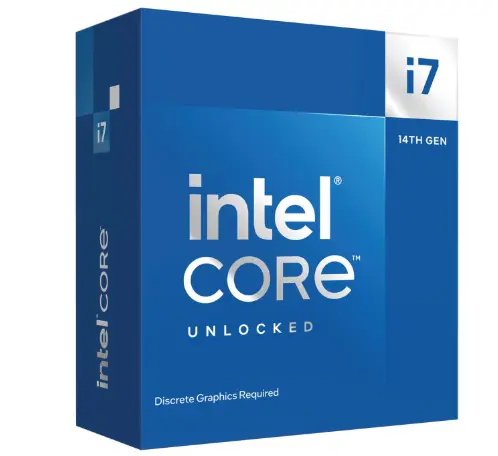
Why Choose the Core i7-14700KF?
- 20 total cores
- 28 threads
- Up to 5.6 GHz
- 33 MB Intel Smart Cache
- Excellent gaming performance
- Strong productivity performance
- Great for streaming and multitasking
- Excellent high-end GPU pairing
For gamers who also use their PC as a workstation, the i7-14700KF is probably the most balanced premium LGA 1700 option.
Intel Core i9-14900K — Best Maximum-Performance Option
The Core i9-14900K sits at the top of Intel’s LGA 1700 mainstream desktop lineup.
It features 8 Performance cores and 16 Efficient cores, delivering 24 total cores and 32 threads. Intel lists up to 6.0 GHz maximum turbo frequency for the processor.
Its 36 MB of Intel Smart Cache and massive core count make it extremely powerful for both gaming and demanding professional workloads.
If you’re building a high-end gaming PC with a flagship GPU and want to eliminate as much CPU limitation as possible, the i9-14900K is an obvious candidate.
However, the i9 is not automatically the best purchase for every gamer.
The additional cores can provide significant benefits in heavily threaded workloads, but many games don’t use all 24 cores effectively. As a result, the real-world gaming advantage over the i7 can be considerably smaller than the specification difference suggests.
The i9 also demands serious cooling. With a maximum turbo power rating of 253W, it should be paired with a capable high-end cooler and a motherboard with strong power delivery.
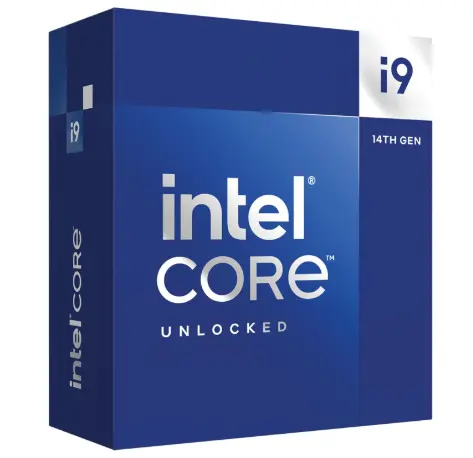
Why Choose the Core i9-14900K?
- 24 cores
- 32 threads
- Up to 6.0 GHz
- 36 MB Intel Smart Cache
- Exceptional gaming capability
- Excellent productivity performance
- Ideal for enthusiast systems
If your primary goal is maximum performance and your budget allows for premium cooling and motherboard hardware, the i9-14900K is the performance leader of this LGA 1700 selection.
For pure gaming value, though, the i7 or i5 can make more sense.
What to Look for When Choosing the Best LGA 1700 CPU for Gaming
There are several technical characteristics worth considering before purchasing an LGA 1700 gaming processor.
Core and Thread Count
More cores aren’t automatically better for gaming, but they become valuable when you’re streaming, editing, rendering, or multitasking.
The i5-14600K has 20 threads, the i7-14700KF has 28, and the i9-14900K has 32.
Clock Speed
High clock speeds are useful for gaming because many game workloads benefit from strong single-threaded performance.
The three CPUs all offer impressive turbo frequencies, ranging from 5.3 GHz on the i5 to up to 6.0 GHz on the i9.
Cache
Cache can help the CPU access frequently used data more efficiently.
The i5-14600K has 24 MB of Intel Smart Cache, the i7-14700KF has 33 MB, and the i9-14900K has 36 MB.
Memory Support
LGA 1700 gives builders flexibility because compatible motherboards can support DDR4 or DDR5 depending on the board design.
That can significantly affect total system cost.
If you already own quality DDR4 memory, a DDR4-compatible motherboard may make an LGA 1700 upgrade more affordable.
Best Pick Based on Your Use Case
| Use Case | Recommended CPU |
|---|---|
| Budget-conscious gaming | Core i5-14600K |
| 1080p high-FPS gaming | Core i5-14600K |
| 1440p gaming | Core i5-14600K / i7-14700KF |
| High-end GPU | Core i7-14700KF |
| 240Hz competitive gaming | Core i7-14700KF |
| Gaming + streaming | Core i7-14700KF |
| Gaming + content creation | Core i7-14700KF |
| Extreme gaming PC | Core i9-14900K |
| Heavy rendering + gaming | Core i9-14900K |
| Existing DDR4 LGA 1700 system upgrade | Core i5-14600K / i7-14700KF |
For the majority of gamers, the Core i7-14700KF is the best high-end all-rounder, while the Core i5-14600K is the best value choice.
The i9-14900K is best reserved for enthusiasts who specifically want the maximum available performance from the platform.
Real-World Performance
Gaming performance depends heavily on the GPU, game engine, resolution, memory, cooling, motherboard, BIOS configuration, and graphics settings, so processor specifications should not be treated as guaranteed FPS numbers.
In CPU-limited scenarios, the i9-14900K has the highest performance ceiling. Its high turbo frequency, 24-core design, and large cache make it extremely capable.
The i7-14700KF comes surprisingly close in many gaming scenarios while providing considerably stronger multi-core capability than the i5.
The i5-14600K remains highly competitive because gaming does not always scale proportionally with core count.
At 1080p with a powerful graphics card, differences between these processors can become more noticeable. Competitive games running at low settings are particularly likely to expose CPU differences.
At 1440p, the GPU becomes more influential.
At 4K, differences can shrink further because the graphics card usually becomes the dominant performance limitation.
This is why buying the most expensive CPU isn’t always the smartest upgrade.
A gamer using an RTX 4070-class GPU, for example, may get better overall value by choosing an i5 or i7 and investing the remaining money into a stronger GPU, faster storage, or better cooling.
Safety & Protection
One of the most important considerations when buying a high-end LGA 1700 CPU is BIOS and power configuration.
Intel has publicly documented a Vmin Shift Instability issue affecting some 13th- and 14th-generation desktop processors. Intel’s current guidance recommends using the latest BIOS containing microcode 0x12F or later and following Intel Default Settings. Intel also states that eligible affected processors have received a two-year warranty extension, up to five years from the original purchase date.
This makes motherboard BIOS support particularly important.
Before installing a 13th- or 14th-generation CPU, update the motherboard BIOS when appropriate and use the manufacturer’s recommended settings.
Avoid aggressive motherboard auto-overclocking or unnecessarily high voltage settings.
Important Safety Practices
- Keep the motherboard BIOS updated.
- Use Intel Default Settings where recommended.
- Use a capable CPU cooler.
- Monitor CPU temperatures.
- Avoid excessive manual voltage.
- Use a quality power supply.
- Maintain adequate case airflow.
- Keep dust away from heatsinks and fans.
- Monitor system stability after major BIOS changes.
The goal isn’t simply to achieve the highest benchmark score. A stable system that maintains reasonable temperatures is far better for long-term gaming.
Long-Term Reliability Tips
A powerful processor can last for many years if it is properly configured and cooled.
Keep Temperatures Under Control
High temperatures are normal during heavy workloads, but consistently excessive temperatures should be investigated.
Make sure the cooler is properly mounted and the thermal interface material is applied correctly.
Update the BIOS
BIOS updates can improve CPU compatibility, memory behavior, stability, and microcode support.
For 13th- and 14th-generation Intel desktop processors, keeping the BIOS current is particularly important because Intel recommends the latest BIOS with microcode 0x12F or later for mitigating Vmin Shift Instability risk.
Avoid Unnecessary Overclocking
Unlocked processors are designed to support overclocking, but additional voltage and heat can increase stress.
If long-term reliability is your priority, a sensible power configuration may be preferable to chasing the last few percentage points of benchmark performance.
Use Quality Cooling
Cooling is especially important for the i7-14700KF and i9-14900K.
A premium air cooler can work well in suitable configurations, while a high-performance liquid cooler can provide additional thermal capacity for demanding workloads.
Maintain Case Airflow
Good airflow helps both CPU and GPU temperatures.
Use a balanced intake and exhaust configuration and regularly clean dust filters.
Monitor Stability
Watch for unexpected crashes, application errors, freezes, blue screens, or unusual performance degradation.
These can sometimes indicate cooling, BIOS, voltage, memory, or hardware problems.
Buying Recommendations
If you’re looking for the best LGA 1700 CPU for gaming, your decision should be based on your budget and GPU rather than simply choosing the most expensive model.
Best Value: Core i5-14600K
Choose the i5-14600K if gaming is your primary priority and you want to maximize your overall system value.
It’s particularly attractive for 1080p and 1440p gaming systems.
Best Overall: Core i7-14700KF
For gamers who want a premium processor that can also handle streaming, content creation, multitasking, and demanding applications, the i7-14700KF is the strongest all-round recommendation.
It offers substantially more cores and threads than the i5 while avoiding some of the extreme enthusiast positioning of the i9.
Best Extreme Performance: Core i9-14900K
Choose the i9-14900K if you’re building a flagship LGA 1700 system and want maximum CPU performance.
It makes the most sense when paired with a high-end GPU, fast memory, excellent cooling, and a strong motherboard.
Best Upgrade for Existing LGA 1700 Owners
If you already have an LGA 1700 motherboard, upgrading the CPU can be considerably cheaper than changing platforms.
Before purchasing, verify:
- Motherboard CPU compatibility.
- BIOS support.
- VRM quality.
- Cooling capability.
- DDR4 or DDR5 memory compatibility.
- Power supply capacity.
- Current CPU performance.
- Expected GPU upgrade.
A CPU upgrade makes the most sense when your current processor is actually limiting your gaming performance.
Final Verdict
The best LGA CPU for gaming depends on what you expect from your PC.
The Intel Core i5-14600K is the best value-oriented choice. It provides excellent gaming performance, high clock speeds, 20 threads, and enough processing power for modern gaming without requiring an expensive flagship platform.
The Intel Core i7-14700KF is our overall recommendation for enthusiasts and serious gamers. With 20 cores, 28 threads, and turbo speeds reaching 5.6 GHz, it offers a superb combination of gaming, streaming, productivity, and multitasking performance.
The Intel Core i9-14900K is the ultimate choice for users who want maximum LGA 1700 performance. Its 24 cores, 32 threads, and up to 6.0 GHz turbo frequency make it an exceptionally powerful processor.
However, the i9’s higher price, power consumption, and cooling requirements mean it isn’t automatically the best choice for every gamer.
For most users, the i7-14700KF offers the best combination of performance and flexibility. For budget-conscious gamers, the i5-14600K is the smarter value.
Whichever processor you choose, pay close attention to BIOS updates, cooling, motherboard quality, and Intel’s recommended default settings.
FAQs
Q1: What is the best LGA 1700 CPU for gaming?
Ans: The Intel Core i7-14700KF is the best overall LGA 1700 CPU for gaming because it combines excellent gaming performance with 20 cores, 28 threads, and high clock speeds. The i5-14600K is a better value choice, while the i9-14900K is ideal for maximum-performance enthusiast systems.
Q2: Is the i7-14700KF better than the i5-14600K for gaming?
Ans: The i7-14700KF is generally the stronger processor, particularly for high-refresh-rate gaming, streaming, multitasking, and CPU-intensive workloads. However, the i5-14600K can offer better value when most of your budget is being allocated to the graphics card.
Q3: Is the i9-14900K overkill for gaming?
Ans: For many gaming PCs, yes. The i9-14900K is extremely powerful, but its additional cores aren’t always fully utilized by games. It becomes more attractive when paired with a flagship GPU, high-refresh-rate monitor, or demanding productivity workloads.
Q4: Can LGA 1700 still be used for gaming?
Ans: Yes. LGA 1700 remains a capable gaming platform, especially if you already own a compatible motherboard. A high-end 13th- or 14th-generation CPU can still provide excellent gaming performance when paired with a modern graphics card.
Q5: Does LGA 1700 support DDR5 RAM?
Ans: Yes. LGA 1700 supports DDR5, but the specific memory type depends on the motherboard. Some LGA 1700 motherboards support DDR4 while others support DDR5, so you should verify the motherboard specifications before purchasing memory.
Q6: What cooler do I need for an LGA 1700 gaming CPU?
Ans: The i5-14600K benefits from a capable tower cooler or liquid cooler, while the i7-14700KF and i9-14900K should generally be paired with stronger high-performance cooling. The higher the sustained workload, the more important cooling becomes.
Q7: Is the i9-14900K worth buying in 2026?
Ans: It can be worthwhile if you specifically want a powerful LGA 1700 processor and find it at an attractive price. However, buyers should consider the total cost of the CPU, motherboard, and cooling system. For many gamers, the i7-14700KF or i5-14600K provides better overall value.
Q8: Is the i5-14600K good for 1440p gaming?
Ans: Yes. The i5-14600K is an excellent 1440p gaming processor. At this resolution, the graphics card is often the main performance limitation, meaning spending substantially more on an i7 or i9 may not produce a proportional increase in gaming FPS.
Q9: Should I buy an LGA 1700 CPU for a new gaming PC?
Ans: It depends heavily on pricing and existing hardware. If you’re starting from scratch, compare the complete platform cost against newer CPU platforms. If you already own a compatible LGA 1700 motherboard, however, upgrading to a strong 13th- or 14th-generation CPU can be a very cost-effective route.
Short Conclusion
The LGA 1700 platform still offers several excellent CPUs for gaming. The Core i5-14600K is the best value option, the Core i7-14700KF is the best overall choice for most serious gamers, and the Core i9-14900K delivers the highest level of enthusiast performance. Your GPU, resolution, cooling system, motherboard, and budget should ultimately determine which processor is right for you.
If you have any questions about “Best LGA 1700 CPU for Gaming: Top CPU for Maximum FPS”, feel free to let us know through your comments.


