
The best RAM for Ryzen 7 7700X can make a noticeable difference in gaming performance, multitasking, and productivity. AMD’s Ryzen 7 7700X is an 8-core, 16-thread processor built on the AM5 platform and designed to take full advantage of DDR5 memory. While the CPU is powerful on its own, pairing it with the right RAM helps reduce latency, improve frame rates in CPU-intensive games, and speed up demanding workloads like video editing and 3D rendering.
With so many DDR5 kits available, choosing the ideal memory can be confusing. You’ll find options ranging from budget-friendly DDR5-5600 kits to high-performance DDR5-6400 modules with tighter timings. Capacity also matters, as 32GB has become the sweet spot for modern gaming and productivity, while 64GB is ideal for creators and professionals working with large files or virtual machines.
Another important factor is AMD EXPO support. RAM kits optimized with EXPO profiles make setup quick and ensure your memory runs at its advertised speed with minimal effort. This compatibility improves stability and helps you get the most from your Ryzen processor without manual tuning.
In this guide, we’ll compare the best RAM for Ryzen 7 7700X, highlighting their performance, features, pricing, and ideal use cases. Whether you’re building a high-end gaming PC, a streaming workstation, or an all-purpose desktop, you’ll find a memory kit that perfectly complements your Ryzen 7 7700X.
Why It Matters to You
Choosing the best RAM for Ryzen 7 7700X isn’t just about buying the fastest memory available—it’s about balancing speed, latency, capacity, and value for your specific needs.
Here’s why your RAM choice matters:
- Higher gaming FPS: Faster DDR5 memory improves performance in CPU-bound games, especially esports titles.
- Better multitasking: More RAM allows you to run games, browsers, Discord, and streaming software simultaneously without slowdowns.
- Improved content creation: Video editing, photo editing, CAD, and rendering applications benefit from larger memory capacities.
- Reduced loading times: Faster memory improves data transfer between the CPU and system memory, making applications feel more responsive.
- Future-proofing: DDR5 continues to evolve, making it a smart investment for AM5 systems that may be upgraded later.
- Simple optimization: AMD EXPO-certified memory allows one-click performance tuning in the BIOS.
- Greater stability: Premium memory kits undergo rigorous testing for compatibility with Ryzen platforms.
- Enhanced aesthetics: RGB-equipped memory modules add style to gaming builds without sacrificing performance.
Selecting the right DDR5 kit ensures your Ryzen 7 7700X performs at its best both today and for years to come.
Feature-by-Feature Comparison Table
Before diving into individual reviews, here’s a side-by-side comparison of the best RAM for Ryzen 7 7700X. These three DDR5 kits offer excellent compatibility with AMD’s AM5 platform and support AMD EXPO profiles for easy performance tuning. While all three are outstanding choices, each one targets a different type of user—from competitive gamers to professional content creators.
| Feature | G.Skill Trident Z5 Neo RGB DDR5-6000 CL30 | Corsair Vengeance RGB DDR5-6000 CL30 | Kingston Fury Beast DDR5-6000 CL30 |
|---|---|---|---|
| Best For | Enthusiast Gaming | Gaming & Productivity | Budget Performance |
| Memory Type | DDR5 | DDR5 | DDR5 |
| Capacity Options | 32GB, 64GB | 32GB, 64GB | 32GB, 64GB |
| Configuration | 2×16GB / 2×32GB | 2×16GB / 2×32GB | 2×16GB / 2×32GB |
| Speed | DDR5-6000 | DDR5-6000 | DDR5-6000 |
| CAS Latency | CL30 | CL30 | CL30 |
| AMD EXPO Support | Yes | Yes | Yes |
| Intel XMP Support | Yes | Yes | Yes |
| RGB Lighting | Yes | Yes | Optional (RGB & Non-RGB) |
| Heat Spreader | Aluminum | Aluminum | Low-profile Aluminum |
| Overclocking Potential | Excellent | Excellent | Very Good |
| Stability | Excellent | Excellent | Excellent |
| Cooling Efficiency | Excellent | Very Good | Very Good |
| Height | Medium | Medium | Low Profile |
| Software Support | BIOS EXPO | Corsair iCUE | Kingston FURY CTRL |
| Warranty | Limited Lifetime | Limited Lifetime | Limited Lifetime |
| Ideal Users | Hardcore Gamers & Enthusiasts | Streamers & Power Users | Value-Oriented Builders |
Quick Highlights Table
If you want a quick overview before reading the detailed reviews, the table below summarizes the best RAM for AMD Ryzen 7 7700X. Each kit excels in different areas, whether you’re building a high-end gaming PC, a workstation for content creation, or a budget-friendly AM5 system.

| RAM Kit | Best For | Capacity | Speed | Latency | AMD EXPO | RGB | Overall Rating |
|---|---|---|---|---|---|---|---|
| G.Skill Trident Z5 Neo RGB DDR5-6000 CL30 | Overall Best | 32GB / 64GB | DDR5-6000 | CL30 | ✅ | Yes | ⭐⭐⭐⭐⭐ |
| Corsair Vengeance RGB DDR5-6000 CL30 | Gaming & Streaming | 32GB / 64GB | DDR5-6000 | CL30 | ✅ | Yes | ⭐⭐⭐⭐⭐ |
| Kingston Fury Beast DDR5-6000 CL30 | Best Value | 32GB / 64GB | DDR5-6000 | CL30 | ✅ | Optional | ⭐⭐⭐⭐☆ |
The three memory kits above all provide outstanding performance with the Ryzen 7 7700X. They support AMD EXPO for one-click optimization, offer excellent stability, and are available in capacities suitable for both gamers and professionals. Your final choice depends on your budget, aesthetic preferences, and workload requirements.
In-Depth Reviews of the Best RAM for Ryzen 7 7700X
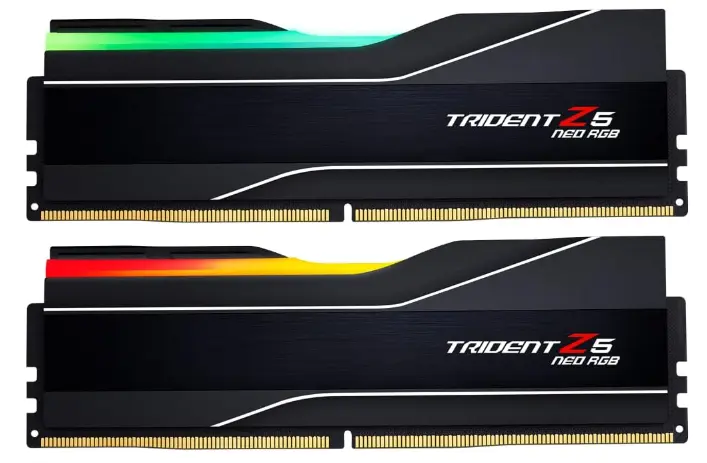
1. G.Skill Trident Z5 Neo RGB DDR5-6000 CL30 – Best Overall RAM for Ryzen 7 7700X
The G.Skill Trident Z5 Neo RGB DDR5-6000 CL30 is widely regarded as one of the best DDR5 memory kits for AMD’s AM5 platform. Specifically tuned for Ryzen processors, it combines high frequency with exceptionally low latency, delivering excellent gaming performance, faster application responsiveness, and outstanding multitasking capabilities.
Running at DDR5-6000 with CL30 timings, this kit hits the sweet spot recommended for Ryzen 7000 processors. In CPU-intensive games, it helps maximize frame rates while reducing latency-related bottlenecks. Creative workloads such as Adobe Premiere Pro, Blender, and Photoshop also benefit from the increased memory bandwidth.
The premium aluminum heat spreaders effectively dissipate heat during extended gaming sessions and heavy workloads, while the customizable RGB lighting adds a polished look to any modern gaming build. AMD EXPO support makes setup simple—just enable the EXPO profile in your motherboard BIOS to achieve the rated speed without manual tweaking.
Key Features
- DDR5-6000 frequency
- Low CL30 latency
- AMD EXPO certified
- Intel XMP compatible
- Premium RGB lighting
- High-quality aluminum heat spreaders
- Available in 32GB and 64GB kits
- Limited lifetime warranty
Pros
- Excellent gaming performance
- Optimized specifically for Ryzen 7000 CPUs
- Outstanding low latency
- Easy one-click EXPO setup
- Attractive RGB lighting
- Excellent overclocking potential
- Premium build quality
Cons
- Premium pricing
- RGB may not appeal to minimalist builders
- Slightly taller modules may interfere with some large air coolers
Best For
- Enthusiast gamers
- Competitive esports players
- Streamers
- Video editors
- High-end productivity systems
Overall Rating
⭐⭐⭐⭐⭐ (5/5)
The G.Skill Trident Z5 Neo RGB is the strongest all-around choice for anyone looking for the best RAM for Ryzen 7 7700X, delivering exceptional speed, low latency, stability, and long-term value.
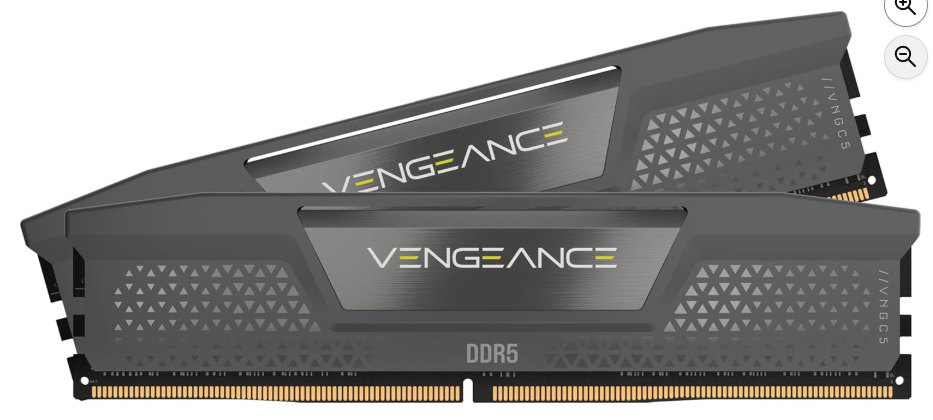
2. Corsair Vengeance RGB DDR5-6000 CL30 – Best for Gaming and Streaming
The Corsair Vengeance RGB DDR5-6000 CL30 is an excellent option for users who want a combination of premium performance, elegant RGB lighting, and dependable reliability. Designed with AMD EXPO compatibility, it pairs exceptionally well with the Ryzen 7 7700X and provides smooth performance across gaming, streaming, and content creation workloads.
With a DDR5-6000 speed and CL30 timings, this memory kit delivers low-latency performance that helps maintain high frame rates in modern games while improving responsiveness in demanding applications. Whether you’re live streaming, editing videos, or running multiple applications simultaneously, the Corsair Vengeance RGB handles the workload with ease.
Its aluminum heat spreader keeps temperatures under control during extended sessions, while the vibrant RGB lighting can be customized through Corsair’s iCUE software to match the rest of your setup.
Key Features
- DDR5-6000 speed
- CL30 low latency
- AMD EXPO ready
- Intel XMP support
- Dynamic RGB lighting
- Premium aluminum heat spreader
- Available in 32GB and 64GB capacities
- Corsair iCUE RGB software support
- Limited lifetime warranty
Pros
- Excellent gaming performance
- Reliable AMD EXPO compatibility
- Attractive RGB customization
- Great cooling performance
- High build quality
- Stable under heavy workloads
- Easy installation and BIOS setup
Cons
- Slightly more expensive than non-RGB alternatives
- iCUE software may be unnecessary for users who don’t use other Corsair products
- Taller modules may limit compatibility with certain compact builds
Best For
- Gamers
- Streamers
- Content creators
- RGB enthusiasts
- Power users who multitask frequently
Overall Rating
⭐⭐⭐⭐⭐ (4.9/5)
The Corsair Vengeance RGB DDR5-6000 CL30 offers an excellent blend of speed, reliability, and aesthetics, making it one of the best memory kits for Ryzen 7 7700X users who want premium performance with customizable RGB lighting.
3. Kingston Fury Beast DDR5-6000 CL30 – Best Value RAM for Ryzen 7 7700X
If you’re looking for the best RAM for Ryzen 7 7700X without spending premium prices, the Kingston Fury Beast DDR5-6000 CL30 is an outstanding value. It delivers nearly the same real-world performance as more expensive DDR5 kits while maintaining excellent stability, compatibility, and build quality.
Designed with AMD EXPO support, this memory kit is optimized for Ryzen 7000-series processors. Simply enable the EXPO profile in your motherboard BIOS, and the RAM will run at its rated DDR5-6000 speed with CL30 timings. This combination offers excellent gaming performance, smooth multitasking, and responsive application performance without requiring manual memory tuning.
One of the biggest advantages of the Fury Beast series is its versatility. Kingston offers both RGB and non-RGB versions, allowing you to choose the style that best fits your build. The low-profile heat spreader is especially useful for systems using large tower air coolers, as it improves compatibility in tighter cases.
Whether you’re gaming at high refresh rates, editing photos and videos, or simply building a reliable everyday PC, the Kingston Fury Beast delivers exceptional performance for its price.

Key Features
- DDR5-6000 frequency
- CL30 low latency
- AMD EXPO certified
- Intel XMP compatible
- Available in RGB and non-RGB versions
- Low-profile aluminum heat spreader
- 32GB and 64GB capacity options
- Limited lifetime warranty
Pros
- Excellent price-to-performance ratio
- Performs nearly as well as premium kits
- Easy AMD EXPO setup
- Low-profile design improves cooler compatibility
- Excellent reliability and stability
- Available with or without RGB
- Great value for gaming and productivity
Cons
- Less premium appearance than flagship RGB models
- Slightly lower overclocking headroom
- RGB software is more basic than some competitors
Best For
- Budget-conscious gamers
- Everyday users
- Students
- Home office systems
- First-time PC builders
- Users who prefer low-profile RAM
Overall Rating
⭐⭐⭐⭐⭐ (4.8/5)
The Kingston Fury Beast DDR5-6000 CL30 is one of the best value options available. It combines excellent Ryzen compatibility, reliable performance, and competitive pricing, making it an easy recommendation for most Ryzen 7 7700X builds.
Buying Guide: What to Look for When Choosing the RAM for Ryzen 7 7700X
Selecting the best RAM for Ryzen 7 7700X requires balancing speed, latency, capacity, compatibility, and budget. While many DDR5 kits appear similar on paper, understanding a few key factors will help you make a smarter purchase.
Capacity
Capacity should be your first consideration.
16GB (2×8GB)
Suitable only for light gaming and everyday computing. While it can still handle many games, newer AAA titles and multitasking workloads increasingly benefit from more memory.
32GB (2×16GB)
The ideal choice for most users.
Perfect for:
- AAA gaming
- Competitive esports
- Streaming
- Photo editing
- Video editing
- Heavy multitasking
- Future-proof gaming builds
64GB (2×32GB)
Recommended for professionals who regularly work with:
- 4K and 8K video editing
- Blender rendering
- CAD software
- Virtual machines
- Software development
- AI and machine learning projects
For the majority of Ryzen 7 7700X owners, 32GB remains the sweet spot.
Memory Speed
Although DDR5 is available in speeds ranging from 5200 MT/s to over 8000 MT/s, Ryzen 7000 processors achieve their best balance of performance and stability around DDR5-6000.
Benefits include:
- Higher gaming frame rates
- Better application responsiveness
- Lower memory latency
- Stable operation
- Easier BIOS configuration
Going beyond DDR5-6000 often results in diminishing returns for most users.
Memory Latency
Don’t focus solely on frequency.
Latency is equally important.
Recommended options include:
- CL30 — Excellent
- CL32 — Very Good
- CL36 — Acceptable
A DDR5-6000 CL30 kit generally outperforms higher-latency alternatives in gaming and many productivity tasks.
AMD EXPO Support
Always choose memory with AMD EXPO support.
Benefits include:
- One-click BIOS setup
- Improved compatibility
- Better stability
- Optimized Ryzen performance
- Reduced troubleshooting
EXPO-certified kits are specifically validated for AMD AM5 platforms.
Cooling Design
Quality heat spreaders help maintain consistent performance during long gaming sessions or demanding workloads.
Look for:
- Aluminum heat spreaders
- Solid PCB construction
- High-quality memory ICs
- Good airflow inside your case
Proper cooling contributes to long-term reliability and stable operation.
RGB vs Non-RGB
Choose based on your priorities.
RGB
Ideal for:
- Showcase gaming PCs
- Tempered-glass cases
- RGB ecosystems
- Custom lighting effects
Non-RGB
Better for:
- Budget builds
- Professional workstations
- Minimalist aesthetics
- Maximum cooler clearance
Performance is identical between RGB and non-RGB versions when specifications are the same.
Warranty and Brand Reputation
A lifetime warranty is a strong indicator of product confidence.
Trusted manufacturers include:
- G.Skill
- Corsair
- Kingston
These brands consistently deliver high-quality DDR5 memory with excellent Ryzen compatibility.
By focusing on these factors, you can confidently choose the best RAM for Ryzen 7 7700X that fits both your budget and performance requirements.
Best Pick Based on Your Use Case
The best RAM for Ryzen 7 7700X depends on how you plan to use your PC. While all three recommended DDR5 kits deliver excellent performance, each one excels in different scenarios.
| Use Case | Recommended RAM | Why It’s the Best Choice |
|---|---|---|
| Best Overall | G.Skill Trident Z5 Neo RGB DDR5-6000 CL30 | Excellent balance of speed, latency, stability, and AMD EXPO optimization. |
| Best for Gaming | G.Skill Trident Z5 Neo RGB DDR5-6000 CL30 | Maximizes FPS and minimizes latency in CPU-intensive games. |
| Best for Streaming | Corsair Vengeance RGB DDR5-6000 CL30 | Smooth multitasking while gaming, streaming, and running background applications. |
| Best for Content Creation | Corsair Vengeance RGB DDR5-6000 CL30 (64GB) | Ideal for video editing, rendering, and creative software. |
| Best Budget Option | Kingston Fury Beast DDR5-6000 CL30 | Delivers premium-level performance at a more affordable price. |
| Best Non-RGB Option | Kingston Fury Beast DDR5-6000 CL30 (Non-RGB) | Clean design with excellent compatibility and lower cost. |
| Best for Future Upgrades | G.Skill Trident Z5 Neo RGB 64GB | High-speed memory with plenty of capacity for future software demands. |
| Best Value | Kingston Fury Beast DDR5-6000 CL30 | Outstanding performance-per-dollar for most Ryzen 7 7700X users. |
No matter your workload, a 32GB DDR5-6000 CL30 kit is the ideal starting point for most Ryzen 7 7700X builds, while professionals who regularly work with demanding applications should consider 64GB for additional headroom.
Real-World Performance
Benchmark numbers are helpful, but everyday performance is what most users notice. Pairing the Ryzen 7 7700X with a quality DDR5-6000 CL30 memory kit results in a responsive system that performs exceptionally well across gaming, productivity, and multitasking.
Gaming
Modern games benefit from faster memory, especially those that rely heavily on CPU performance.
With DDR5-6000 CL30 memory, you can expect:
- Higher average FPS in CPU-bound games
- Improved 1% low frame rates
- Smoother gameplay during intense scenes
- Faster level loading
- Reduced stuttering in open-world titles
Competitive gamers playing games like Counter-Strike 2, Valorant, Rainbow Six Siege, and Fortnite will notice more consistent frame pacing compared to slower DDR5 kits.
Streaming
Streaming while gaming places additional demands on system memory.
A 32GB DDR5-6000 kit easily handles:
- OBS Studio
- Discord
- Multiple browser tabs
- Music applications
- Recording software
- Background utilities
This results in smoother streams and fewer interruptions.
Content Creation
Applications such as Adobe Premiere Pro, Photoshop, Lightroom, Blender, and DaVinci Resolve benefit from higher memory bandwidth and lower latency.
Users can expect:
- Faster project loading
- Improved timeline responsiveness
- Quicker rendering
- Better multitasking
- Reduced waiting during exports
Professionals working with large media files may benefit from upgrading to 64GB.
Everyday Productivity
Even everyday tasks feel smoother with fast DDR5 memory.
Examples include:
- Instant application launches
- Faster file compression
- Better browser performance with many tabs
- Improved responsiveness during multitasking
- Faster software installations
Overall, DDR5-6000 CL30 provides one of the best real-world performance balances for the Ryzen 7 7700X.
Mac vs Windows vs Other OS Compatibility
Although the best RAM for Ryzen 7 7700X is designed specifically for desktop AM5 systems, operating system compatibility also plays an important role in getting the most from your hardware.
| Operating System | Compatibility | Notes |
|---|---|---|
| Windows 11 | ⭐⭐⭐⭐⭐ Excellent | Best overall compatibility, full AMD chipset support, EXPO profile support, and optimal gaming performance. |
| Windows 10 | ⭐⭐⭐⭐☆ Very Good | Works well but lacks some optimizations available in Windows 11 for newer Ryzen platforms. |
| Linux (Ubuntu, Fedora, Pop!_OS, etc.) | ⭐⭐⭐⭐☆ Very Good | Excellent compatibility for development, virtualization, and productivity. BIOS EXPO settings function independently of the operating system. |
| macOS | ❌ Not Compatible | Ryzen 7 7700X is not officially supported by Apple hardware. DDR5 desktop memory cannot be used in Macs. |
| Virtual Machines | ⭐⭐⭐⭐⭐ Excellent | Larger capacities such as 64GB provide an outstanding experience when running multiple virtual machines. |
For the best experience, Windows 11 remains the recommended operating system for Ryzen 7 7700X systems.
Safety & Protection
High-quality DDR5 memory is designed for years of reliable operation, but proper installation and care help maximize its lifespan.
Choose Trusted Manufacturers
Reliable brands such as G.Skill, Corsair, and Kingston thoroughly test their memory for compatibility and stability before release.
Install RAM Correctly
- Power off the system before installation.
- Align the notch correctly.
- Press evenly until both retention clips lock into place.
- Install dual-channel kits in the motherboard’s recommended slots.
Enable EXPO Instead of Manual Overclocking
Using AMD EXPO profiles provides optimized performance while maintaining stability and reducing the risk of configuration errors.
Maintain Proper Airflow
Ensure your PC case has sufficient airflow to keep RAM temperatures low during long gaming or rendering sessions.
Keep BIOS Updated
Motherboard BIOS updates often improve memory compatibility, stability, and overall system performance.
Protect Against Power Issues
Using a quality power supply and a surge protector or UPS helps safeguard your entire system, including your RAM, from electrical damage.
By following these best practices, your DDR5 memory can deliver stable performance for many years.
Long-Term Reliability Tips
Investing in the best RAM for Ryzen 7 7700X is only part of the equation. Proper maintenance and system care ensure your DDR5 memory continues to deliver stable, high-speed performance for years. Fortunately, RAM requires very little upkeep, but following a few best practices can maximize its lifespan and reliability.
Keep Your BIOS Updated
Motherboard manufacturers frequently release BIOS updates that improve memory compatibility, stability, and AMD EXPO performance. Updating your BIOS can also fix bugs and enhance support for newer DDR5 memory kits.
Use AMD EXPO Profiles
Rather than manually overclocking your memory, enable the AMD EXPO profile in your BIOS. EXPO is validated for compatible RAM kits and provides an optimal balance between speed, latency, and system stability.
Ensure Good Case Airflow
Although DDR5 memory is energy-efficient, it can still generate heat during intensive workloads. A well-ventilated PC case with adequate intake and exhaust fans helps maintain lower operating temperatures for all components, including RAM.
Avoid Unnecessary Voltage Increases
Manual overclocking with excessive voltage may improve benchmark scores, but it can reduce long-term reliability. For most users, sticking with the manufacturer’s recommended voltage is the safest option.
Keep the RAM Slots Clean
Dust buildup can affect electrical connections over time. Periodically cleaning your PC with compressed air helps prevent dust from accumulating around the DIMM slots and other components.
Use a Quality Power Supply
A reliable PSU delivers stable power to your entire system. Choosing a high-quality power supply reduces the risk of voltage fluctuations that could impact system stability.
Monitor System Stability
If you experience crashes or memory-related errors, run a memory diagnostic tool to verify that your RAM is functioning correctly. Early detection can prevent data corruption and system instability.
With proper care, premium DDR5 memory from trusted manufacturers can provide dependable performance throughout the lifespan of your Ryzen 7 7700X system.
Buying Recommendations
Choosing the best RAM for Ryzen 7 7700X ultimately comes down to your budget, workload, and future upgrade plans. Here are our recommendations based on different user profiles.
Buy the G.Skill Trident Z5 Neo RGB DDR5-6000 CL30 if:
- You want the best overall performance.
- Gaming is your top priority.
- You plan to overclock or fine-tune your system.
- You appreciate premium RGB aesthetics.
- You want the best long-term investment for an AM5 build.
Buy the Corsair Vengeance RGB DDR5-6000 CL30 if:
- You stream while gaming.
- You edit videos or create digital content.
- You already use Corsair components and iCUE software.
- You want premium RGB customization with reliable performance.
Buy the Kingston Fury Beast DDR5-6000 CL30 if:
- You’re building a gaming PC on a budget.
- You want excellent performance without paying for premium styling.
- You prefer a low-profile memory design.
- You need dependable DDR5 memory with great value.
Capacity Recommendations
- 16GB: Suitable only for basic users and entry-level gaming.
- 32GB: The best choice for most gamers, streamers, and professionals.
- 64GB: Recommended for advanced content creators, software developers, and heavy multitaskers.
For most users, a 32GB (2×16GB) DDR5-6000 CL30 AMD EXPO kit offers the perfect balance of performance, value, and future-proofing.
Final Verdict
Finding the best RAM for Ryzen 7 7700X doesn’t have to be complicated. The Ryzen 7 7700X performs exceptionally well with DDR5-6000 CL30 memory, making it the ideal choice for gamers, content creators, and power users alike.
Among our top recommendations, the G.Skill Trident Z5 Neo RGB DDR5-6000 CL30 stands out as the overall winner thanks to its excellent AMD EXPO optimization, low latency, premium build quality, and outstanding gaming performance.
The Corsair Vengeance RGB DDR5-6000 CL30 is an excellent alternative for users who want premium RGB lighting and reliable performance for streaming and creative workloads.
If value is your priority, the Kingston Fury Beast DDR5-6000 CL30 delivers nearly flagship-level performance at a more affordable price, making it one of the smartest purchases for most Ryzen 7 7700X builders.
Regardless of which kit you choose, pairing your Ryzen 7 7700X with a quality DDR5-6000 CL30 memory kit ensures excellent responsiveness, smooth multitasking, and a system that’s ready for modern games and demanding applications.
FAQs
Q1: What is the best RAM speed for Ryzen 7 7700X?
Ans: DDR5-6000 is widely considered the sweet spot for the Ryzen 7 7700X, offering an excellent balance of performance, stability, and value, especially when paired with low CL30 latency.
Q2: Is 32GB RAM enough for Ryzen 7 7700X?
Ans: Yes. A 32GB (2×16GB) kit is ideal for gaming, streaming, content creation, and multitasking. It provides enough capacity for modern applications while leaving room for future software demands.
Q3: Does Ryzen 7 7700X support AMD EXPO?
Ans: Yes. The Ryzen 7 7700X fully supports AMD EXPO memory profiles, allowing compatible DDR5 kits to run at their advertised speeds with a simple BIOS setting.
Q4: Is DDR5-6400 better than DDR5-6000 for Ryzen 7 7700X?
Ans: While DDR5-6400 can offer small performance improvements in certain workloads, DDR5-6000 CL30 generally provides the best balance of speed, latency, compatibility, and stability for most Ryzen 7 7700X systems.
Q5: Which RAM capacity should I buy: 32GB or 64GB?
Ans: Choose 32GB for gaming, streaming, and everyday productivity. Opt for 64GB if you frequently work with 4K video editing, 3D rendering, virtual machines, or other memory-intensive professional applications.
Q6: Can I use Intel XMP RAM with Ryzen 7 7700X?
Ans: Yes. Many DDR5 kits support both AMD EXPO and Intel XMP profiles. However, RAM specifically optimized for AMD EXPO is generally recommended for the best compatibility and easiest setup on AM5 systems.
Q7: Does faster RAM improve gaming performance on Ryzen 7 7700X?
Ans: Yes. Faster DDR5 memory with lower latency can improve average frame rates, enhance 1% low FPS, reduce stuttering in CPU-bound games, and provide smoother overall gameplay, especially when using a powerful graphics card.
Short Conclusion
Choosing the best RAM for Ryzen 7 7700X is one of the most effective ways to unlock the full potential of your AM5 gaming or productivity PC. While all three memory kits featured in this guide are excellent options, DDR5-6000 CL30 with AMD EXPO support remains the ideal combination of speed, latency, stability, and value. Whether you choose the premium G.Skill Trident Z5 Neo RGB, the versatile Corsair Vengeance RGB, or the budget-friendly Kingston Fury Beast, you’ll enjoy faster performance, smoother multitasking, and a system that’s well-prepared for current and future workloads.
If you have any questions about “Best RAM for Ryzen 7 7700X: Top DDR5 RAM Kits for Gaming”, feel free to let us know through your comments.


