
Finding the best micro ATX motherboard for Ryzen 7 9800X3D is just as important as choosing the processor itself. AMD’s Ryzen 7 9800X3D is one of the fastest gaming CPUs available, thanks to its advanced 3D V-Cache technology. However, to unlock its full potential, you’ll need a motherboard with strong VRMs, efficient cooling, DDR5 memory support, and modern connectivity features.
Micro ATX motherboards are an excellent choice for gamers and PC builders who want a compact system without sacrificing performance. They offer nearly all the features of full-size ATX boards while fitting into smaller cases and often costing less. Whether you’re building a high-end gaming PC, a streaming setup, or a workstation that doubles as a gaming machine, choosing the right motherboard ensures better stability, easier upgrades, and long-term reliability.
In this guide, we’ll compare the best micro ATX motherboard for Ryzen 7 9800X3D, highlighting their strengths, weaknesses, and ideal use cases. By the end, you’ll know which motherboard delivers the best value, premium features, or budget-friendly performance for your build.
Why it Matters to You
Your motherboard is the backbone of your entire PC. Even though the Ryzen 7 9800X3D is highly efficient, it still benefits from clean and stable power delivery, especially during long gaming sessions.
Choosing the right motherboard gives you:
- Stable gaming performance without VRM overheating
- Faster DDR5 memory compatibility
- Better BIOS support for future Ryzen processors
- PCIe 5.0 support for next-generation SSDs and GPUs
- More USB ports for peripherals
- Better networking with Wi-Fi 6E or Wi-Fi 7
- Improved cooling for long gaming sessions
- Easier future upgrades
A poor motherboard can limit your upgrade options, reduce system stability, and create thermal issues that affect performance over time.
Feature-by-Feature Comparison Table
Before diving into detailed reviews, here’s a quick comparison of the three best micro ATX motherboards for the Ryzen 7 9800X3D.

| Feature | MSI MAG B650M Mortar WiFi | ASUS TUF Gaming B650M-Plus WiFi | Gigabyte B650M AORUS Elite AX |
|---|---|---|---|
| Chipset | B650 | B650 | B650 |
| Socket | AM5 | AM5 | AM5 |
| CPU Support | Ryzen 7000/8000/9000 | Ryzen 7000/8000/9000 | Ryzen 7000/8000/9000 |
| Memory | DDR5 | DDR5 | DDR5 |
| Max RAM | 256GB | 192GB | 256GB |
| Memory Speed | 8200+ MT/s (OC) | 7600+ MT/s | 8000+ MT/s |
| PCIe 5.0 GPU | Yes | No | No |
| PCIe 5.0 SSD | Yes | Yes | Yes |
| Wi-Fi | Wi-Fi 7 | Wi-Fi 6E | Wi-Fi 6E |
| LAN | 5GbE | 2.5GbE | 2.5GbE |
| VRM Quality | Excellent | Very Good | Excellent |
| Best For | Premium Gaming | Best Value | Performance |
Quick Highlights Table
Here’s a simplified comparison to help you choose faster.
| Category | Winner |
|---|---|
| Best Overall | MSI MAG B650M Mortar WiFi |
| Best Value | ASUS TUF Gaming B650M-Plus WiFi |
| Best VRM | MSI MAG B650M Mortar WiFi |
| Best Cooling | Gigabyte B650M AORUS Elite AX |
| Best Networking | MSI MAG B650M Mortar WiFi |
| Best for Future Upgrades | MSI MAG B650M Mortar WiFi |
| Best Budget Premium | ASUS TUF Gaming B650M-Plus WiFi |
In-Depth Reviews of the Best Micro ATX Motherboard for Ryzen 7 9800X3D
Choosing the best micro ATX motherboard for the Ryzen 7 9800X3D requires balancing performance, features, and value. In the reviews below, we compare three top-performing models based on VRM quality, DDR5 support, PCIe 5.0 connectivity, cooling, networking, BIOS experience, and overall gaming performance to help you find the ideal motherboard for your next AM5 build.
1. MSI MAG B650M Mortar WiFi (Best Overall)
The MSI MAG B650M Mortar WiFi is one of the strongest micro ATX motherboards available for the Ryzen 7 9800X3D. It combines premium power delivery, PCIe 5.0 support for both graphics cards and SSDs, Wi-Fi 7 connectivity, and excellent thermal performance in a compact form factor.
Its robust VRM design ensures stable voltage even during extended gaming or heavy multitasking. Large heatsinks help keep temperatures under control, while support for high-speed DDR5 memory allows users to extract every bit of performance from the 9800X3D.
Storage expansion is another highlight, with multiple M.2 slots—including PCIe 5.0 support—making it easy to install the latest NVMe SSDs. MSI’s BIOS is beginner-friendly, and the board offers features like Flash BIOS Button for easy updates.

Pros
- Outstanding VRM quality
- PCIe 5.0 GPU and SSD support
- Wi-Fi 7 and 5Gb Ethernet
- Excellent cooling design
- Premium build quality
- Great BIOS interface
Cons
- Higher price than most B650M boards
- Overkill for budget builds
Best For
Gamers who want the most future-proof micro ATX motherboard without stepping up to expensive X870 or X670 options.
2. ASUS TUF Gaming B650M-Plus WiFi (Best Value)
The ASUS TUF Gaming B650M-Plus WiFi strikes an excellent balance between affordability, reliability, and performance, making it one of the best value-oriented micro ATX motherboards for the Ryzen 7 9800X3D. ASUS designed the TUF series with durability in mind, using military-grade components, reinforced PCIe slots, and a dependable VRM layout capable of handling AMD’s flagship gaming processors.
Although it lacks PCIe 5.0 support for graphics cards, it still includes PCIe 5.0 storage support, allowing you to install next-generation NVMe SSDs. For most gamers using modern GPUs like the RTX 5070, RTX 5080, or Radeon RX 9070 XT, PCIe 4.0 x16 provides virtually identical gaming performance, making the missing PCIe 5.0 GPU slot a minor compromise.
Cooling is another strong point. Large VRM heatsinks, multiple hybrid fan headers, and M.2 heatsinks help maintain low temperatures during extended gaming sessions. ASUS also includes AI Noise Cancelation, Aura Sync RGB compatibility, BIOS FlashBack, and an intuitive UEFI BIOS that makes system tuning straightforward for both beginners and experienced builders.
With Wi-Fi 6E, 2.5Gb Ethernet, USB-C connectivity, and support for fast DDR5 memory, this motherboard offers nearly everything most gamers need without venturing into premium pricing.

Key Features
- AMD B650 chipset
- AM5 socket
- DDR5 memory support up to 7600+ MT/s (OC)
- PCIe 5.0 M.2 SSD support
- PCIe 4.0 x16 graphics slot
- Wi-Fi 6E + Bluetooth
- 2.5Gb Ethernet
- BIOS FlashBack
- Reinforced PCIe slot
- Multiple M.2 heatsinks
Pros
- Excellent value for money
- Reliable VRM cooling
- Durable TUF components
- Easy-to-use BIOS
- Great gaming stability
- Strong connectivity options
Cons
- No PCIe 5.0 graphics slot
- Fewer premium USB ports than higher-end models
Best For
- Gamers seeking the best price-to-performance ratio
- Mid-range and high-end gaming builds
- Builders who value long-term reliability
- Users upgrading to AM5 on a reasonable budget
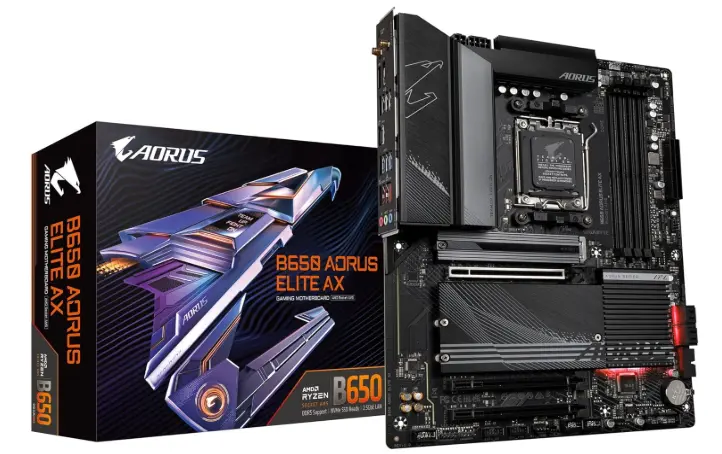
3. Gigabyte B650M AORUS Elite AX (Best for Performance & Cooling)
The Gigabyte B650M AORUS Elite AX is an excellent choice for enthusiasts who prioritize thermal performance, memory overclocking, and overall stability. Its powerful digital VRM design delivers clean power to the Ryzen 7 9800X3D, ensuring consistent performance during demanding gaming, content creation, and multitasking workloads.
One of the standout features is Gigabyte’s impressive cooling system. Large finned VRM heatsinks, high-quality thermal pads, and dedicated M.2 cooling help prevent thermal throttling even under sustained loads. Combined with Smart Fan 6 controls, users can fine-tune airflow for quieter or more aggressive cooling profiles.
Memory support is another area where this board shines. It supports high-speed DDR5 kits up to 8000+ MT/s (OC), making it ideal for enthusiasts looking to maximize gaming performance through memory tuning. While it doesn’t offer PCIe 5.0 for graphics cards, it does include PCIe 5.0 support for one M.2 SSD, ensuring compatibility with future ultra-fast storage devices.
Connectivity includes Wi-Fi 6E, Bluetooth, 2.5Gb Ethernet, multiple USB ports, and a modern internal layout that simplifies cable management in compact micro ATX cases.
Key Features
- AMD B650 chipset
- Robust digital VRM design
- DDR5 support up to 8000+ MT/s (OC)
- PCIe 5.0 M.2 SSD slot
- PCIe 4.0 x16 GPU slot
- Wi-Fi 6E
- 2.5Gb Ethernet
- Smart Fan 6
- Multiple M.2 slots with heatsinks
Pros
- Excellent VRM cooling
- Great memory overclocking support
- Strong gaming stability
- Easy cable management
- Premium build quality
- Competitive pricing
Cons
- No PCIe 5.0 graphics slot
- BIOS can feel overwhelming for first-time users
Best For
- Enthusiast gamers
- High-refresh-rate esports systems
- Users planning fast DDR5 memory overclocking
- Compact performance-focused PC builds
What to Look For When Choosing the Best Micro ATX Motherboard for Ryzen 7 9800X3D
Choosing the best micro ATX motherboard for the Ryzen 7 9800X3D isn’t just about buying the newest model. Focus on features that improve stability, future upgrades, and overall user experience.
Strong VRM Design
A quality VRM ensures clean and consistent power delivery to the CPU. Better VRMs run cooler, improve system stability, and maintain peak performance during long gaming sessions.
DDR5 Memory Support
Look for motherboards that support at least DDR5-6000 EXPO memory, with higher overclocking support if you plan to tune your RAM for extra performance.
PCIe Expansion
A PCIe 5.0 M.2 slot is highly recommended for future-proof storage. PCIe 5.0 GPU support is a bonus but not essential for current gaming performance.
Cooling Features
Choose a board with:
- Large VRM heatsinks
- M.2 heatsinks
- Multiple fan headers
- Advanced fan control software
These features help maintain lower temperatures and quieter operation.
Networking
Modern gaming benefits from fast networking options. Ideally, choose a motherboard with:
- 2.5Gb Ethernet or faster
- Wi-Fi 6E or Wi-Fi 7
- Bluetooth 5.3 or newer
Storage Options
Having three or more M.2 slots gives you room to expand your storage without relying on SATA drives.
USB Connectivity
Look for:
- USB-C
- High-speed USB 3.2 Gen 2
- Plenty of rear USB ports
- Internal USB-C header for modern PC cases
Answering these questions will help you choose the motherboard that best matches your needs instead of paying for features you’ll never use.
Best Pick Based on Your Use Case
| Use Case | Recommended Motherboard | Why It Stands Out |
|---|---|---|
| Best Overall | MSI MAG B650M Mortar WiFi | Premium features, PCIe 5.0, Wi-Fi 7, exceptional VRM performance |
| Best Value | ASUS TUF Gaming B650M-Plus WiFi | Outstanding balance of price, reliability, and gaming performance |
| Best Cooling | Gigabyte B650M AORUS Elite AX | Superior VRM and M.2 cooling with excellent thermal stability |
| Best Future-Proof Option | MSI MAG B650M Mortar WiFi | Latest chipset and next-generation connectivity |
| Best for First-Time Builders | ASUS TUF Gaming B650M-Plus WiFi | User-friendly BIOS and dependable setup experience |
| Best for Memory Overclocking | Gigabyte B650M AORUS Elite AX | Excellent DDR5 tuning capabilities |
Real-World Performance
In real-world gaming, all three motherboards deliver nearly identical FPS when paired with the Ryzen 7 9800X3D and the same graphics card. The CPU itself is the primary performance driver, so motherboard differences are more noticeable in stability, thermals, boot times, storage performance, and expansion capabilities than in raw frame rates.
The MSI MAG B650M Mortar WiFi stands out during prolonged gaming sessions thanks to its premium VRM design and efficient cooling, maintaining consistently low temperatures even under sustained CPU loads. This makes it an excellent choice for competitive gamers, streamers, and users who frequently multitask.
The ASUS TUF Gaming B650M-Plus WiFi offers dependable everyday performance with excellent stability. It handles demanding games, productivity applications, and general multitasking effortlessly while keeping costs reasonable.
Meanwhile, the Gigabyte B650M AORUS Elite AX excels in memory-intensive tasks and extended workloads. Its advanced cooling and DDR5 optimization make it particularly attractive for enthusiasts who enjoy fine-tuning system performance or running high-speed memory kits.
Overall, each motherboard provides a smooth gaming experience, fast storage performance, and reliable operation, allowing the Ryzen 7 9800X3D to perform at its full potential without bottlenecks.
Safety & Protection
A quality micro ATX motherboard does more than provide connectivity—it also protects your investment. The Ryzen 7 9800X3D is a premium gaming CPU, so pairing it with a motherboard that includes advanced protection features helps ensure long-term stability and reliability.
Modern B650M and B650M motherboards include multiple safeguards against electrical and thermal issues, reducing the risk of hardware damage.
Power Protection
Look for motherboards with:
- High-quality digital VRMs
- Premium capacitors rated for long lifespans
- Reinforced power stages
- Overcurrent protection (OCP)
- Overvoltage protection (OVP)
These features provide clean, stable power to the CPU and memory, even during heavy gaming or productivity workloads.
Thermal Protection
Efficient cooling is essential for maintaining performance.
Important cooling features include:
- Large aluminum VRM heatsinks
- Dedicated M.2 SSD heatsinks
- Intelligent fan control
- Multiple PWM fan headers
- Temperature monitoring sensors
Lower temperatures reduce component wear and improve overall system longevity.
PCIe & Memory Reinforcement
Premium motherboards often include:
- Steel-reinforced PCIe x16 slots
- Strengthened DIMM slots
- Anti-static USB and LAN ports
These enhancements help prevent physical damage when installing large graphics cards or frequently upgrading components.
Internal and External Performance
Although “internal vs external” performance is commonly used when comparing storage devices, it also applies to motherboard capabilities. Internal performance refers to how efficiently the motherboard manages core hardware, while external performance focuses on connectivity and expansion.
| Internal Performance | External Performance |
|---|---|
| VRM efficiency | USB speed and quantity |
| CPU stability | Wi-Fi performance |
| DDR5 memory compatibility | Bluetooth connectivity |
| PCIe bandwidth | Ethernet speed |
| SSD performance | Display outputs |
| BIOS optimization | Audio quality |
| Cooling efficiency | Expansion ports |
Internal Performance
All three recommended motherboards deliver excellent internal performance for the Ryzen 7 9800X3D.
The MSI MAG B650M Mortar WiFi leads the pack with:
- Exceptional VRM efficiency
- PCIe 5.0 support for GPU and SSD
- Excellent DDR5 memory compatibility
- Outstanding thermal performance
The Gigabyte B650M AORUS Elite AX follows closely with impressive VRM cooling and memory overclocking capabilities.
The ASUS TUF Gaming B650M-Plus WiFi prioritizes stability over extreme features, making it a dependable choice for most users.
External Performance
External connectivity affects everyday usability.
The MSI board again stands out thanks to:
- Wi-Fi 7
- 5Gb Ethernet
- High-speed USB-C
- Multiple USB 3.2 ports
The ASUS and Gigabyte boards offer:
- Wi-Fi 6E
- Bluetooth
- 2.5Gb Ethernet
- Plenty of USB connectivity for gaming peripherals, external drives, and streaming equipment
Unless you require the fastest wireless networking or 5Gb LAN, all three boards provide excellent external connectivity for gaming and productivity.
Long-Term Reliability Tips
A motherboard is one of the few PC components that often lasts through multiple hardware upgrades. Following these best practices can help maximize its lifespan.
Keep BIOS Updated
Manufacturers frequently release BIOS updates that improve:
- CPU compatibility
- Memory stability
- Gaming performance
- Security
- System reliability
Updating your BIOS periodically ensures optimal performance with future hardware.
Maintain Proper Airflow
Compact micro ATX builds can trap heat if airflow is restricted.
For the best cooling:
- Use at least two intake fans
- Install one rear exhaust fan
- Keep cables neatly managed
- Clean dust filters regularly
Use a Reliable Power Supply
Pair your motherboard with a high-quality PSU that provides:
- Stable voltage
- 80 Plus Gold efficiency or higher
- Sufficient wattage for future GPU upgrades
A reliable power supply reduces electrical stress on motherboard components.
Monitor Temperatures
Use software tools to monitor:
- CPU temperatures
- VRM temperatures
- SSD temperatures
Keeping components within safe operating ranges improves long-term reliability.
Avoid Excessive Overclocking
While these motherboards support memory tuning and performance optimization, aggressive overclocking can increase heat and reduce component lifespan. Moderate tuning with proper cooling offers the best balance between performance and durability.
Buying Recommendations
Choosing the best micro ATX motherboard for the Ryzen 7 9800X3D ultimately depends on your budget and priorities.
Choose the MSI MAG B650M Mortar WiFi if:
- You want the best overall micro ATX motherboard
- You plan to upgrade over the next several years
- PCIe 5.0 GPU support is important
- You want Wi-Fi 7 and 5Gb Ethernet
- Premium features justify a higher price
Choose the ASUS TUF Gaming B650M-Plus WiFi if:
- You want excellent value
- Your budget is limited
- You need dependable gaming performance
- You prefer ASUS’s easy-to-use BIOS
- Long-term reliability is your top priority
Choose the Gigabyte B650M AORUS Elite AX if:
- You prioritize cooling
- You enjoy DDR5 memory overclocking
- You want excellent VRM performance
- You prefer Gigabyte’s feature-rich platform
- You need multiple M.2 storage options
Final Verdict
If you’re searching for the best micro ATX motherboard for Ryzen 7 9800X3D, the MSI MAG B650M Mortar WiFi is the clear winner. Its powerful VRM design, PCIe 5.0 support for graphics cards and SSDs, Wi-Fi 7, 5Gb Ethernet, and premium build quality make it the most future-proof option for high-end gaming and productivity builds.
For buyers who want the best value without sacrificing reliability, the ASUS TUF Gaming B650M-Plus WiFi is an outstanding choice. It offers stable performance, durable construction, and all the essential features most gamers need at a more affordable price.
If cooling performance and memory tuning are your priorities, the Gigabyte B650M AORUS Elite AX is an excellent alternative, delivering strong VRM cooling, fast DDR5 support, and dependable performance for enthusiasts.
No matter which motherboard you choose, all three pair exceptionally well with the Ryzen 7 9800X3D and provide a solid foundation for a powerful, compact gaming PC.
FAQs
Q1: What is the best micro ATX motherboard for Ryzen 7 9800X3D?
Ans: The MSI MAG B650M Mortar WiFi is the best overall choice thanks to its excellent VRM design, PCIe 5.0 support, Wi-Fi 7, and future-ready features.
Q2: Is a B650 motherboard enough for the Ryzen 7 9800X3D?
Ans: Yes. A high-quality B650 motherboard provides excellent performance, DDR5 support, PCIe 5.0 storage, and reliable power delivery for the Ryzen 7 9800X3D.
Q3: Do I need PCIe 5.0 for gaming?
Ans: Not necessarily. Current graphics cards perform nearly the same on PCIe 4.0 x16, but PCIe 5.0 offers better future compatibility for upcoming GPUs and SSDs.
Q4: Does the Ryzen 7 9800X3D support DDR5 memory?
Ans: Yes. The Ryzen 7 9800X3D is designed for the AM5 platform and exclusively supports DDR5 memory.
Q5: Is Wi-Fi 7 worth paying extra for?
Ans: If you have a compatible router and want the fastest wireless speeds with lower latency, Wi-Fi 7 is worthwhile. Otherwise, Wi-Fi 6E remains an excellent option for most users.
Q6: Which motherboard is best for future upgrades?
Ans: The MSI MAG B650M Mortar WiFi is the most future-proof option due to its newer chipset, PCIe 5.0 graphics support, faster networking, and robust power delivery.
Q7: Can I overclock memory on these motherboards?
Ans: Yes. All three motherboards support DDR5 memory overclocking using AMD EXPO profiles, allowing you to achieve higher memory speeds for improved gaming and productivity performance.
Short Conclusion
The right motherboard can make a significant difference in the longevity, stability, and upgrade potential of your Ryzen 7 9800X3D build. While all three options deliver excellent gaming performance, the MSI MAG B650M Mortar WiFi stands out as the best overall choice for enthusiasts seeking premium features and long-term value. If you’re looking to save money without compromising on reliability, the ASUS TUF Gaming B650M-Plus WiFi is the best value pick, while the Gigabyte B650M AORUS Elite AX excels for users focused on cooling and memory performance. Choose the motherboard that best fits your budget and future upgrade plans, and you’ll have a powerful micro ATX gaming system ready for years to come.
If you have any questions about “Best Micro ATX Motherboard for Ryzen 7 9800X3D: Top 3 Picks”, feel free to let us know through your comments.


