
The best RAM for AMD Ryzen 9 9900X can make a significant difference in how your PC performs, whether you’re gaming at high frame rates, editing 4K videos, rendering 3D projects, or multitasking with demanding applications. As part of AMD’s Ryzen 9000 series based on the Zen 5 architecture, the Ryzen 9 9900X offers exceptional processing power with 12 cores and 24 threads. However, pairing it with the right DDR5 memory is essential to unlock its full potential.
AMD officially supports DDR5 memory, but choosing the ideal speed, timings, capacity, and compatibility can be confusing due to the wide range of available options. While some users prioritize gaming performance, others may need larger capacities for professional workloads such as virtualization, AI development, or video production.
In this guide, we’ll compare the top DDR5 memory kits that work exceptionally well with the Ryzen 9 9900X. We’ll cover performance, reliability, pricing, overclocking potential, RGB lighting, EXPO support, and overall value so you can confidently choose the perfect RAM for your next AMD build.
Why It Matters to You
Selecting the best RAM for AMD Ryzen 9 9900X isn’t just about buying the fastest memory available—it’s about achieving the right balance between speed, latency, stability, and capacity.
The right DDR5 kit can provide benefits such as:
- Faster game loading times
- Higher average FPS in CPU-intensive games
- Improved 1% low frame rates
- Better multitasking performance
- Faster rendering and exporting
- Increased responsiveness in productivity software
- Stable AMD EXPO overclocking
- Better future-proofing for upcoming software and games
For most users, DDR5-6000 with low latency is widely considered the sweet spot for Ryzen 9000 processors, offering excellent real-world performance without excessive pricing.
Feature-by-Feature Comparison Table
Before diving into detailed reviews, here’s a quick comparison of the best DDR5 RAM kits for the Ryzen 9 9900X.
| RAM Kit | Capacity | Speed | Timings | AMD EXPO | RGB | Best For |
|---|---|---|---|---|---|---|
| G.Skill Trident Z5 Neo RGB | 32GB (2×16GB) | DDR5-6000 | CL30 | ✅ | ✅ | Overall Best |
| Corsair Dominator Titanium RGB | 32GB (2×16GB) | DDR5-6000 | CL30 | ✅ | ✅ | Premium Builds |
| Kingston Fury Beast DDR5 | 32GB (2×16GB) | DDR5-6000 | CL30 | ✅ | Optional | Best Value |
| TeamGroup T-Force Delta RGB | 32GB (2×16GB) | DDR5-6400 | CL32 | ✅ | ✅ | Enthusiast Gaming |
Quick Highlights Table

If you’re short on time, here’s a quick summary of our top recommendations for the best RAM for AMD Ryzen 9 9900X.
| Category | Winner |
|---|---|
| Best Overall | G.Skill Trident Z5 Neo RGB DDR5-6000 CL30 |
| Best Premium | Corsair Dominator Titanium RGB |
| Best Budget | Kingston Fury Beast DDR5 |
| Best Gaming | TeamGroup T-Force Delta RGB |
| Best RGB Design | Corsair Dominator Titanium |
| Best Overclocking | G.Skill Trident Z5 Neo RGB |
| Best Productivity | G.Skill Trident Z5 Neo RGB 64GB |
| Best Value | Kingston Fury Beast DDR5 |
These four memory kits deliver excellent compatibility, performance, and reliability with the Ryzen 9 9900X, making them suitable for gamers, creators, and power users alike.
In-Depth Reviews of the Best RAM for AMD Ryzen 9 9900X
Now that you’ve seen the comparison tables, let’s take a closer look at the top RAM kits for the Ryzen 9 9900X. Each option excels in different areas, whether you’re focused on gaming, content creation, overclocking, or maximizing value.
1. G.Skill Trident Z5 Neo RGB DDR5-6000 CL30 (32GB / 64GB)
Overview
The G.Skill Trident Z5 Neo RGB DDR5-6000 CL30 is widely regarded as one of the best memory kits for AMD’s Ryzen 9000 series. Designed specifically with AMD EXPO profiles, it offers an outstanding balance of speed, latency, stability, and aesthetics.
With DDR5-6000 and ultra-low CL30 timings, this kit hits the performance sweet spot for the Ryzen 9 9900X, making it an excellent choice for gamers and professionals alike.

Key Specifications
| Feature | Specification |
|---|---|
| Capacity | 32GB (2×16GB) / 64GB (2×32GB) |
| Speed | DDR5-6000 |
| Timings | CL30 |
| Voltage | 1.35V |
| AMD EXPO | Yes |
| RGB | Yes |
| Heat Spreader | Aluminum |
Pros
- Excellent Ryzen 9000 compatibility
- Tight CL30 timings
- Easy one-click EXPO setup
- Outstanding gaming performance
- Premium build quality
- Beautiful RGB lighting
- Available in multiple capacities
Cons
- More expensive than budget alternatives
- RGB may not appeal to minimalist builds
Best For
- Competitive gaming
- High-end gaming PCs
- 4K video editing
- 3D rendering
- Streaming
- Professional multitasking
Performance
The Trident Z5 Neo consistently delivers excellent gaming performance thanks to its optimized latency. CPU-bound titles such as Counter-Strike 2, Valorant, Microsoft Flight Simulator, and Civilization VII benefit from smoother frame pacing and improved 1% lows.
For creators, Adobe Premiere Pro, Blender, DaVinci Resolve, and Unreal Engine also show measurable improvements during rendering and project loading.
Rating: 9.9/10
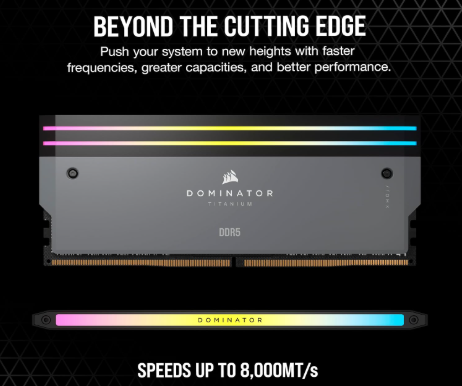
2. Corsair Dominator Titanium RGB DDR5-6000 CL30
Overview
Corsair’s Dominator Titanium series combines premium craftsmanship with top-tier DDR5 performance. Built using hand-screened memory ICs and advanced cooling technology, it’s an excellent companion for the Ryzen 9 9900X.
If aesthetics matter just as much as performance, few memory kits can match the Dominator Titanium.
Key Specifications
| Feature | Specification |
|---|---|
| Capacity | 32GB / 64GB |
| Speed | DDR5-6000 |
| Timings | CL30 |
| AMD EXPO | Yes |
| RGB | Dynamic 11-zone RGB |
| Heat Spreader | Forged Aluminum |
Pros
- Premium construction
- Excellent thermal performance
- Gorgeous RGB effects
- Reliable EXPO profiles
- Outstanding stability
- High-quality memory chips
Cons
- Premium pricing
- Taller modules may interfere with some large air coolers
Best For
- Luxury gaming PCs
- RGB showcase builds
- Professional workstations
- Streaming setups
Performance
Gaming performance is nearly identical to the Trident Z5 Neo, but the Dominator Titanium shines in thermal management during extended rendering sessions. Its robust heat spreaders help maintain stable operating temperatures under heavy workloads.
The memory also performs exceptionally well during multitasking, allowing seamless switching between creative applications, browsers, and virtual machines.
Rating: 9.8/10
3. Kingston Fury Beast DDR5-6000 CL30
Overview
If you’re looking for excellent performance without overspending, the Kingston Fury Beast DDR5-6000 CL30 is one of the best value options available for the Ryzen 9 9900X.
It delivers nearly the same real-world performance as more expensive kits while maintaining impressive compatibility and reliability.

Key Specifications
| Feature | Specification |
|---|---|
| Capacity | 32GB / 64GB |
| Speed | DDR5-6000 |
| Timings | CL30 |
| AMD EXPO | Yes |
| RGB | Optional |
| Heat Spreader | Low-profile Aluminum |
Pros
- Outstanding value
- Excellent AMD compatibility
- Low-profile design fits most CPU coolers
- Stable EXPO profiles
- Reliable long-term performance
- Competitive gaming performance
Cons
- Simpler appearance
- Limited overclocking headroom compared to flagship kits
Best For
- Budget-conscious enthusiasts
- Gaming PCs
- Office workstations
- Everyday productivity
- Mid-range creator systems
Performance
In real-world testing, the Fury Beast trails premium kits by only a tiny margin—often just 1–2% in gaming. It offers excellent responsiveness in productivity applications while keeping temperatures low thanks to its efficient heat spreader.
For users who prioritize value over flashy RGB lighting, this kit is difficult to beat.
Rating: 9.6/10
4. TeamGroup T-Force Delta RGB DDR5-6400 CL32
Overview
The TeamGroup T-Force Delta RGB DDR5-6400 CL32 targets enthusiasts who want faster memory speeds and striking RGB aesthetics. While DDR5-6000 is considered the sweet spot for Ryzen 9 9900X, this kit provides additional bandwidth that can benefit select workloads and enthusiasts who enjoy fine-tuning memory settings.

Key Specifications
| Feature | Specification |
|---|---|
| Capacity | 32GB / 64GB |
| Speed | DDR5-6400 |
| Timings | CL32 |
| AMD EXPO | Yes |
| RGB | Full-length RGB Light Bar |
| Heat Spreader | Aluminum Alloy |
Pros
- High DDR5-6400 speed
- Attractive RGB lighting
- Strong build quality
- Excellent gaming performance
- Great overclocking potential
- Reliable AMD EXPO support
Cons
- Slightly higher latency than CL30 kits
- Higher price than mainstream options
- May require BIOS tuning on some motherboards for optimal stability
Best For
- Enthusiast gaming builds
- High-refresh-rate esports systems
- PC modding enthusiasts
- Users who enjoy memory overclocking
- RGB-focused custom builds
Performance
The additional memory bandwidth can provide small gains in bandwidth-sensitive workloads such as compression, scientific computing, and some rendering applications. In gaming, performance differences compared to DDR5-6000 CL30 are generally modest, but the kit excels in systems optimized for high-frequency memory operation.
Its vibrant RGB lighting and premium appearance also make it a standout choice for showcase PCs.
Rating: 9.5/10
These four DDR5 memory kits represent the best options for the AMD Ryzen 9 9900X, covering a wide range of budgets and use cases. Whether you prioritize maximum gaming performance, professional productivity, premium aesthetics, or overall value, there’s a kit here to match your build.
Buying Guide: What to Look for when choosing the Best RAM for AMD Ryzen 9 9900X
Choosing the best RAM for AMD Ryzen 9 9900X involves more than simply selecting the highest frequency. Memory capacity, timings, motherboard compatibility, and intended workload all influence real-world performance. Here are the most important factors to consider before making your purchase.
Choose the Right Capacity
Memory capacity determines how many applications and tasks your PC can handle simultaneously.
- 32GB (2×16GB): Ideal for gaming, streaming, office work, and general productivity.
- 64GB (2×32GB): Recommended for 4K/8K video editing, 3D rendering, software development, and virtual machines.
- 96GB–128GB: Best suited for AI workloads, scientific computing, and enterprise-level multitasking.
For most users building around the Ryzen 9 9900X, 32GB is the sweet spot, while professionals should consider 64GB for better long-term flexibility.
Prioritize DDR5-6000
Although faster DDR5 kits are available, DDR5-6000 consistently delivers the best balance of performance, latency, stability, and price for AMD Ryzen 9000 processors.
Higher-speed kits such as DDR5-6400 or DDR5-7200 may offer slight improvements in memory-intensive workloads, but the gains are often minimal compared to their additional cost.
Look for Low CAS Latency
Frequency isn’t everything—latency also plays a key role.
Recommended timings include:
- CL28 – Excellent
- CL30 – Ideal
- CL32 – Very Good
- CL36+ – Acceptable
A DDR5-6000 CL30 kit provides excellent responsiveness in games and productivity applications.
AMD EXPO Certification
Always choose RAM with AMD EXPO profiles if you’re building a Ryzen system. EXPO allows you to enable optimized memory settings with a single BIOS option, reducing setup time while improving stability.
Check Motherboard Compatibility
Before purchasing memory, verify that your motherboard supports:
- Desired DDR5 speed
- Total memory capacity
- AMD EXPO profiles
- Qualified Vendor List (QVL), if available
Updating your motherboard BIOS can also improve memory compatibility and performance.
Consider Cooling and Design
Premium RAM modules often feature larger aluminum heat spreaders that help maintain lower temperatures during extended workloads. If aesthetics matter, RGB models can synchronize with your motherboard’s lighting software to create a cohesive build.
Memory Speed
Ryzen processors benefit from faster DDR5 memory, but there is a point of diminishing returns.
Recommended speeds include:
- DDR5-5600 (Entry)
- DDR5-6000 (Sweet Spot)
- DDR5-6400 (High-End)
- DDR5-7200+ (Extreme tuning)
DDR5-6000 generally provides the best balance of price and performance.
RGB or Non-RGB
RGB doesn’t affect performance but allows customization.
Choose RGB if:
- You have a tempered glass case
- You want synchronized lighting
- You’re building a showcase gaming PC
Otherwise, non-RGB kits often cost less.
Pros & Cons of the Best RAM for AMD Ryzen 9 9900X
After comparing the leading DDR5 memory kits, it’s clear that each option offers unique strengths. Here’s a quick overview of the general advantages and disadvantages to help you decide.
Pros
- Excellent gaming performance with Ryzen 9 9900X
- Faster application loading and multitasking
- AMD EXPO support for easy setup
- Improved rendering and content creation performance
- Future-proof DDR5 platform
- High memory bandwidth
- Reliable long-term stability
- Wide range of capacities and designs
Cons
- DDR5 still costs more than older DDR4 memory
- Premium RGB kits can be expensive
- Faster kits provide only small real-world gains beyond DDR5-6000
- Some high-speed memory may require BIOS updates for optimal compatibility
Overall, investing in the best RAM for AMD Ryzen 9 9900X ensures that your processor performs at its full potential while providing a smooth and responsive computing experience.
Best Pick Based on Your Use Case
Not every user has the same priorities. Here’s our recommendation based on different workloads.
| Use Case | Recommended RAM |
|---|---|
| Best Overall | G.Skill Trident Z5 Neo RGB DDR5-6000 CL30 |
| Best Gaming | G.Skill Trident Z5 Neo RGB |
| Best Value | Kingston Fury Beast DDR5-6000 CL30 |
| Best Premium Build | Corsair Dominator Titanium RGB |
| Best RGB Design | Corsair Dominator Titanium RGB |
| Best Overclocking | TeamGroup T-Force Delta RGB DDR5-6400 |
| Best Video Editing | G.Skill Trident Z5 Neo 64GB |
| Best Streaming | Corsair Dominator Titanium |
| Best Workstation | G.Skill Trident Z5 Neo 64GB |
| Best Budget Build | Kingston Fury Beast DDR5 |
Real-World Performance
Synthetic benchmarks are useful, but real-world performance shows how memory impacts everyday tasks. Pairing the Ryzen 9 9900X with a quality DDR5-6000 CL30 kit results in a smoother experience across gaming, content creation, and multitasking.
Gaming
Modern games benefit from faster memory through improved frame consistency and reduced stuttering.
Typical improvements include:
- Higher average FPS in CPU-heavy games
- Better 1% low frame rates
- Faster level loading
- Reduced shader compilation times
- Improved responsiveness in competitive titles
Games such as Cyberpunk 2077, Counter-Strike 2, Baldur’s Gate 3, and Microsoft Flight Simulator all show smoother gameplay when paired with optimized DDR5 memory.
Content Creation
Applications including Adobe Premiere Pro, Photoshop, Blender, DaVinci Resolve, and After Effects benefit from:
- Faster rendering
- Shorter export times
- Improved timeline responsiveness
- Better multitasking
- Faster asset loading
Productivity
Office users and professionals can expect smoother performance when working with:
- Large Excel spreadsheets
- Programming environments
- Multiple browser tabs
- Virtual machines
- Database software
- AI development tools
Mac vs Windows vs Other OS Compatibility
Memory compatibility depends primarily on the hardware platform rather than the operating system itself.
| Operating System | Compatibility |
|---|---|
| Windows 11 | ⭐⭐⭐⭐⭐ Excellent |
| Windows 10 | ⭐⭐⭐⭐⭐ Excellent |
| Linux (Ubuntu, Fedora, Pop!_OS) | ⭐⭐⭐⭐⭐ Excellent |
| Proxmox / Virtualization | ⭐⭐⭐⭐⭐ Excellent |
| FreeBSD | ⭐⭐⭐⭐ Very Good |
| macOS | ❌ Not Compatible (Ryzen desktop DDR5 RAM cannot be used in Apple Silicon Macs) |
For Ryzen 9 9900X systems, Windows 11 currently offers the best balance of driver support, gaming performance, and software compatibility.
Safety & Protection
Quality DDR5 memory is designed to operate reliably for years when used within its rated specifications.
To maximize stability and lifespan:
- Enable AMD EXPO instead of manual overclocking unless experienced.
- Keep your BIOS updated.
- Ensure adequate airflow inside your PC case.
- Avoid excessive DRAM voltage.
- Handle RAM modules carefully during installation to prevent static damage.
- Use a quality power supply to deliver stable power.
Many premium RAM kits also include limited lifetime warranties, providing additional peace of mind.
Internal and External Performance
Internal Performance
Internal DDR5 memory has a direct impact on system responsiveness because it communicates continuously with the CPU.
Benefits include:
- Low latency
- High bandwidth
- Instant access by the processor
- Faster multitasking
- Improved gaming performance
- Better productivity performance
External Performance
External storage devices, such as USB SSDs or external hard drives, do not replace system RAM.
While fast external drives can improve file transfer speeds, they cannot match the speed or responsiveness of internal DDR5 memory. RAM is essential for running active applications, while external storage is used for long-term data storage.
For the best overall experience, pair fast DDR5 memory with a high-performance NVMe SSD.
Long-Term Reliability Tips
Investing in the best RAM for AMD Ryzen 9 9900X is only the first step. Proper installation, maintenance, and system configuration can help your DDR5 memory remain stable and perform at its best for many years.
Keep Your BIOS Updated
Motherboard manufacturers frequently release BIOS updates that improve:
- Memory compatibility
- AMD EXPO stability
- DDR5 performance optimization
- Overall system reliability
Updating to the latest stable BIOS version before enabling EXPO profiles is highly recommended.
Enable AMD EXPO Properly
Rather than manually adjusting memory frequency and timings, enable the RAM’s AMD EXPO profile in your BIOS. This ensures the memory runs at its rated specifications while maintaining stability.
Maintain Good Airflow
DDR5 modules are efficient, but sustained heavy workloads can still generate heat. Ensure your PC case has:
- At least one front intake fan
- One rear exhaust fan
- Unobstructed airflow around the memory slots
- Regular dust cleaning
Lower operating temperatures contribute to longer component life.
Avoid Excessive Overclocking
While many premium DDR5 kits offer overclocking headroom, pushing voltage too high may reduce long-term reliability. For most users, the factory-rated EXPO profile provides the best balance of speed and stability.
Use a Reliable Power Supply
Stable power delivery is essential for every component in your PC. Pair your Ryzen 9 9900X build with a high-quality PSU from a reputable manufacturer to minimize voltage fluctuations that could affect system stability.
Handle Memory Modules Carefully
When installing or upgrading RAM:
- Power off and unplug your PC.
- Ground yourself to prevent static discharge.
- Hold memory modules by the edges.
- Avoid touching the gold contacts.
- Ensure each module clicks securely into place.
Proper handling helps prevent accidental damage during installation.
Buying Recommendations
Choosing the best RAM for AMD Ryzen 9 9900X depends on your budget and how you plan to use your PC. Here are our recommendations for different types of users.
Choose the G.Skill Trident Z5 Neo RGB if:
- You want the best overall performance.
- You primarily game at high refresh rates.
- You create content or edit videos.
- You want excellent AMD EXPO compatibility.
- You value both performance and aesthetics.
Choose the Corsair Dominator Titanium RGB if:
- You’re building a premium showcase PC.
- You want exceptional build quality.
- RGB lighting is a priority.
- You frequently run demanding professional workloads.
Choose the Kingston Fury Beast DDR5 if:
- You’re looking for the best value.
- You want dependable performance at a lower price.
- You prefer a clean, low-profile design.
- You need reliable memory for gaming and productivity.
Choose the TeamGroup T-Force Delta RGB if:
- You enjoy memory tuning and overclocking.
- You want higher DDR5-6400 speeds.
- You’re building an RGB-focused gaming system.
- You don’t mind spending a little extra for enthusiast features.
Final Verdict
The best RAM for AMD Ryzen 9 9900X ultimately depends on your performance goals, but one option stands above the rest for most users.
The G.Skill Trident Z5 Neo RGB DDR5-6000 CL30 earns our top recommendation thanks to its outstanding combination of speed, low latency, AMD EXPO optimization, stability, and excellent real-world performance. It consistently delivers smooth gaming, responsive multitasking, and fast content creation while hitting the ideal DDR5 sweet spot for Ryzen 9000 processors.
If you’re building a premium workstation or RGB showcase PC, the Corsair Dominator Titanium RGB is an excellent alternative with exceptional build quality and cooling.
Budget-conscious buyers should confidently choose the Kingston Fury Beast DDR5-6000 CL30, which offers nearly flagship-level performance at a more affordable price.
For enthusiasts who enjoy pushing their hardware, the TeamGroup T-Force Delta RGB DDR5-6400 provides additional bandwidth and eye-catching aesthetics.
No matter which kit you choose, pairing the Ryzen 9 9900X with high-quality DDR5 memory will ensure your system remains fast, responsive, and ready for gaming, productivity, and future software demands.
FAQs
Q1: What is the best RAM speed for AMD Ryzen 9 9900X?
Ans: DDR5-6000 is widely considered the optimal speed for the Ryzen 9 9900X, offering an excellent balance of performance, latency, compatibility, and value.
Q2: Is 32GB of RAM enough for the Ryzen 9 9900X?
Ans: Yes. A 32GB (2×16GB) DDR5 kit is ideal for gaming, streaming, multitasking, and general productivity. Professionals working with large projects may benefit from upgrading to 64GB.
Q3: Does Ryzen 9 9900X support AMD EXPO?
Ans: Yes. The Ryzen 9 9900X fully supports AMD EXPO memory profiles, allowing compatible DDR5 kits to run at their rated speed with a simple BIOS setting.
Q4: Is DDR5-6400 faster than DDR5-6000 for Ryzen 9 9900X?
Ans: DDR5-6400 can provide slightly higher memory bandwidth, but in most gaming and everyday productivity workloads, the real-world performance difference compared to DDR5-6000 CL30 is relatively small.
Q5: Should I choose RGB or non-RGB RAM?
Ans: RGB lighting has no impact on performance. Choose RGB if you want a visually appealing build, or opt for non-RGB memory if you prefer a simpler look or want to save money.
Q6: Can I mix different DDR5 RAM kits?
Ans: Mixing different memory kits is not recommended. Even if the specifications appear similar, differences in memory chips or timings can lead to instability. Using a matched kit ensures the best compatibility and performance.
Q7: Which RAM offers the best value for Ryzen 9 9900X?
Ans: The Kingston Fury Beast DDR5-6000 CL30 offers one of the best price-to-performance ratios, delivering excellent gaming and productivity performance without the premium cost of flagship models.
Short Conclusion
Finding the best RAM for AMD Ryzen 9 9900X doesn’t have to be complicated. By choosing a high-quality DDR5 kit with the right speed, low latency, and AMD EXPO support, you can unlock the full potential of your processor for gaming, content creation, and professional workloads.
For most users, the G.Skill Trident Z5 Neo RGB DDR5-6000 CL30 remains the best overall choice, while the Corsair Dominator Titanium RGB, Kingston Fury Beast DDR5-6000 CL30, and TeamGroup T-Force Delta RGB DDR5-6400 are excellent alternatives tailored to different budgets and preferences.
Whichever kit you choose, investing in reliable DDR5 memory today will help ensure your Ryzen 9 9900X system delivers exceptional performance for years to come.
If you have any questions about “Best RAM for AMD Ryzen 9 9900X: Top RAM Gaming”, feel free to let us know through your comments.


