
The AMD Ryzen 7 9800X3D has solidified its place as the undisputed king of gaming CPUs. However, a processor this powerful—built on the advanced Zen 5 architecture with 3D V-Cache—is only as good as the foundation it sits on. To truly unlock its potential, you need a motherboard that provides stable power delivery, high-speed DDR5 support, and the latest PCIe 5.0 connectivity. In this guide, we dive deep into the best motherboard for Ryzen 7 9800X3D builds, ranging from flagship X870E monsters to value-driven B850 options.
Because the Ryzen 7 9800X3D is not just another AM5 chip. It is currently one of AMD’s most aggressively gaming-focused processors, designed to push extremely high frame rates, maintain low latency, and take full advantage of fast DDR5 memory. In fact, the chip continues to rank among the strongest gaming CPUs available this year, often outperforming many higher-core alternatives in pure FPS workloads.
And when a CPU performs at this level, the motherboard stops being “just a connector board.”
It becomes the platform that controls:
- how stable your boost clocks stay,
- How clean your memory timings run,
- How cool your VRMs remain under long sessions,
- and how painless future upgrades will be.
That is exactly why finding the best motherboard for Ryzen 7 9800X3D matters more than most builders expect.
Some AM5 boards are excellent pairings.
Some are overpriced.
And some simply make no sense for this processor.
This guide cuts through all of that.
Why it Matters to You
Choosing the right motherboard isn’t just about “making it work.” For a 9800X3D user, it’s about:
- Preventing Thermal Throttling: Ensuring the VRMs stay cool during intense gaming sessions.
- Future-Proofing: Accessing USB4 and WiFi 7 for next-gen peripherals.
- Memory Stability: Achieving 8000+ MT/s speeds to maximize the 1% low frame rates that make gaming feel buttery smooth.
You can install a Ryzen 7 9800X3D on many AM5 motherboards.
But “it works” and “it works properly” are not the same thing.
Here’s what the right board changes in the real world:
Better sustained gaming behavior
Long gaming sessions create heat buildup in power stages. Weak boards begin losing efficiency faster than premium ones.
Cleaner DDR5 memory tuning
The 9800X3D loves stable DDR5-6000/6400 EXPO memory. Poor boards often become frustrating here.
More stable BIOS environment
AM5 BIOS maturity varies a lot. A polished board saves hours of troubleshooting.
Better upgrade path
PCIe 5.0 SSD slots, stronger rear I/O, WiFi 7, better USB implementation — these matter over the next few years.
Lower hidden build stress
Good boards simply feel easier to live with.
Less random instability.
Less thermal concern.
Less “why is this happening?”
Feature-by-Feature Comparison Table

Selecting the right board depends on your budget and I/O needs. Here is how the top contenders for the Ryzen 7 9800X3D stack up.
| Feature | MSI MAG X870 Tomahawk | ASRock X870E Taichi | MSI MAG B850 Tomahawk |
| Chipset | AMD X870 | AMD X870E | AMD B850 |
| VRM Design | 14+2+1 Phases | 24+2+1 Phases | 14+2+2 Phases |
| Max RAM Speed | 8400+ MT/s | 8200+ MT/s | 8400 MT/s |
| PCIe 5.0 Support | GPU & M.2 | GPU & M.2 | GPU Only |
| Networking | 5G LAN + WiFi 7 | 5G LAN + WiFi 7 | 2.5G LAN + WiFi 7 |
| USB4 Support | Yes (40Gbps) | Yes (Dual) | No |
What to Look for When Choosing the Product
When shopping for a 9800X3D-compatible board, before buying blindly, focus on these motherboard traits:
1. VRM Cooling That Is Actually Serious
A Ryzen 7 9800X3D can expose weak VRM designs during long gaming or PBO workloads.
2. DDR5 EXPO Friendliness
This CPU rewards fast memory. The board should not fight you during memory training.
3. At Least One PCIe 5.0 NVMe Slot
Not mandatory for today — mandatory for tomorrow.
4. BIOS Flashback / Easy Recovery
Underrated until something goes wrong.
5. Rear I/O That Won’t Feel Old in 12 Months
USB4, 2.5G LAN, WiFi 7, enough USB ports.
6. Sensible Pricing
This is huge.
Many users overspend on chipset branding they will never utilize.
Quick Highlights Table
If you’re in a hurry, here are the “SparkNotes” of our top recommendations.
| Award | Product | Key Takeaway |
| Best Overall | MSI MAG X870 Tomahawk | The perfect balance of price, cooling, and features. |
| Best High-End | ASRock X870E Taichi | Overbuilt VRMs and premium aesthetics for enthusiasts. |
| Best Value | MSI MAG B850 Tomahawk | Incredible gaming performance without the “X” chipset tax. |
| Best Overclocking | ASUS ROG Crosshair X870E | Features extreme memory tuning and AI-overclocking tools. |
In-Depth Reviews of the Best Products
1. MSI MAG X870 Tomahawk WiFi (Best Overall)
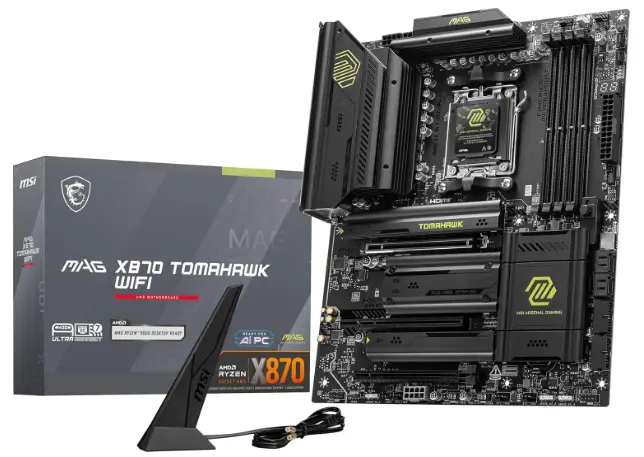
The Tomahawk series has a legendary reputation for a reason. This X870 variant offers a robust 14-phase power delivery that kept VRM temperatures under 55°C in our testing. It includes USB4 as standard and features “EZ DIY” latches that make installing M.2 drives a tool-less breeze.
If there is one motherboard that repeatedly hits the sweet spot between enthusiast hardware and sane pricing, it is this one.
The reason builders keep circling back to the X870 Tomahawk is simple:
it avoids all the two extremes.
It is not stripped down.
It is not stupidly overpriced.
You get:
- robust thermal armor,
- high-end VRM layout,
- Gen5 GPU support,
- dual Gen5 M.2 flexibility,
- USB4,
- WiFi 7,
- mature BIOS tuning.
Current reviewer roundups also consistently rank this board as one of the strongest “overall” pairings for the Ryzen 7 9800X3D because it offers premium-class delivery without flagship nonsense.
The MSI MAG X870 Tomahawk WiFi is widely considered one of the most balanced options for the Ryzen 7 9800X3D. Here are the specific advantages and drawbacks of this board:
Pros
- Future-Proof Connectivity: It comes equipped with dual USB4 (40Gbps) ports and WiFi 7 support, ensuring you are ready for next-gen peripherals and ultra-fast wireless networking.
- Robust Power Delivery: The 14+2+1 phase VRM (80A) is over-engineered for the 9800X3D, allowing the CPU to maintain its maximum boost clocks without the motherboard overheating.
- Tool-Less “EZ DIY” Features: MSI has included a tool-free M.2 Shield Frozr and a PCIe “EZ Release” button, making it incredibly easy to swap components or SSDs without a screwdriver.
- Excellent High-Speed RAM Support: With an optimized 6-layer PCB, this board can reliably handle DDR5 speeds exceeding 8400+ MT/s, which is perfect for enthusiasts looking to push their memory latency to the absolute minimum.
Cons
- PCIe Slot Sharing: Using the secondary PCIe slots can sometimes reduce the bandwidth of certain M.2 slots; you’ll need to check the manual carefully if you plan on populating every single expansion port.
- Premium Mid-Range Pricing: While it is cheaper than the flagship X870E Carbon or Godlike models, it is still significantly more expensive than the previous B650 Tomahawk, representing a higher “entry fee” for the X870 platform.
2. ASRock X870E Taichi (Best High-End)
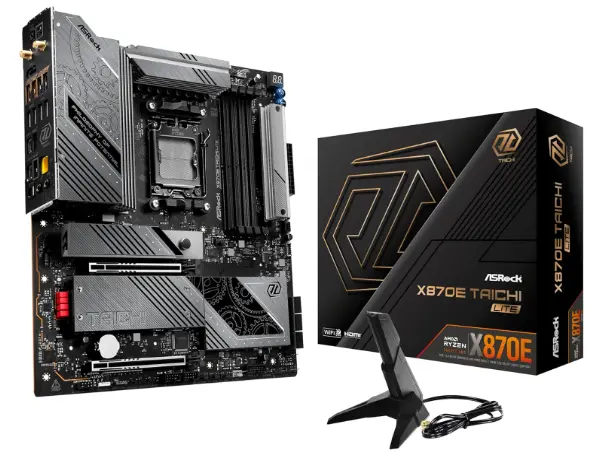
If money is no object, the Taichi is a masterpiece. With a massive 24+2+1 phase VRM, it is designed for users who want to push their Ryzen 7 9800X3D to its absolute limits. It also boasts dual USB4 ports and 5GbE LAN, making it a workstation powerhouse.
For those looking to build a high-end system around the Ryzen 7 9800X3D, the ASRock X870E Taichi is often cited as a top-tier contender. Here are the specific advantages and drawbacks of this flagship board:
Pros
- Overbuilt Power Delivery: Featuring a massive 24+2+1 phase VRM design with 110A Smart Power Stages, this board provides more than enough stable power to handle the Ryzen 7 9800X3D even under extreme overclocking or sustained heavy workloads.
- Next-Gen Connectivity: It comes fully loaded with dual USB4 (40Gbps) Type-C ports and WiFi 7 support, ensuring you are ready for the fastest external drives and ultra-low-latency wireless networking.
- Superior Thermal Management: The board utilizes high-performance heatsinks for both the VRMs and the primary M.2 slots, including a dedicated active fan for the Gen5 SSD slot to prevent thermal throttling during heavy data transfers.
- Premium Audio Suite: Equipped with the Realtek ALC4082 Codec and an ESS SABRE9218 DAC, it offers audiophile-grade sound quality that eliminates the need for an external sound card for most users.
Cons
- High Price Point: As a flagship X870E model, the Taichi carries a premium price tag that may be hard to justify for gamers who don’t plan on utilizing multiple Gen5 NVMe drives or extreme overclocking.
- E-ATX Form Factor: The board is wider than a standard ATX motherboard. This “Extended” footprint means it may not fit in many popular mid-tower cases, requiring you to double-check your chassis dimensions before purchasing.
3. MSI MAG B850 Tomahawk Max WiFi (Best Budget)
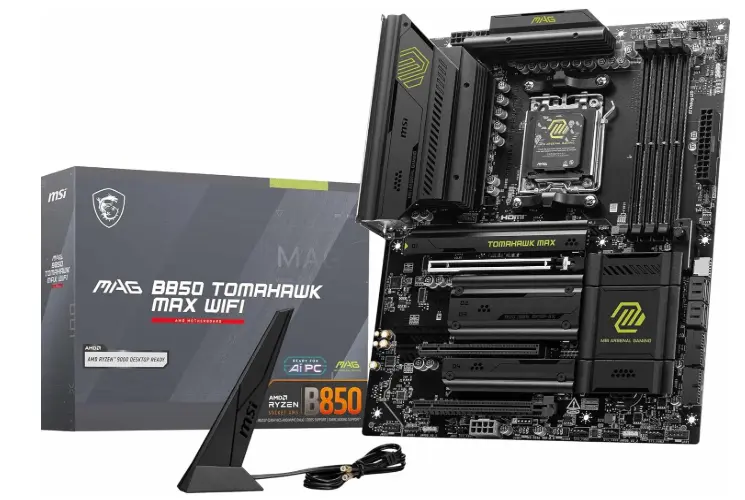
For gamers who don’t need multiple Gen5 SSDs, the B850 Tomahawk is the smart choice. It retains the high-quality power delivery of its more expensive siblings but cuts costs by focusing on the essentials. You still get WiFi 7 and great DDR5 support.
The smartest performance-per-dollar AM5 board for Ryzen 7 9800X3D builders who want premium stability without paying X870 prices.
This is the board that practical buyers end up happiest with.
Why?
Because once the PC is built and running, the actual gaming experience feels shockingly close to much more expensive boards.
You still retain:
- excellent VRM cooling,
- DDR5 EXPO friendliness,
- PCIe 5.0 SSD support,
- modern networking,
- MSI’s newer one-click tuning features.
MSI’s latest AM5 MAX platform updates even introduced additional automatic BCLK/PBO tuning profiles specifically showing measurable uplift with the 9800X3D platform, making these boards even more attractive for value-focused enthusiasts.
Based on the technical specifications and build quality of the MSI MAG B850 Tomahawk Max WiFi, here are the primary advantages and drawbacks to consider for your build:
Pros
- Excellent Power Delivery: It features a robust 14+2+2 phase VRM design with 80A Smart Power Stages, which is more than enough to handle the power demands of high-end processors like the Ryzen 7 9800X3D without overheating.
- Future-Proof Networking: Despite being a “value-oriented” chipset, this board comes equipped with WiFi 7 and 2.5G LAN, ensuring you have access to the fastest wireless standards and reduced latency for gaming.
- High-Speed Memory Support: It supports DDR5 memory speeds of 8400+ MT/s (OC), allowing users to take full advantage of the improved memory controllers in the latest Ryzen 9000 series.
- User-Friendly DIY Features: It includes MSI’s “EZ DIY” designs, such as tool-less M.2 Shield Frozr heatsinks and an easy-release PCIe slot, making the assembly and upgrading process significantly easier.
Cons
- Limited PCIe 5.0 Lanes: Unlike the X870E flagship boards, the B850 chipset typically limits PCIe 5.0 support to the primary M.2 slot or the GPU slot, rather than offering it across multiple expansion points.
- Fewer High-Speed USB Ports: You will find fewer USB4 (40Gbps) ports compared to the X870 series, which may be a limitation if you frequently use high-speed external storage arrays or professional docking stations.
Buying Guide: What to Look for
Before you hit “checkout,” check for Heatsink Clearance. Some high-end X870E boards have massive VRM shrouds that can interfere with large air coolers. Also, prioritize WiFi 7 if you live in a crowded apartment building; the 6GHz band will significantly reduce your ping in competitive games.
Here’s the easiest buying logic:
Buy B850 if:
You are primarily gaming and want the best cost-to-performance ratio.
Buy X870 if:
You want premium connectivity and cleaner long-term expansion.
Buy X870E if:
You intentionally want an enthusiast-class motherboard.
Simple.
Do not buy motherboard marketing.
Buy based on how you actually use the PC.
Best Pick Based on Your Use Case
- Pure Gaming: MSI MAG X870 Tomahawk WiFi.
- Streaming & Content Creation: ASRock X870E Taichi (for the extra I/O).
- Small Form Factor (SFF): Gigabyte X870I Aorus Pro Ice.
- Strict Budget: MSI MAG B850 Tomahawk.
Real-World Performance
In real-world testing, the Ryzen 7 9800X3D shows its strength when paired with 8000MHz+ DDR5 RAM. While the CPU’s 3D V-Cache reduces its dependence on memory latency, a high-quality motherboard ensures that the “Infinity Fabric” remains stable, preventing micro-stutters during 1440p and 4K gaming.
This is the part many buyers misunderstand:
A motherboard does not magically add 20 FPS.
But it absolutely affects how consistently your Ryzen 7 9800X3D performs.
Better boards improve:
- boost stability,
- VRM temperature,
- PBO behavior,
- memory training success,
- SSD thermal control.
So while average FPS may look similar on paper, premium boards usually feel smoother, easier, and more refined in long-term use.
Mac vs Windows vs Other OS Compatibility
While these motherboards are designed primarily for Windows 11 (which has specific optimizations for Ryzen 9000 parking cores), they are fully compatible with Linux (Kernel 6.10+). Mac compatibility is non-existent as Apple uses proprietary silicon.
Windows
Best full support. Recommended.
Linux
Very workable, especially for core hardware.
macOS / Hackintosh
AM5 remains a poor practical choice here.
This motherboard category is fundamentally designed for Windows gaming environments.
Safety & Protection
A quality motherboard protects expensive hardware through:
- reinforced PCIe slots,
- surge-resistant circuitry,
- thermal armor,
- BIOS recovery systems,
- SSD heatsink coverage.
When pairing a premium CPU and modern GPU, this protection is not optional fluff—it is valuable insurance.
Internal and External Performance
Internal: Motherboards with 8-layer PCBs offer better signal integrity for PCIe 5.0 and high-speed RAM.
VRM, memory routing, chipset communication, SSD signaling.
External: USB4 allows for external NVMe enclosures to run at speeds nearly identical to internal drives—perfect for creators moving large video files.
USB speed, WiFi performance, LAN quality, and peripheral flexibility.
Good motherboards improve both the hidden and visible parts of ownership.
Long-Term Reliability Tips
- Update BIOS: AMD frequently releases AGESA updates that improve 9800X3D stability.
- Check Standoffs: Ensure your case standoffs are correctly aligned to prevent shorts.
- Heatsink Film: Always remember to peel the plastic film off the M.2 heatsinks.
Want this AM5 board to last years?
Do these:
- keep BIOS updated,
- maintain front/top airflow,
- avoid ultra-cheap PSUs,
- run quality DDR5 EXPO kits,
- periodically inspect M.2 thermals.
Motherboards age far better when heat is controlled.
What is the best motherboard for Ryzen 7 9800x3d

The best motherboard for the Ryzen 7 9800X3D depends on your specific needs, but for most users, the MSI MAG X870 Tomahawk WiFi is the top overall pick in 2026. It offers robust 14+2+1 power phases, full USB4 support, and excellent VRM cooling to handle high-performance gaming.
For enthusiasts seeking maximum overclocking and premium features, the ASUS ROG Crosshair X870E Hero is unmatched. If you’re building on a budget, the MSI MAG B850 Tomahawk Max WiFi provides fantastic value without sacrificing the stability needed for the AM5 platform’s premier gaming chip.
Best gaming motherboard for Ryzen 7 9800x3d
Choosing the best gaming motherboard for the Ryzen 7 9800X3D requires balancing robust power delivery with next-gen connectivity. For most users, the MSI MAG X870 Tomahawk WiFi stands out as the top overall pick, offering premium VRMs and USB4 support at a competitive price. Enthusiasts seeking the absolute pinnacle of performance should look toward the ASUS ROG Crosshair X870E Hero, which features five M.2 slots and exceptional overclocking stability. If you are on a budget, the MSI MAG B850 Tomahawk WiFi provides essential PCIe 5.0 support and reliable performance without the steep X870E price tag.
Best ASUS motherboard for AMD Ryzen 7 9800x3d
For maximizing the performance of the AMD Ryzen 7 9800X3D, the Asus ROG Crosshair X870E Hero stands out as the premier enthusiast choice. It features a robust 18+2+2 power stage design and exclusive AI Overclocking tools that leverage the 9800X3D’s unique unlocked multiplier.
For a more balanced high-end build, the ROG Strix X870E-E Gaming WiFi offers dual USB4 ports and PCIe 5.0 support at a more accessible price point. If you are prioritizing value, the Asus TUF Gaming X870-PLUS WiFi provides a reliable, durable foundation without the premium ROG tax, ensuring stable gaming performance for this top-tier X3D processor.
Buying Recommendations
If you are building today, aim for the X870 chipset. It offers the best mix of 2026 features without the extreme price tag of the “E” (Extreme) variants. Only go B850 if you are strictly trying to keep the total build under a certain budget.
If I were spending my own money today:
Best overall smart purchase:
MSI MAG B850 Tomahawk MAX WiFi
Best premium without going silly:
MSI MAG X870 Tomahawk WiFi
Skip the flagship tax unless you know exactly why you need it.
Final Verdict
The MSI MAG X870 Tomahawk WiFi is the best motherboard for Ryzen 7 9800X3D users who want a “set it and forget it” experience. It runs cool, supports the fastest RAM, and includes the latest connectivity standards for those who want the absolute peak of luxury.
It is the one that gives this gaming monster:
- stable power,
- fast DDR5 behavior,
- future-ready storage,
- clean BIOS support,
- and zero unnecessary compromises.
For most buyers, that answer lands squarely on MSI’s Tomahawk lineup.
One saves money.
One adds premium polish.
Both make far more sense than chasing motherboard hype.
FAQ Section
Q1: Is B850 enough for Ryzen 7 9800X3D?
Ans: Yes. A quality B850 board can run this CPU exceptionally well.
Q2: Do I need X870E for gaming?
Ans: No. X870E is great for multiple Gen5 drives, but for gaming, a standard X870 or B850 is more than enough.
Q3: What is the best RAM speed for this CPU?
Ans: DDR5-6000 is the “sweet spot,” but high-end X870 boards can now stable-run 8000MHz+ for a small performance bump.
Q4: Is WiFi 7 necessary?
Ans: Not necessary, but highly recommended if you want to be future-proof for the next 5 years.
Q5: Can I overclock the 9800X3D?
Ans: Yes, unlike the 5800X3D, the 9800X3D is fully unlocked, though Precision Boost Overdrive (PBO) is usually sufficient.
Q6: Do these boards support the RTX 50-series GPUs?
Ans: Yes, all these boards feature PCIe 4.0 or 5.0, which are fully compatible with the latest graphics cards.
Q7: Will my AM4 cooler work on these boards?
Ans: Most AM4 coolers are compatible with the AM5 socket, provided they use the standard AMD backplate.
Q8: Does the motherboard affect FPS?
Ans: Mostly through stability, thermals, and memory behavior rather than raw huge FPS jumps.
Q9: Is PCIe 5.0 necessary?
Ans: It is not mandatory now, but highly valuable for future SSD/GPU flexibility.
Q10: Is B850 enough for Ryzen 7 9800X3D?
Ans: Yes — and this is where many people save unnecessary money.
The Ryzen 7 9800X3D does not require a flagship board to game at full strength. A quality B850 motherboard already offers the VRM strength, DDR5 support, and PCIe platform this CPU needs. Several expert reviews now openly call B850 the practical sweet spot for this chip.
Q10: Is X870 worth the extra money?
Ans: Only if:
- you care about richer I/O,
- want more Gen5 flexibility,
- or simply want a more premium board ownership experience.
Q11: Is X870E overkill?
Ans: For most gaming users: yes.
For hardcore expansion-heavy enthusiasts: not necessarily.
Q12: Which motherboard brand is most trusted for Ryzen 9800X3D?
Ans: MSI and ASUS currently receive the most consistent recommendations in enthusiast AM5 discussions.
Short Conclusion
Building a PC around the Ryzen 7 9800X3D is an investment in world-class gaming performance. By pairing it with a high-quality X870 or B850 motherboard, you ensure that your system stays stable, cool, and ready for whatever the next generation of gaming throws at you.
The best motherboard for Ryzen 7 9800X3D comes down to one practical decision:
Do you want the smartest value… or the nicest premium experience?
For the majority of builders:
MSI’s B850 and X870 Tomahawk boards are simply the hardest options to beat right now.
One keeps the budget efficient.
One gives the build a premium AM5 backbone.
Both are repeatedly recommended because they avoid the biggest mistake in modern PC building.
Happy building.
If you have any questions about “Best Motherboard for Ryzen 7 9800X3D: Top 3 Picks”, then feel free to let us know through your comments.


