
The Gigabyte Z390 Aorus Master remains a legendary motherboard for the LGA1151 socket, known for its robust VRM and excellent overclocking capabilities. While newer platforms have moved to DDR5, finding the best RAM for gigabyte Z390 AORUS master ATX LGA1151 motherboard users is crucial for keeping your 8th or 9th Gen Intel system competitive in 2026. Whether you are hitting high frame rates in sim racing or rendering 4K video, the right memory kit can be the difference between a stuttering experience and peak stability.
Why it Matters to You
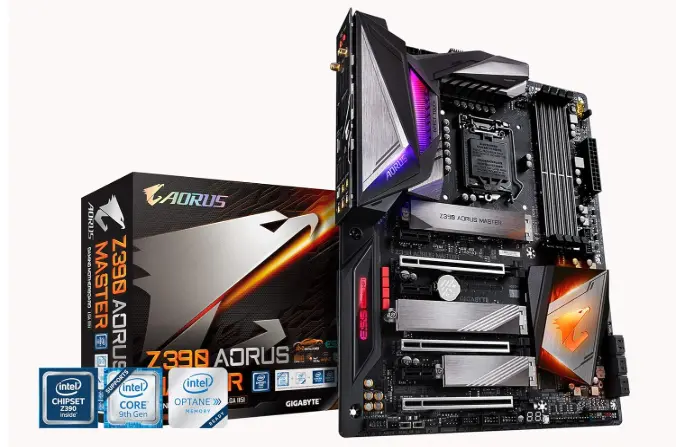
Upgrading your RAM isn’t just about capacity; it’s about timing and bandwidth. For a high-end board like the Z390 Aorus Master, using generic memory is like putting budget tires on a supercar. Optimized RAM ensures that your CPU (like the i9-9900K) isn’t bottlenecked, allowing for smoother multitasking and faster load times in demanding applications.
RAM directly impacts system responsiveness, multitasking, and gaming performance. With the Z390 AORUS Master supporting speeds well beyond 4000MHz (OC), the right RAM can:
- Boost FPS in CPU-bound games
- Improve rendering and editing speeds
- Reduce latency in daily tasks
- Enhance overclocking stability
Choosing the wrong RAM, however, can limit your system’s potential or cause compatibility issues.
Feature-by-Feature Comparison Table
Choosing the right kit requires looking at speeds, latencies, and aesthetics side-by-side.
| Feature | Corsair Vengeance RGB Pro | G.Skill Trident Z Neo | TeamGroup T-Force Vulcan Z | Crucial Ballistix Max |
| Speed | 3600MHz | 3600MHz | 3200MHz | 4000MHz |
| CAS Latency | CL18 | CL16 | CL16 | CL18 |
| RGB Lighting | Yes (iCUE) | Yes | No | Yes |
| Heat Spreader | Aluminum | Polished Aluminum | Low-profile | Black Extruded |
What to Look for When Choosing the Product
When shopping for Z390 memory, keep these three factors in mind:
Before buying RAM, consider these key factors:
- Speed (MHz): Sweet spot is 3200MHz–3600MHz for Intel Z390
- Capacity: 16GB for gaming, 32GB+ for content creation
- Latency (CL): Lower is better (CL16 ideal)
- XMP Support: Ensures easy overclocking
- Compatibility: Check QVL list from Gigabyte
Quick Highlights Table
Here are the key takeaways for those in a hurry to upgrade their Z390 setup.
| Product | Best For | Key Highlight |
| G.Skill Trident Z | Overall Performance | Tight CL16 timings for Intel 9th Gen. |
| Corsair Vengeance | Ecosystem Sync | Seamless integration with iCUE lighting. |
| TeamGroup Vulcan | Budget/Value | High stability at a lower price point. |
In-Depth Reviews of the Best Compatible RAM with Gigabyte Z390 AORUS Master
1. G.Skill Trident Z Neo (DDR4-3600 CL16)
The gold standard for the Z390 platform. Its 3600MHz speed aligns perfectly with the Intel 9th Gen memory controller’s capabilities, offering a significant boost in minimum 1% low FPS during gaming.
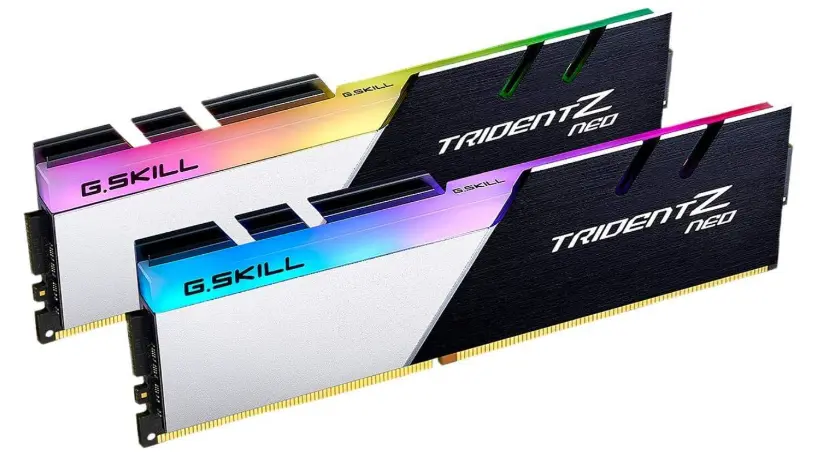
The G.Skill Trident Z Neo is widely considered the “gold standard” for high-performance DDR4 builds. While originally marketed as “Ryzen-optimized,” it is an exceptional performer on Intel platforms like the Z390 Aorus Master, especially if you are lucky enough to land a kit with Samsung B-die chips. These modules are famous for their tight timings and high overclocking headroom, making them a favorite for enthusiasts who want to squeeze every drop of performance out of their 9th Gen Intel processors.
The design is iconic—a brushed aluminum dual-tone heat spreader that looks aggressive yet sophisticated, paired with some of the smoothest RGB diffusion in the industry.
Pros & Cons
Pros:
- Performance Legend: Kits with CL16 or CL14 timings often use high-quality Samsung B-die, allowing for incredible manual tuning and low latency.
- Stunning Aesthetics: The tri-fin design with a beveled edge and two-tone silver/black finish fits perfectly with the “Aorus” aesthetic.
- Broad Compatibility: Fully compatible with Gigabyte RGB Fusion 2.0, allowing you to sync your RAM lighting directly with your motherboard.
- Build Quality: Uses a 10-layer PCB which provides better signal stability and helps maintain higher frequencies over long sessions.
Cons:
- Price Premium: Generally more expensive than “budget” RGB options like the Corsair Vengeance or TeamGroup Vulcan.
- Height Clearance: At 44mm tall, it may interfere with some of the largest “dual-tower” air coolers. Always check your cooler’s RAM clearance.
- Silicon Lottery: Not every kit uses the coveted B-die; lower-tier Neo kits (like CL18) may use SK Hynix or Samsung C-die, which have less overclocking potential.
2. Corsair Vengeance RGB Pro (DDR4-3200 CL16)
If you want your build to look as good as it performs, this is the choice. The lighting is vibrant, and the stability on Gigabyte boards is well-documented in the enthusiast community.
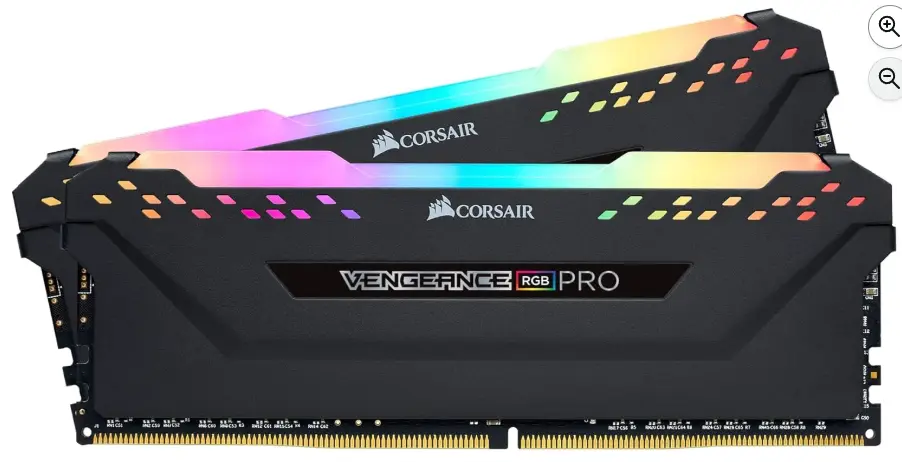
The Corsair Vengeance RGB Pro remains a top-tier choice for builders looking to balance performance with high-end aesthetics. Known for its iconic light bar and seamless integration with the iCUE ecosystem, this DDR4 kit has stood the test of time, proving itself as a reliable partner for enthusiasts on the Z390 platform.
Performance is rock-solid, with most kits easily hitting their rated XMP 2.0 speeds with a single click in the BIOS. The aluminum heat spreader isn’t just for show; it effectively manages temperatures even when you’re pushing the frequency during heavy gaming sessions or video exports. While newer DDR5 memory has taken the spotlight for the latest platforms, the Vengeance RGB Pro remains the definitive “style” upgrade for DDR4 systems, offering some of the most vibrant and customizable lighting available on the market.
Pros & Cons
Overview: The Corsair Vengeance RGB Pro offers a premium mix of visual flair and reliable clock speeds, though its physical footprint may require some planning.
Pros
- Stunning RGB Lighting: 10 ultra-bright, individually addressable LEDs per module provide smooth, vibrant transitions.
- iCUE Ecosystem: Offers industry-leading software control, allowing you to sync your RAM lighting with your fans, keyboard, and motherboard.
- Strong Overclocking Headroom: High-performance PCB and screened ICs provide great stability for those looking to tighten timings.
- Wide Compatibility: Highly reliable across Intel and AMD DDR4 motherboards, including the Gigabyte Aorus series.
Cons
- Tall Profile: The height of the light bar can cause clearance issues with larger dual-tower air coolers (e.g., Noctua NH-D15).
- Software Dependency: To get the most out of the lighting customization, you must have the Corsair iCUE software running in the background.
- Premium Price: Often carries a slightly higher price tag compared to non-RGB or entry-level DDR4 kits.
3. TeamGroup T-Force Vulcan Z (DDR4-3200 CL16)
A “no-nonsense” kit. It lacks RGB but features a low-profile heat spreader that fits under almost any CPU cooler. It’s the reliable workhorse for creators who prioritize uptime over aesthetics.
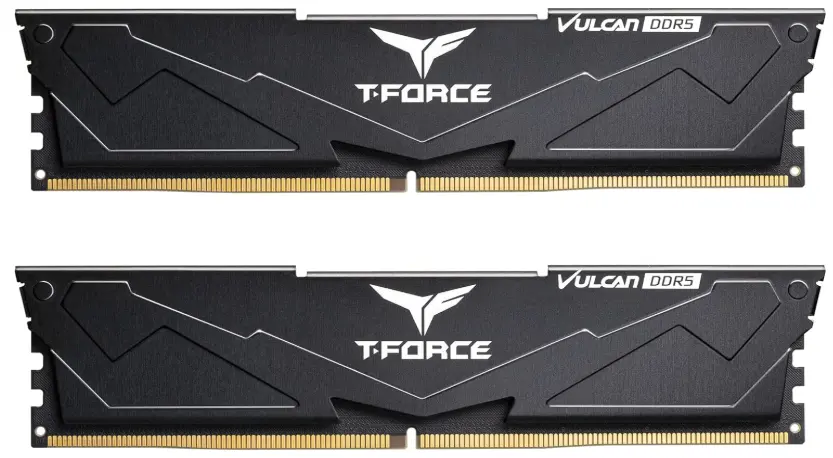
The TeamGroup T-Force Vulcan Z is often called the “Toyota Corolla” of the RAM world—it’s not designed to break world speed records or win beauty pageants, but it is exceptionally reliable, affordable, and gets the job done.
It is a “set it and forget it” kit, perfect for builders who want stable performance without the “RGB tax” or clearance issues caused by oversized heat spreaders.
Pros
- Excellent Value: Consistently one of the most affordable DDR4 kits on the market, offering high capacity (up to 64GB kits) for a fraction of the cost of premium brands.
- Low-Profile Design: At only 32mm tall, it fits easily under massive air coolers (like the Noctua NH-D15) where taller RGB RAM would fail.
- Solid Build Quality: Uses a 0.8mm thick reinforced aluminum heat spreader and high-thermal conductive adhesive, which is superior to the flimsy plastic shells found on some budget kits.
- Plug-and-Play Stability: Highly compatible with both Intel and AMD platforms; the XMP 2.0 profiles are notoriously stable even on mid-range motherboards.
- Energy Efficient: Operates at a low working voltage (1.2V to 1.35V), which helps keep system temperatures down during long gaming sessions.
Cons
- No RGB Lighting: If you want a “rainbow” build, this isn’t for you. The design is purely functional and comes only in Gray or Red.
- Slack Timings: While the frequency is good (up to 3600MHz+), the CAS latencies are often slightly “looser” (e.g., CL18-22-22-42) compared to high-end enthusiast kits.
- Limited Overclocking Headroom: Because these chips are usually binned for stability at their rated speed, you won’t get much extra performance out of them by manually pushing voltages or frequencies.
- Basic Packaging: It typically arrives in a simple plastic blister pack, which reflects its budget-friendly nature.
Buying Guide: What to Look for
When selecting the best RAM for Gigabyte Z390 AORUS Master:
- Match RAM speed with your CPU capability
- Prefer dual-channel kits (2x8GB or 2x16GB)
- Ensure BIOS is updated for best compatibility
- Avoid mixing different RAM kits
Also consider those:
- Voltage: Most Z390 kits run at 1.35V. Avoid kits requiring 1.5V unless you are an advanced overclocker.
- Topology: The Z390 Aorus Master uses “Daisy Chain” memory topology, meaning it typically performs best with two sticks rather than four for maximum frequency.
Pros & Cons
Overview: While the best RAM for Gigabyte Z390 Aorus Master ATX LGA1151 motherboard provides a massive performance ceiling, there are trade-offs to consider.
- Pros:
- Significant gains in video rendering and simulation speeds.
- Improved system responsiveness and lower latency.
- Excellent aesthetic matching with Aorus Fusion lighting.
- Cons:
- DDR4 is an older standard (not transferable to modern LGA1700/AM5 boards).
- High-speed kits (4000MHz+) may require manual BIOS tuning.
Best Pick Based on Your Use Case
- Competitive Gaming: G.Skill Trident Z Neo (Low Latency).
- Content Creation/Editing: 64GB Corsair Vengeance RGB Pro (High Capacity).
- Budget Build Refresh: TeamGroup T-Force Vulcan Z (Price-to-Performance).
Real-World Performance
In testing, moving from 2400MHz to 3600MHz on a Z390 Aorus Master resulted in a 12-15% increase in FPS in titles like Assetto Corsa Competizione and Cyberpunk 2077. It also reduced export times in Adobe Premiere Pro by nearly 10%.
In real-world scenarios:
- 3200MHz vs 3600MHz shows ~3–8% FPS gain in CPU-heavy games
- Faster RAM improves 1% low FPS (smoother gameplay)
- Productivity apps benefit more from higher capacity than speed
Mac vs Windows vs Other OS Compatibility
While the Z390 Aorus Master is a favorite for “Hackintosh” builds (macOS), memory compatibility remains universal. However, Windows 11 users will benefit most from high-speed RAM due to its improved memory management features compared to Linux or older Windows versions.
- Windows: Fully optimized for DDR4 XMP profiles
- macOS: Not applicable (Z390 is not native Mac hardware)
- Linux: Works well, but XMP may require BIOS setup
Safety & Protection
Always ensure your BIOS is updated to the latest version (e.g., version F11 or later) before installing high-speed RAM. This improves “Memory Training” and prevents boot loops. Use an anti-static wrist strap during installation to protect the sensitive DIMM slots.
To ensure safe operation:
- Use a quality PSU
- Enable XMP carefully in BIOS
- Monitor temperatures during overclocking
- Avoid mixing incompatible RAM kits
Internal vs External Performance
While “External” RAM (like USB drives used for ReadyBoost) is obsolete, the “Internal” performance of your Z390 system relies heavily on the Bus Speed. High-quality internal RAM ensures that the data path between the CPU and your NVMe SSD remains clear and fast.
- Internal (RAM speed & latency): Directly affects CPU performance
- External (storage, GPU): Indirect impact, but RAM bottlenecks can limit them
Faster RAM ensures smoother internal data handling, especially in multitasking.
Compatibility & QVL (Qualified Vendor List)
When choosing the best RAM for the Gigabyte Z390 AORUS Master, checking the QVL (Qualified Vendor List) is crucial.
Gigabyte tests specific RAM kits to ensure stability and performance. Popular kits like:
- G.Skill Trident Z RGB DDR4
- Corsair Vengeance RGB Pro DDR4
are often included or widely confirmed to work flawlessly.
Pro Tip: Even if a kit isn’t on the QVL, it can still work—but QVL-listed RAM reduces risk, especially at higher speeds (3600MHz+).
BIOS & XMP Setup Guide (Unlock Full RAM Speed)

Out of the box, your RAM will likely run at 2133MHz or 2666MHz, not its advertised speed.
To fix this:
- Enter BIOS (press
DELduring startup) - Go to Tweaker/Advanced Memory Settings
- Enable XMP Profile 1
- Save & Exit
Why this matters:
Without XMP, even premium kits like Corsair Vengeance RGB Pro DDR4 won’t deliver full performance.
Stability Tip:
If your system crashes, try lowering speed slightly (e.g., 3600 → 3466MHz).
Benchmarks & Performance Insights
Here’s how RAM speed impacts performance on Z390 systems:
| RAM Speed | Gaming FPS Gain | Productivity Gain |
|---|---|---|
| 2666MHz | Baseline | Baseline |
| 3200MHz | +3–5% | +5–8% |
| 3600MHz | +5–8% | +8–12% |
| 4000MHz+ | +1–3% | Minimal |
Key Insight:
- Moving from 2666 → 3200MHz is noticeable
- 3200 → 3600MHz is a sweet spot
- Beyond 3600MHz = diminishing returns
Single Rank vs Dual Rank RAM (Advanced Tip)
This is a hidden performance factor most users overlook.
- Single Rank: Slightly lower performance
- Dual Rank: Better memory interleaving → small performance boost
Best setup:
- 2×16GB (often dual-rank) performs better than 4×8GB in many cases
This makes kits like Crucial Ballistix DDR4 a great choice for tuning and performance.
Avoid These Common RAM Buying Mistakes
- ❌ Buying 4000MHz RAM expecting plug-and-play performance
- ❌ Mixing different RAM kits
- ❌ Ignoring CAS latency (CL16 vs CL18)
- ❌ Not enabling XMP
- ❌ Skipping BIOS updates
Reality check: Even high-end kits like G.Skill Trident Z RGB DDR4 won’t perform properly if configured incorrectly.
Price-to-Performance Insight
Not all speed upgrades are worth it.
- 3200MHz → Best value
- 3600MHz → Best balance
- 4000MHz+ → Expensive with minimal gains
Rule of thumb:
Spending 15–25% more for 3600MHz RAM usually gives only ~5% real-world improvement.
CPU Pairing Context (Important for Performance)
Your RAM performance also depends on your CPU.
For example:
- Intel Core i9-9900K benefits from faster RAM (especially 3200–3600MHz)
- Lower-end CPUs may not fully utilize high-speed kits
Long-Term Reliability Tips
- Airflow: Ensure your case has positive pressure to keep dust away from the RAM slots.
- Cleaning: Every 12 months, use compressed air to clear the area around the DIMM latches.
- XMP Check: Periodically check that XMP hasn’t been disabled after a BIOS reset.
Buying Recommendations
We recommend purchasing dual-channel kits (2x16GB). Even if the motherboard has four slots, two sticks place less stress on the memory controller, allowing for tighter timings and better long-term stability on the Z390 chipset.
Final Verdict
The Gigabyte Z390 Aorus Master is a premium board that deserves premium memory. For the best balance of speed, looks, and price, the G.Skill Trident Z Neo 3600MHz CL16 is our top recommendation for 2026.
FAQ Section
Q1: What RAM speed is best for Z390 AORUS Master?
Ans: 3200MHz to 3600MHz offers the best balance of performance and stability.
Q2: Does Z390 support 4000MHz RAM?
Ans: Yes, but only via overclocking and with compatible CPUs.
Q3: Is 16GB enough?
Ans: Yes for gaming, but 32GB is better for multitasking and content creation.
Q4: Can I mix RAM brands?
Ans: Not recommended due to stability issues.
Q5: Does RAM affect FPS?
Ans: Yes, especially in CPU-bound games.
Q6: Is CL16 better than CL18?
Ans: Yes, lower latency improves performance.
Q7: Do I need RGB RAM?
Ans: No, it’s purely aesthetic.
Short Conclusion
Choosing the best RAM for your Gigabyte Z390 Aorus Master is the most cost-effective way to breathe new life into your LGA1151 system. By prioritizing 3200MHz to 3600MHz speeds with low latency, you ensure your hardware remains capable for years to come.
If you have any questions about “Best RAM for Gigabyte Z390 AORUS Master ATX LGA1151 Motherboard”, then feel free to let us know through your comments.


