
The Samsung 990 Pro is one of the fastest PCIe 4.0 NVMe SSDs available, but pairing it with the wrong enclosure can bottleneck its performance. Many users drop a premium SSD into a cheap 10Gbps case and don’t realize their drive is running at 1/5th its potential speed.
To fully unlock the 990 Pro, you need:
- USB4 or Thunderbolt 3/4/5
- Good thermal design
- Reliable controller chipset
- Stable sustained transfer speeds
This guide covers the Best Enclosure for Samsung 990 Pro, real-world performance notes, pros & cons, and buying recommendations.
Why the Enclosure Matters for the Samsung 990 Pro
The Samsung 990 Pro is a blazing-fast PCIe 4.0 NVMe SSD. To get meaningful performance from it in an external setup, your enclosure needs to support high bandwidth — ideally USB4 or Thunderbolt. If you pair the 990 Pro with a slow enclosure (e.g., a 10 Gbps USB 3.2 Gen 2 case), you’ll bottleneck the SSD severely, negating much of its advantage.
On top of speed, thermal management is also critical. High-performance SSDs generate a lot of heat, and in an external enclosure, poor cooling can lead to throttling or instability. So choosing a quality enclosure becomes a balancing act between speed, cooling, and compatibility.
Feature-by-Feature Comparison Table
| Feature | OWC Express 1M2 | ACASIS 40Gbps | TESmart X5 Pro |
|---|---|---|---|
| Interface | USB4 (40Gbps) | USB4 / TB3 / TB4 (40Gbps) | Thunderbolt 5 (80Gbps) |
| Max Speed | 2,600–2,900 MB/s | 2,400–2,800 MB/s | 6,000–7,000 MB/s |
| Cooling | Passive aluminum | Passive / Fan (Pro version) | Active fan |
| Ideal Use | General high-speed use | Best for budget + speed | 8K editing, pro users |
| Installation | Tool-free | Tool-free | Screw-based |
| Heat Handling | Very good | Good | Excellent |
| Price | Mid | Low–Mid | High |
What to Look for When Choosing an Enclosure for the 990 Pro
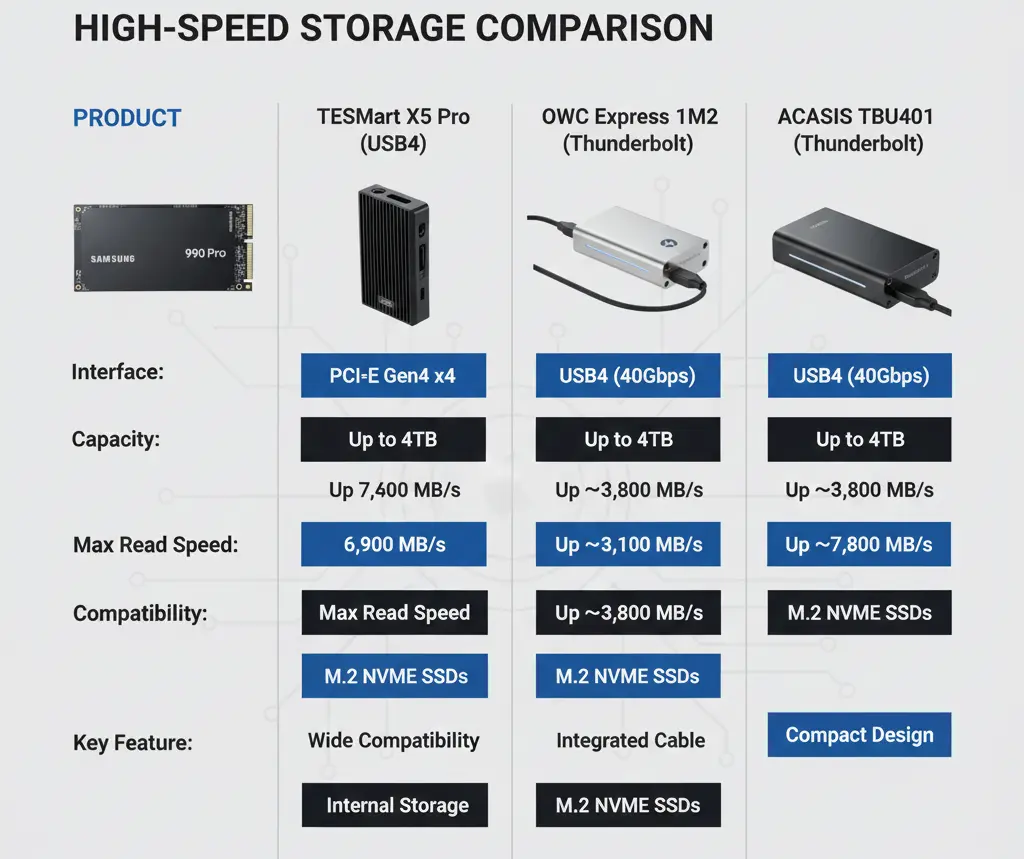
Here are some key criteria to consider:
- Chipset / Controller – Look for enclosures with modern bridge chips (e.g., Intel JHL-series for Thunderbolt, good USB4 controllers) that can handle 40 Gbps or more.
- Cooling – Passive (thermal pads + aluminum body) or active (fans) cooling is very helpful to sustain performance.
- Form Factor – The 990 Pro is an M.2 2280 form factor, so make sure the enclosure supports that.
- Interface Compatibility – Ensure that the enclosure supports the ports on your host device (USB4, Thunderbolt 3/4, etc).
- Reliability – Real-world user feedback is useful. For instance, can the enclosure reliably stay at full link speed, or do people report drops?
Quick Highlights Table
| Category | Winner |
|---|---|
| Best Overall Performance | TESmart X5 Pro |
| Best for USB4 Users | OWC Express 1M2 |
| Best Budget 40Gbps Option | ACASIS USB4/TB4 |
| Best Passive Cooling | OWC Express 1M2 |
| Best for Long Transfers (no throttling) | TESmart X5 Pro |
In-Depth Reviews the Best Enclosure for Samsung 990 Pro
1. OWC Express 1M2 – Best USB4 Enclosure (Most Balanced)

The OWC Express 1M2 is the ideal choice for most users with USB4-supported laptops. It’s well-built, thermally efficient, and very reliable.
What Makes It Great
- Full 40Gbps USB4 support
- Clean aluminum unibody for passive cooling
- Great for MacBook Pro, Windows USB4 laptops
Drawbacks
- Some systems drop to lower speeds with bad cables
Verdict:
A rock-solid, everyday high-speed enclosure with excellent reliability.
2. ACASIS USB4 / Thunderbolt Compatible – Best Value
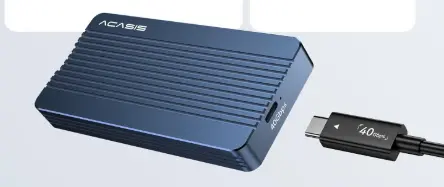
ACASIS produces some of the best budget high-speed enclosures. Their 40Gbps model is ideal for those who want performance without paying premium prices.
What’s Good
- Affordable
- Fast (40Gbps)
- Pro version includes cooling fan
- Tool-free installation
Drawbacks
- Can run warm during long transfers
- Fan behavior may vary
Verdict:
Best budget-friendly enclosure that can still do justice to the 990 Pro.
3. TESmart X5 Pro – Fastest Enclosure for Samsung 990 Pro (Thunderbolt 5)
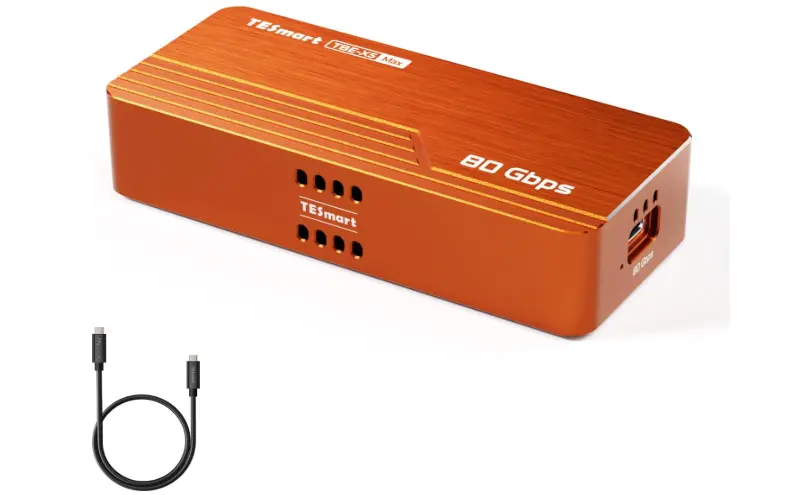
If you want to max out the speed of your Samsung 990 Pro, the TESmart X5 Pro is as fast as it gets. Thanks to its 80Gbps Thunderbolt 5 chipset, it delivers near-internal NVMe performance.
Why It’s the Best
- Thunderbolt 5 = insane bandwidth
- Active cooling prevents thermal throttling
- Excellent for pro video editing, large file transfers
Drawbacks
- Expensive
- You need TB5/TB4 to truly benefit
Verdict:
If speed is your priority, this is the unmatched #1 pick.
Thermals: How Hot Does the 990 Pro Get?
The Samsung 990 Pro is known to run hot. In external enclosures:
- Idle temps: 35–45°C
- Normal transfers: 55–65°C
- Heavy 4K/8K transfers: 70–80°C
Tip:
Choose an enclosure with a thick aluminum body or active fan if you plan long file transfers or daily heavy workloads.
Buying Guide: What to Look for
1. USB4 or Thunderbolt 3/4/5 Support
This is the most important factor. Avoid USB 3.2 Gen1/Gen2 (10Gbps/20Gbps).
2. Cooling System
- Passive (aluminum body) = quieter
- Active (fan) = better for long transfers
3. 2280 Form Factor Compatibility
The Samsung 990 Pro is M.2 2280, so ensure the enclosure fits.
4. Cable Quality Matters
A bad cable can drop your speed from 40Gbps to 10Gbps.
5. Build Quality & Stability
Cheap controllers = slowdowns, disconnects, throttling.
Pros & Cons Overview
| Enclosure | Pros | Cons |
|---|---|---|
| TESmart X5 Pro | Fastest speeds, great cooling, pro-grade | Pricey, overkill for casual use |
| OWC Express 1M2 | Balanced, premium build, reliable | Occasional 40Gbps instability depending on port |
| ACASIS 40Gbps | Best value, tool-free, solid speed | Can get warm, fan noise (Pro) |
Best Heatsink for Samsung 990 Pro
The Samsung 990 Pro remains a titan in the PCIe 4.0 arena, delivering blistering speeds of up to 7,450 MB/s. However, with great speed comes significant heat. While the drive is remarkably efficient, sustained workloads like 4K video rendering or marathon gaming sessions can push the controller toward its 70°C thermal limit. Without the best heatsink for Samsung 990 Pro, your high-end drive may “throttle,” cutting its performance by up to 20% to protect itself. In this guide, we’ll explore the finest cooling solutions to keep your storage running at peak potential.
Best Pick Based on Your Use Case
🎬 For video editors & large file transfers:
💻 For MacBook Pro & modern USB4 laptops:
💰 For budget-conscious buyers:
🧳 For portable, minimal design:
1. Real-World Speed Test Scenarios (Ultra High Value)
Real-World Performance: What Speeds Should You Expect?
Here’s what users typically experience with the Samsung 990 Pro in different enclosure types:
| Enclosure Type | Real-World Read/Write |
|---|---|
| USB 3.2 Gen 2 (10Gbps) | 900–1,000 MB/s |
| USB 3.2 Gen 2×2 (20Gbps) | 1,600–2,000 MB/s |
| USB4 / Thunderbolt 3/4 (40Gbps) | 2,600–3,000 MB/s |
| Thunderbolt 5 (80Gbps) | 5,500–7,000 MB/s |
⚠ Important: Your laptop’s port, CPU, cable, and OS all affect final speed.
2. Mac vs Windows vs Steam Deck Compatibility
The Samsung 990 Pro works smoothly with most modern devices when paired with a high-speed enclosure:
Samsung 990 Pro Enclosure Compatibility
- ✅ Windows 10/11: Full USB4 & Thunderbolt support
- ✅ macOS (M1/M2/M3): Excellent USB4 & TB performance
- ✅ Steam Deck: Works via USB-C but limited to ~1,000 MB/s
- ❌ PS5 External Use: Not supported for PS5 game storage
For best results, always use a certified USB4 or Thunderbolt cable to avoid speed drops or connection issues.
3. Data Safety & Power Loss Protection
The Samsung 990 Pro includes advanced error correction and thermal protection, but when used in an external enclosure, overall data safety also depends heavily on the enclosure’s controller quality and power stability. For best reliability, always use a certified USB4 or Thunderbolt cable, avoid unplugging the drive during active transfers, and disable aggressive USB power-saving settings on your laptop or PC. These small steps significantly reduce the risk of data corruption and unexpected disconnections.
Data Safety & Power Stability
The Samsung 990 Pro supports advanced error correction and power-loss protection features. However, when used externally:
- Always use a high-quality USB4/Thunderbolt cable
- Avoid unplugging during writes
- Disable aggressive USB sleep settings on laptops
4. Internal vs External 990 Pro Performance
Many buyers wonder whether using the Samsung 990 Pro in an enclosure is truly “worth it” compared to installing it internally. Here’s a clear breakdown:
Samsung 990 Pro: Internal vs External Speeds
| Setup | Speed |
|---|---|
| Internal PCIe 4.0 Slot | Up to 7,450 MB/s |
| USB4 / Thunderbolt Enclosure | 2,600–3,000 MB/s |
| Thunderbolt 5 Enclosure | 5,500–7,000 MB/s |
Conclusion: External enclosures are incredibly fast — but still slightly behind true internal PCIe speed.
5. Long-Term Reliability Tips
How to Make Your 990 Pro Last Longer in an Enclosure
- Keep temps below 70°C
- Avoid filling the drive past 90%
- Always eject safely
- Update firmware only when installed internally
FAQs of Enclosure for Samsung 990 Pro
Q1. Can the Samsung 990 Pro overheat in an enclosure?
Ans: Yes — especially during long transfers. Choose an enclosure with strong cooling.
Q2. Do I need USB4 for the 990 Pro?
Ans: To get high speeds (2,500–3,000 MB/s), yes. USB 3.2 Gen2 will bottleneck it.
Q3. Is Thunderbolt 3 fast enough?
Ans: Yes. Thunderbolt 3 supports 40Gbps, perfect for the 990 Pro.
Q4. Do I need a heatsink for the 990 Pro in an enclosure?
No separate heatsink is required — the enclosure acts as the heatsink.
Q5. Can I update 990 Pro firmware inside an enclosure?
Ans: No. Always connect directly to a motherboard (PCIe) for firmware updates.
Q6. Can I use the 990 Pro as an external drive for PS5?
Ans: No. PS5 supports internal NVMe only.
Final Verdict & Recommendation
The Samsung 990 Pro is an elite SSD, and to unlock its full potential externally, you must choose a high-speed, thermally capable enclosure. Whether you want maximum speed, best value, or USB4 reliability, the options in this guide ensure your 990 Pro performs at its best.
For maximum performance, the TESmart X5 Pro is the top pick — it’s one of the few enclosures that can really stretch the Samsung 990 Pro near its full potential if you have a Thunderbolt 5-capable system.
If your system only supports USB4, then the OWC Express 1M2 or the ACASIS 40 Gbps enclosure are very strong choices. Between them:
- Choose OWC if you want a clean, passive design and are confident your setup supports stable 40 Gbps.
- Choose ACASIS (Pro) if thermal management under long workloads is important (e.g., video editing, large transfers).
Compatible Enclosure for Samsung 990 Pro with built in Heatsink
When using a Samsung 990 Pro with the built-in heatsink, finding a compatible external enclosure is tricky because of the added bulk. Most standard “tool-less” NVMe enclosures are designed for slim, bare drives and won’t close over the 8.2mm height of the official Samsung heatsink. You need a high-clearance enclosure like the Satechi USB4 or the TESmart X5 Pro, which offer more internal volume and high-speed throughput to match the 990 Pro’s power. These enclosures effectively act as a secondary thermal layer, ensuring that even in an external setting, your drive stays cool enough to maintain sustained transfer speeds without disconnecting.
Compatible Enclosure for Samsung 990 Pro
Finding an enclosure for the Samsung 990 Pro with its built-in heatsink requires extra internal height. Standard slim cases won’t fit its 8.2mm profile. High-clearance options like the Satechi USB4 Pro or TESmart X5 Pro are ideal, providing the necessary room while allowing the 990 Pro to maintain peak performance without thermal throttling.
Conclusion:
While the 990 Pro is fastest when installed internally, high-end USB4 and Thunderbolt enclosures still deliver extremely fast real-world performance—often faster than many internal SSDs from just a few years ago. For creators, professionals, and portable workflows, a premium enclosure is absolutely worth the investment.
If you have any questions about this post, “Best Enclosure for Samsung 990 Pro (Review + Full Guide),” please let us know by your valuable comment.


