
When choosing a modern airflow-focused PC case, h5 flow vs h3 flow is a common comparison among gamers and PC builders. Both cases follow NZXT’s clean design language and emphasize cooling performance, but they target very different build sizes, budgets, and use cases.
In this guide, we’ll break down everything you need to know—design, airflow, cooling support, compatibility, and value—so you can confidently decide which Flow case fits your next PC build best.
Feature-by-Feature Comparison Table
Before diving into details, here’s a clear side-by-side comparison of h3 flow vs h5 flow to highlight where they differ most.
| Feature | H5 Flow | H3 Flow |
|---|---|---|
| Case Type | Mid-Tower ATX | Mini-ITX / Micro-ATX |
| Airflow Design | Front mesh + angled GPU fan | Front mesh focused intake |
| Motherboard Support | ATX, Micro-ATX, Mini-ITX | Mini-ITX, Micro-ATX |
| Pre-installed Fans | 2 fans | 1 fan |
| GPU Clearance | Longer GPUs supported | Limited GPU length |
| Radiator Support | Up to 280mm | Up to 240mm |
| PSU Type | Standard ATX PSU | SFX / SFX-L |
| Target Users | Gaming & performance builds | Compact & minimalist builds |

Quick Highlights Table
Here’s a quick snapshot for readers who want the short version.
| Category | Winner |
|---|---|
| Best Airflow | H5 Flow |
| Best Compact Build | H3 Flow |
| Easier Cable Management | H5 Flow |
| Desk-Friendly Size | H3 Flow |
| Overall Value | Depends on build size |
Key Takeaways
If you’re comparing h5 flow vs h3 flow, these are the core takeaways:
- H5 Flow offers better airflow and component compatibility for full-sized builds
- H3 Flow is ideal for compact, minimalist, or space-saving setups
- Cooling flexibility is higher on H5 Flow
- H3 Flow trades expandability for a smaller footprint and cleaner desk setup
Airflow & Thermal Performance Breakdown

Airflow is the main reason builders compare h5 flow vs h3 flow, and this is where the size difference really matters.
H5 Flow benefits from a larger chassis, allowing better front-to-back airflow and more fan placements. Its angled bottom intake fan helps push cool air directly toward the GPU, which improves temperatures during long gaming sessions or heavy workloads.
H3 Flow, despite being compact, still delivers impressive airflow for its size thanks to its mesh front panel. However, limited internal volume means heat can build up faster when using high-end components.
Thermal Expectations:
- H5 Flow: Better sustained cooling for high-end GPUs and CPUs
- H3 Flow: Efficient cooling for mid-range builds, but less headroom
👉 Winner: H5 Flow (especially for gaming and long workloads)
Build Compatibility & Clearance Details
Compatibility is a critical factor when choosing between h5 flow vs h3 flow, especially for first-time builders.
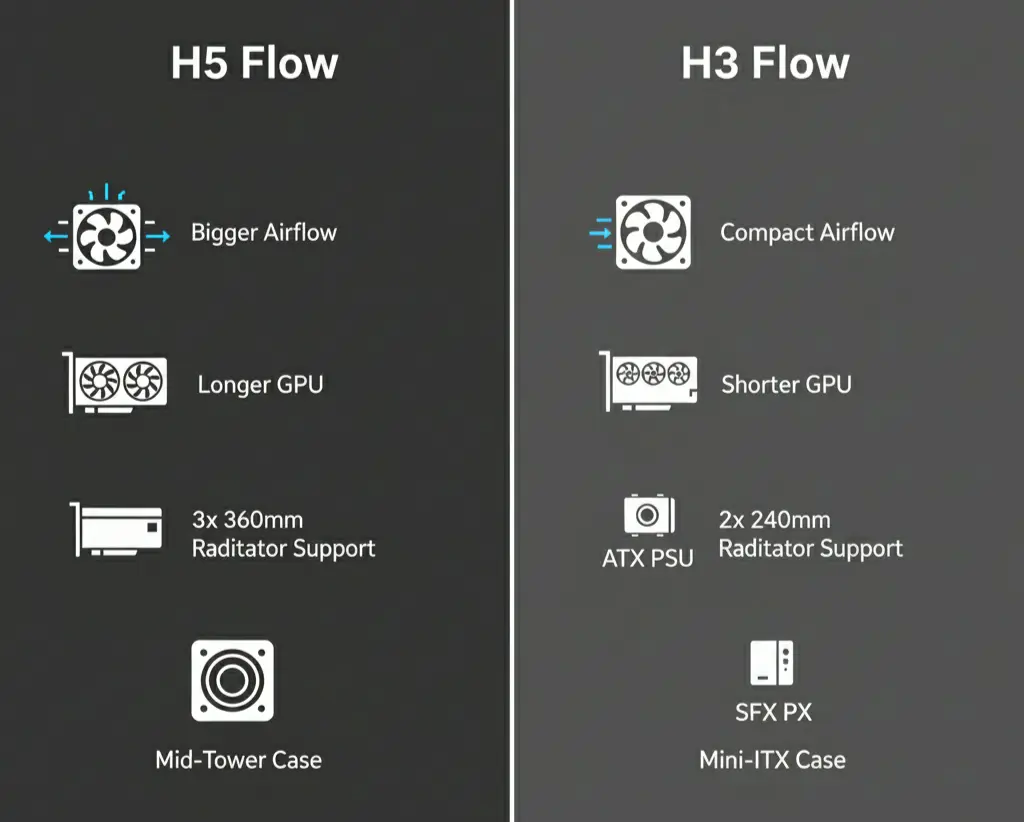
H5 Flow Compatibility
- Supports full-size ATX motherboards
- Fits longer and thicker GPUs
- Compatible with standard ATX power supplies
- More room for tall air coolers and larger radiators
H3 Flow Compatibility
- Limited to Mini-ITX and Micro-ATX motherboards
- Shorter GPU clearance (large triple-fan GPUs may not fit)
- Requires SFX or SFX-L power supplies
- Tighter space for cable management
👉 Tip: Always check GPU length and PSU type before choosing H3 Flow.
Noise Levels & Acoustics
Noise levels are often overlooked, but they play a big role in daily use.
H5 Flow runs quieter under load because airflow is less restricted. Fans don’t need to spin as fast to keep components cool, which helps reduce noise during gaming or rendering.
H3 Flow, due to its compact size, may produce slightly higher fan noise under heavy loads. This isn’t a flaw—it’s a common tradeoff in small-form-factor cases.
Acoustic Summary:
- H5 Flow: Quieter overall, better airflow-to-noise balance
- H3 Flow: Acceptable noise levels, slightly louder under stress
Who Should NOT Buy Each Case
Avoid H5 Flow if:
- You have very limited desk or room space
- You want a highly portable or compact system
- You prefer minimalist, small-form-factor builds
Avoid H3 Flow if:
- You plan to use a large, high-end GPU
- You want easy upgrades in the future
- You’re uncomfortable building in tight spaces
Price-to-Value Analysis
Looking at h5 flow and h3 flow purely from a value perspective:
- H5 Flow offers better long-term value due to upgrade flexibility and cooling potential
- H3 Flow can be cheaper initially, but may require pricier SFX power supplies
Hidden Cost Insight:
- H3 Flow builds often cost more overall due to compact components
- H5 Flow allows more budget-friendly standard parts
👉 Best value depends on build size, not just case price.
Pros & Cons
Both cases have strengths and trade-offs depending on your priorities.
H5 Flow Pros
- Excellent airflow-focused design
- Supports larger GPUs and ATX motherboards
- Better for high-end gaming systems
- Easier upgrades in the future
H5 Flow Cons
- Larger footprint
- Slightly higher price
- Not ideal for ultra-compact desks
H3 Flow Pros
- Compact and minimalist form factor
- Great airflow for its size
- Ideal for small rooms and desks
- Lower overall system size
H3 Flow Cons
- Limited GPU and PSU compatibility
- Less room for upgrades
- Tighter cable management
Buying Recommendations
Choose H5 Flow if:
- You’re building a gaming or productivity PC
- You plan to use a large GPU or ATX motherboard
- You want maximum airflow and future upgradability
Choose H3 Flow if:
- You want a compact PC with clean aesthetics
- Desk space is limited
- You’re building a Mini-ITX or Micro-ATX system
Final Verdict
In the h5 flow vs h3 flow debate, there’s no universal winner—only the right case for your build. H5 Flow is the better choice for performance-focused users who want flexibility and cooling headroom, while H3 Flow shines for compact, stylish systems where size matters more than expansion.
FAQ Section
Q1: Is H5 Flow better than H3 Flow for gaming?
Ans: Yes, H5 Flow is better for gaming due to better airflow and support for larger GPUs.
Q2: Can H3 Flow handle high-end GPUs?
Ans: It can handle mid-range GPUs, but very large cards may not fit.
Q3: Which case is easier to build in?
Ans: H5 Flow is easier thanks to more internal space and cable routing options.
Q4: Is H3 Flow suitable for beginners?
Ans: Yes, but beginners should plan components carefully due to size limits.
Q5: Does H5 Flow support liquid cooling?
Ans: Yes, it supports larger radiators compared to H3 Flow.
Q6: Which case is more budget-friendly overall?
Ans: H3 Flow usually results in a smaller, cheaper overall build.
Q7: Is airflow really better in H5 Flow?
Ans: Yes, the larger chassis and angled GPU airflow design give H5 Flow an edge.
Conclusion
If you’re deciding between h5 flow vs h3 flow, your choice should be guided by build size, cooling needs, and future upgrade plans. H5 Flow is the safer all-around option for most gamers, while H3 Flow is perfect for compact, modern PC builds where space efficiency is key.
If you have any questions about this post, “H5 Flow vs H3 Flow: Which NZXT Case Is Right for Your PC,” please let us know by your valuable comment.


