
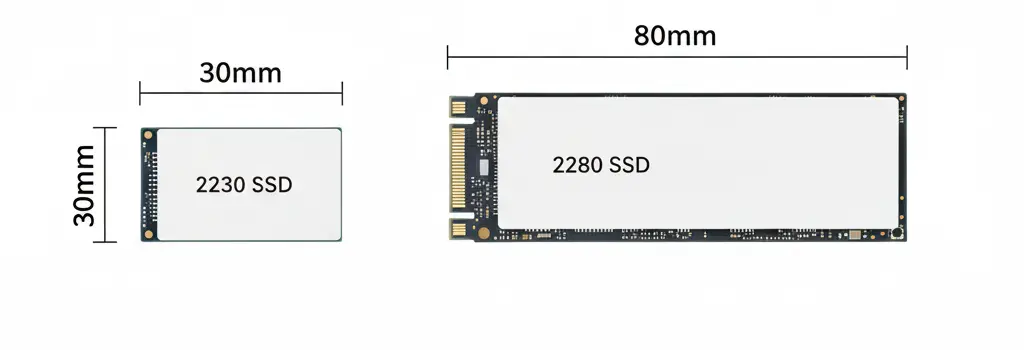
The world of M.2 storage can feel like a numbers game, but the difference between 2230 vs 2280 SSD models is actually quite simple: it’s all about the length. The “22” refers to the width (22mm), while the “30” and “80” refer to the length in millimeters. While the 2280 SSD has long been the gold standard for desktops and gaming laptops, the rise of ultra-portable handhelds like the Steam Deck and ASUS ROG Ally has brought the tiny 2230 SSD into the spotlight. In this guide, we’ll break down whether bigger truly means better or if these pint-sized drives are all you need for your next upgrade.
Feature-by-Feature Comparison Table
While both drives often use the same NVMe protocol, their physical footprints lead to distinct differences in how they handle data and heat.
| Feature | M.2 2230 SSD | M.2 2280 SSD |
| Dimensions | 22mm x 30mm | 22mm x 80mm |
| Max Capacity | Typically up to 2TB | Up to 8TB+ |
| DRAM Cache | Usually DRAM-less (uses HMB) | Often includes dedicated DRAM |
| Heat Management | Higher heat density; limited surface | Better dissipation; heatsink compatible |
| Primary Use | Handhelds, Tablets, Surface Pro | Desktops, Laptops, PS5 |
| Performance | Great, but thermally constrained | Top-tier; reaches max PCIe 5.0 speeds |
Quick Highlights Table
If you are in a rush, here are the high-level takeaways to help you decide at a glance.
| Best For… | Choose This |
| Steam Deck / ROG Ally | 2230 SSD |
| Gaming Desktop / PS5 | 2280 SSD |
| Budget-Friendly Build | 2280 SSD |
| Maximum Storage (4TB+) | 2280 SSD |
Key Takeaways
Before diving into the pros and cons, keep these essential facts in mind regarding the 2230 vs 2280 SSD debate:
- Physical Compatibility: You cannot fit a 2280 drive into a slot meant for a 2230, but you can use an adapter to fit a 2230 into a 2280 slot.
- Performance Ceiling: Because 2280 drives have more room for NAND chips and controllers, they generally offer higher sustained speeds.
- The Price Gap: 2230 drives often carry a “miniaturization premium,” costing more per gigabyte than their larger siblings.
PCIe Generation & Performance (Applies to Both)
One of the biggest misconceptions in the 2230 vs 2280 SSD debate is that longer drives are faster.
That’s not true.
Performance depends on PCIe generation and controller — not length.
| PCIe Generation | Max Theoretical Speed |
|---|---|
| Gen3 | ~3,500 MB/s |
| Gen4 | ~7,500 MB/s |
| Gen5 | 10,000–14,000+ MB/s |
Both 2230 and 2280 drives can support Gen3, Gen4, or even Gen5 (if engineered for it).
For example:
- Samsung 990 Pro (2280 Gen4)
- WD Black SN850X (2280 Gen4)
Some 2230 models also support Gen4 speeds — especially those made for handheld upgrades.
👉 Conclusion: Size does NOT determine speed.
Thermal & Heatsink Considerations
This is where 2280 has a practical advantage.
2230 SSD Thermals:
- Smaller surface area
- Limited heat dissipation
- Usually no space for thick heatsinks
- May throttle under sustained heavy workloads
2280 SSD Thermals:
- Larger surface area
- Better cooling potential
- Supports aftermarket heatsinks
- Better for sustained gaming or content creation
If you’re installing an SSD in a gaming PC or PS5, 2280 with a heatsink is typically recommended.
Compact devices usually don’t allow large heatsinks — which is why 2230 drives are more thermally constrained.
2230 vs 2280 SSD for Gaming
For gaming, both can load games equally fast if PCIe generation is the same.
However:
- 🎮 2280 is better for large AAA libraries (4TB–8TB options)
- 🎮 2280 handles heat better during long sessions
- 🎮 2230 is perfect for handheld gaming devices
- 🎮 Load times depend on PCIe Gen, not size
If you’re building a gaming PC, 2280 is the better long-term choice.
Pros & Cons
Understanding the trade-offs is vital when choosing between a 2230 vs 2280 SSD.
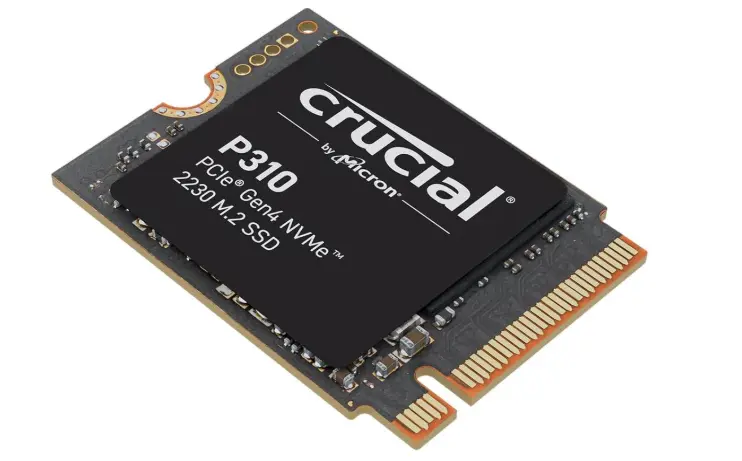
M.2 2230 SSD
Pros:
- Ultra-compact; fits in devices where space is a premium.
- Lightweight and power-efficient.
- Perfect for handheld gaming consoles.
Cons:
- Limited capacity (rarely exceeds 2TB).
- Can run hotter due to concentrated components.
- Higher price per GB.
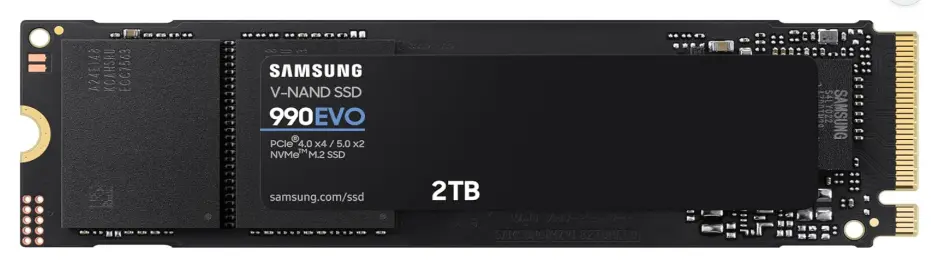
M.2 2280 SSD
Pros:
- Widest range of options and brands.
- Highest speeds available (PCIe 5.0 support).
- Massive storage capacities (up to 8TB).
Cons:
- Too large for many modern ultra-portable devices.
- Requires more physical clearance for heatsinks.
Buying Recommendations
- For Handheld Gamers: If you own a Steam Deck, ROG Ally, or Lenovo Legion Go, the 2230 SSD is your only native option. Look for the WD Black SN770M or Sabrent Rocket 2230.
- For Power Users & Editors: Stick with the 2280 SSD. You’ll want the extra space for a DRAM cache and the ability to add a heatsink for sustained 4K video editing.
- For Budget Builders: The 2280 SSD market is much more competitive. You can often find a 2TB 2280 drive for significantly less than a 1TB 2230 drive.
Final Verdict
The winner of the 2230 vs 2280 SSD battle depends entirely on your hardware. If your device supports a 2280 SSD, buy it—it’s faster, cheaper, and offers more storage. However, the 2230 SSD is a technical marvel that makes modern handheld gaming possible. Don’t force a fit; check your manual first.
The 2230 vs 2280 SSD debate isn’t about which one is faster — it’s about which one fits your device.
If your system supports 2280, it’s usually the smarter choice because it’s cheaper, widely available, and supports larger capacities.
If you’re upgrading a compact device or handheld PC, 2230 is your only option — and it can still deliver excellent performance.
Compatibility comes first. Performance comes second.
FAQ Section
Q1: Can I put a 2230 SSD in a 2280 slot?
Ans: Yes, you can. However, you will likely need a small extension bracket or adapter to ensure the mounting screw can reach the end of the drive to hold it in place.
Q2: Is a 2280 SSD faster than a 2230?
Ans: Generally, yes. Larger 2280 drives have more “lanes” to communicate with more NAND flash chips simultaneously and often include a DRAM cache, which 2230 drives usually lack.
Q3: Does the 2230 SSD overheat easily?
Ans: They can run hotter because all the heat-generating components are packed into a tiny 30mm space. In handhelds, this is managed by the device’s internal fans, but they may throttle under heavy, sustained loads.
Q4: Which one is better for gaming?
Ans: For a PC or PS5, the 2280 is better due to better thermals and speed. For a portable console like the Steam Deck, the 2230 is the standard.
Q5: Are 2230 SSDs more expensive?
Ans: Yes, typically. Because they require higher-density chips and specialized manufacturing to fit everything on a tiny PCB, they usually cost more than 2280 drives of the same capacity.
Q6: Can I cut a 2280 SSD down to a 2230 size?
Ans: No. While some very specific OEM drives used to have “empty” space at the end, modern SSDs have circuit traces running through the entire board. Cutting it will permanently destroy the drive.
Q7: Is capacity the only difference?
Ans: No. Beyond capacity, the 2280’s larger size allows for more robust controllers and better power management components, leading to better long-term reliability for heavy workloads.
Conclusion
Whether you’re looking for the raw power of a 2280 SSD or the portability of a 2230 SSD, the most important step is verifying what your motherboard supports. As 2026 continues to push the limits of flash density, we expect 2230 drives to close the capacity gap, but the 2280 remains the king of performance and value for the foreseeable future.
If you have any questions about this post, “2230 vs 2280 SSD: What’s the Real Difference,” please let us know by your valuable comment.


